
Integrations Overview
Eventixa integrates with email marketing platforms, WooCommerce, virtual meeting providers, and external applications so event registration data can work with the tools you already use.
The current integration system includes MailPoet, Mailchimp, WooCommerce, Zoom, Google Meet, Custom Meeting URL, and Webhooks. Some integrations are included in Eventixa Core, while others require Eventixa Pro.
Global Integration Settings: Eventixa → Settings → Integrations
Per-Event Integration Settings: Eventixa → Events → Add/Edit Event → Integrations
Meeting Connections: Eventixa → Settings → Integrations → Meetings
How Eventixa Integrations Work
Eventixa separates global integration configuration from event-specific behavior.
Global settings are used to enable an integration and configure information that applies across the website, such as connection credentials or provider availability.
Event-specific settings determine whether an integration should be used for a particular event and how that event should interact with the provider.
This keeps integration configuration flexible without forcing every event to use the same behavior.
Global Integration Settings
Go to Eventixa → Settings → Integrations to manage global integration availability and provider connections.
The exact settings shown depend on Eventixa Core, Eventixa Pro, installed third-party plugins, and available services.
The Integrations area can include sections such as General, Meetings, and Webhooks.
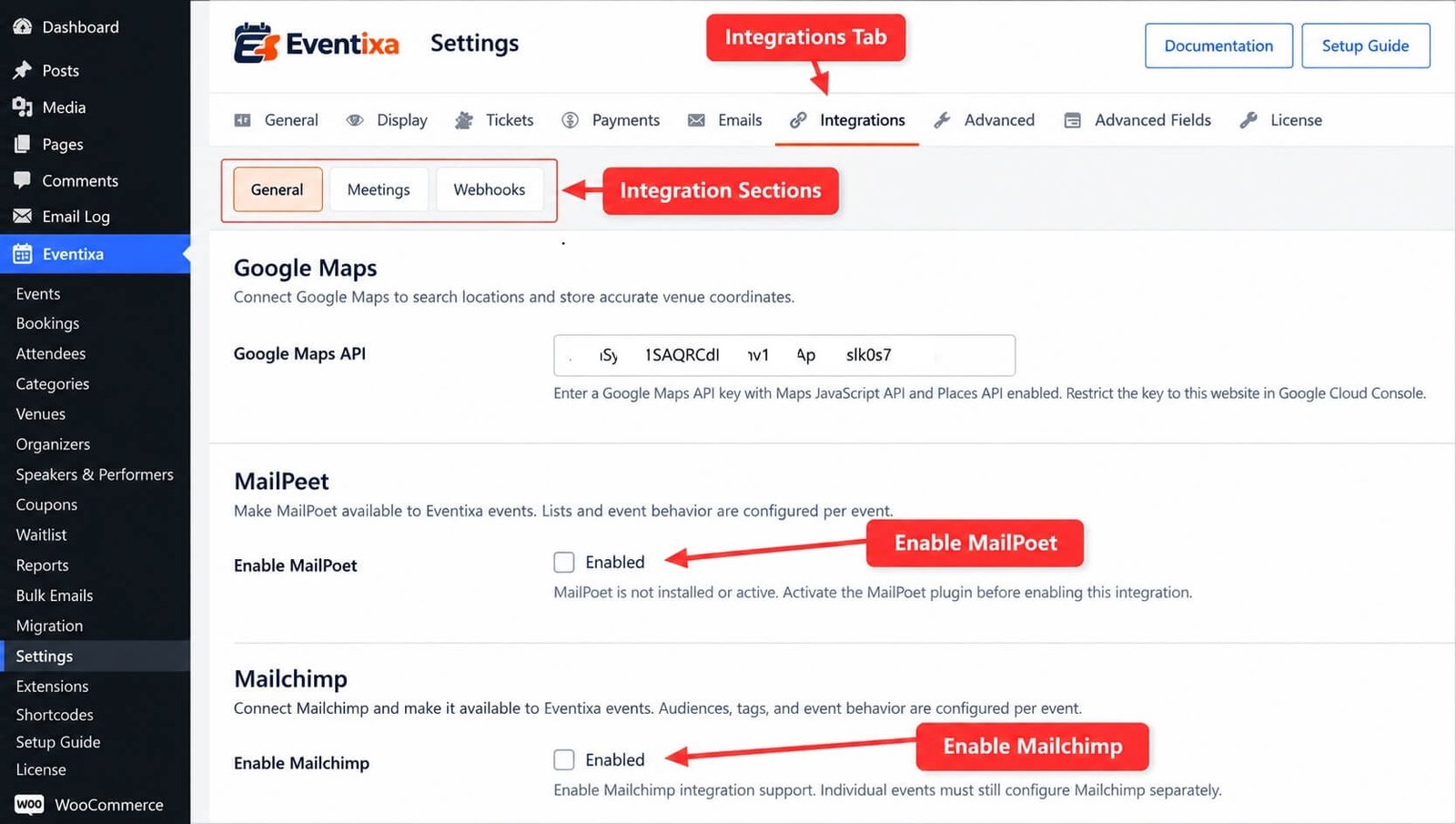
Event-Specific Integrations
Open an event and locate its Integrations settings when you want to configure provider behavior for that specific event.
Eventixa uses one shared Integrations area in the event editor rather than creating a separate event settings tab for every provider.
Each supported provider appears as its own integration section or card inside that shared area.
No Global Event Defaults
Eventixa does not use a global inheritance model where enabling an integration automatically enables it for every event.
For providers that support event-level configuration, the integration must still be configured for the individual event.
This helps prevent registrations from being synchronized to a provider unintentionally.
Current Eventixa Integrations
The current plugin implementation includes the following integration areas:
- MailPoet
- Mailchimp
- WooCommerce Checkout
- Zoom
- Google Meet
- Custom Meeting URL
- Webhooks
Integration Availability
Integration availability depends on the Eventixa edition and any required external service.
MailPoet
MailPoet integration is provided through Eventixa Core and requires the MailPoet WordPress plugin to be installed and active.
Mailchimp
Mailchimp integration is provided by Eventixa Pro and requires a valid Mailchimp connection.
WooCommerce
WooCommerce Checkout integration is available through Eventixa’s WooCommerce integration and requires WooCommerce to be installed and active.
Zoom
Zoom meeting integration requires Eventixa Pro and a connected Zoom account.
Google Meet
Google Meet integration requires Eventixa Pro and a connected Google account.
Custom Meeting URL
Custom Meeting URL does not require an external provider connection. You can add the meeting URL directly to the event.
Webhooks
Webhooks are provided by Eventixa Pro and allow Eventixa activity to be sent to external applications.
MailPoet Integration
MailPoet lets Eventixa synchronize event registration contacts with MailPoet lists.
Go to Eventixa → Settings → Integrations → General and locate the MailPoet section.
The global setting Enable MailPoet makes MailPoet integration support available to Eventixa events.
MailPoet must be installed and active before the integration can be enabled.
MailPoet Event Configuration
After enabling MailPoet globally, open the event’s Integrations settings to configure MailPoet for that event.
The event configuration controls whether the event uses MailPoet and which registration recipients should be synchronized.
Eventixa can distinguish between recipient types such as Purchaser and Attendees when the provider configuration supports them.
Mailchimp Integration
Eventixa Pro includes Mailchimp integration for synchronizing event registration contacts with a Mailchimp audience.
The global Mailchimp configuration is available under Eventixa → Settings → Integrations → General.
Mailchimp requires its connection information before Eventixa can retrieve available audiences.
Mailchimp Event Configuration
After the global Mailchimp connection is available, configure the integration for individual events from the event’s Integrations section.
This allows one event to use Mailchimp while another event does not.
The event can also define the relevant audience and registration recipients supported by the integration.
Purchaser and Attendee Synchronization
Email marketing integrations can distinguish between the person who completed the booking and the individual attendees included in the booking.
The available recipient choices can include Purchaser and Attendees.
This is useful when the booking customer is not necessarily the person attending the event.
WooCommerce Checkout Integration
Eventixa can use WooCommerce as the checkout and payment engine for paid Eventixa bookings.
WooCommerce settings are located under Eventixa → Settings → Payments → WooCommerce rather than the general Integrations tab.
WooCommerce must be installed and active before WooCommerce Checkout can be enabled.
Enable WooCommerce Checkout
The Enable WooCommerce Checkout setting tells Eventixa to use WooCommerce to handle checkout and payment for paid Eventixa bookings.
Eventixa still manages the event and registration context while WooCommerce manages the commerce transaction.
WooCommerce Checkout Destination
The setting After Adding Tickets, Redirect To controls whether customers are sent to the WooCommerce Cart or directly to Checkout after selecting Eventixa tickets.
WooCommerce Confirmation Destination
The setting After Confirming the Order, Redirect To controls whether the customer finishes on the Eventixa Thank You page or the WooCommerce Thank You page.
WooCommerce Account Requirement
WooCommerce integration includes a Require Account Login option that can require customers to be logged in before purchasing Eventixa tickets through WooCommerce.
Additional WooCommerce behavior depends on the remaining WooCommerce settings and installed Eventixa Pro functionality.
WooCommerce and Eventixa Bookings
Eventixa associates the WooCommerce order with the corresponding Eventixa booking.
This allows Eventixa to retain event, ticket, attendee, and booking information while WooCommerce handles the order and payment process.
WooCommerce Status Synchronization
Eventixa monitors relevant WooCommerce order states and synchronizes them with the Eventixa booking lifecycle.
This allows ticket inventory, booking status, attendee processing, and related workflows to stay aligned with the WooCommerce order.
Zoom Integration
Eventixa Pro can connect to Zoom and create or manage Zoom meetings for Virtual and Hybrid events.
Go to Eventixa → Settings → Integrations → Meetings to manage the Zoom connection.
The Meetings screen displays the current provider connection status and connected account information.
Zoom Connection Status
The Zoom integration can display states such as Connected, Not connected, or Connection issue.
Once the account is connected, meeting configuration remains associated with the individual event rather than being defined globally.
Google Meet Integration
Eventixa Pro can connect to Google Meet and create or manage Google Meet sessions for Virtual and Hybrid events.
The Google Meet connection is managed from Eventixa → Settings → Integrations → Meetings.
Like Zoom, Google Meet displays its current connection status and connected account information.
Meeting Connections vs Event Meetings
The Meetings settings screen is only responsible for connecting provider accounts.
Actual meeting configuration belongs to the event.
This separation means the provider connection is global while the meeting itself remains part of the Virtual or Hybrid event configuration.
Custom Meeting URL
Custom Meeting URL does not require a global connection.
Instead, add the external meeting or streaming URL directly to the event.
This is useful for platforms that Eventixa does not manage directly or for any meeting service where you already have a join URL.
Virtual and Hybrid Events
Meeting integrations are used with Eventixa’s Virtual and Hybrid event system.
Depending on the active edition and configuration, a Virtual or Hybrid event can use Zoom, Google Meet, or Custom URL as its meeting provider.
Recurring Virtual Events
Recurring Virtual and Hybrid events can also use meeting integrations.
Eventixa supports workflows where recurring occurrences share the same meeting or use separate meetings per occurrence, depending on the selected event configuration.
Webhooks
Eventixa Pro includes Webhooks for sending event activity to external applications.
Go to Eventixa → Settings → Integrations → Webhooks to control global webhook delivery.
The main setting is Enable Webhooks.
When enabled, Eventixa can send active webhook definitions when their configured triggers occur.
Webhook Management
Webhook definitions are managed globally rather than per event.
This allows administrators to create reusable webhook destinations and decide which Eventixa activities should trigger them.
Webhook Triggers
The current webhook system focuses on booking, RSVP, and attendee/check-in workflows.
Available webhook topics depend on the triggers registered by the current Eventixa version.
The dedicated Webhooks documentation explains the supported triggers and payload behavior in detail.
Integration Dependencies
Some integrations depend on another WordPress plugin or an external provider.
For example, MailPoet requires the MailPoet plugin and WooCommerce Checkout requires WooCommerce.
When a required WordPress plugin is not available, Eventixa can disable the associated integration control and explain that the dependency must first be installed and activated.
Provider Connections
External providers such as Mailchimp, Zoom, and Google Meet require a valid connection before their remote services can be used.
A global integration toggle alone does not replace provider authentication.
Global Enablement vs Event Enablement
For integrations such as MailPoet and Mailchimp, think of configuration in two stages.
First, enable or connect the provider globally. Second, enable and configure the provider for the individual event.
Both parts must be correctly configured for event-specific synchronization to occur.
Example — MailPoet
A typical MailPoet workflow is:
- Install and activate MailPoet.
- Go to Eventixa → Settings → Integrations → General.
- Enable MailPoet.
- Open the Eventixa event.
- Open its Integrations section.
- Enable MailPoet for the event.
- Select the required list and recipient configuration.
- Save the event.
- Test a registration.
Example — Mailchimp
A typical Mailchimp workflow is:
- Activate Eventixa Pro.
- Configure the global Mailchimp connection.
- Confirm Eventixa can access the Mailchimp account.
- Open the event’s Integrations section.
- Enable Mailchimp for the event.
- Select the required audience.
- Select the relevant recipient types.
- Save the event.
- Test the registration sync.
Example — Zoom
A typical Zoom workflow is:
- Activate Eventixa Pro.
- Go to Eventixa → Settings → Integrations → Meetings.
- Connect Zoom.
- Confirm the provider shows Connected.
- Create or edit a Virtual or Hybrid event.
- Select Zoom as the meeting provider.
- Configure the meeting.
- Save the event.
- Test attendee access.
Example — Google Meet
A typical Google Meet workflow is:
- Activate Eventixa Pro.
- Go to Eventixa → Settings → Integrations → Meetings.
- Connect Google Meet.
- Confirm the provider shows Connected.
- Open a Virtual or Hybrid event.
- Select Google Meet.
- Configure the meeting.
- Save the event.
- Test attendee access.
Example — Custom Meeting URL
A typical Custom Meeting URL workflow is:
- Create or edit a Virtual or Hybrid event.
- Select Custom URL as the provider.
- Enter the meeting or streaming URL.
- Save the event.
- Complete a test registration.
- Confirm the attendee receives the correct access information.
No global meeting-provider connection is required.
Example — WooCommerce
A typical WooCommerce workflow is:
- Install and activate WooCommerce.
- Go to Eventixa → Settings → Payments → WooCommerce.
- Enable WooCommerce Checkout.
- Configure the redirect and confirmation behavior.
- Save the settings.
- Create a paid Eventixa ticket.
- Complete a test WooCommerce checkout.
- Confirm the WooCommerce order and Eventixa booking remain synchronized.
Example — Webhooks
A typical Webhook workflow is:
- Activate Eventixa Pro.
- Go to Eventixa → Settings → Integrations → Webhooks.
- Enable Webhooks.
- Create a webhook definition.
- Enter the destination endpoint.
- Select the required Eventixa trigger.
- Save the webhook.
- Send a test request where supported.
- Trigger the real Eventixa workflow and verify delivery.
Integrations and Duplicate Events
Eventixa’s event integration framework supports Duplicate Event behavior.
Provider-specific event settings that are intended to be duplicated can be copied to the new event according to the provider implementation.
Sensitive or provider-generated information may be handled differently to avoid copying unsafe or invalid connection data.
Integration Settings and Security
Do not share provider credentials, API secrets, OAuth credentials, webhook secrets, or private connection information publicly.
When capturing documentation screenshots, hide confidential credentials before publishing them.
Testing an Integration
Always test an integration before relying on it for a live event.
A good test should confirm both the Eventixa side and the external provider side.
For example, an email integration test should confirm that the Eventixa booking is completed and that the correct contact appears in the expected external list or audience.
Recommended Integration Workflow
- Confirm the required Eventixa edition.
- Install any required third-party WordPress plugin.
- Configure the global provider connection.
- Enable the integration globally where required.
- Open the event.
- Configure its event-specific integration settings where supported.
- Save the event.
- Complete a test booking or registration.
- Confirm the Eventixa record.
- Confirm the external provider received or processed the expected data.
Common Problems
Integration Is Disabled in Settings
Check whether the required external WordPress plugin is installed and active or whether the required Eventixa edition is active.
MailPoet Cannot Be Enabled
Confirm the MailPoet plugin is installed and active. Eventixa intentionally disables the integration when MailPoet is unavailable.
MailPoet Is Enabled but an Event Does Not Sync
Global enablement alone is not enough. Open the event and verify its MailPoet integration settings.
Mailchimp Is Connected but Contacts Are Not Added
Check the event-specific Mailchimp settings, selected audience, recipient types, and the booking data being synchronized.
Zoom or Google Meet Is Not Available
Confirm Eventixa Pro is active and the provider is connected under Settings → Integrations → Meetings.
Meeting Provider Shows Connection Issue
Reconnect or review the provider credentials and account authorization before creating new managed meetings.
Custom Meeting URL Is Missing from Global Connections
This is expected. Custom URL does not require a global provider connection and is configured directly on the event.
WooCommerce Checkout Cannot Be Enabled
Confirm WooCommerce is installed and active.
Webhooks Are Not Sending
Confirm Enable Webhooks is active and verify the webhook definition, trigger, destination URL, and delivery configuration.
Important Notes
- Eventixa separates global provider settings from event-specific integration behavior.
- MailPoet is available through Eventixa Core and requires the MailPoet plugin.
- Mailchimp requires Eventixa Pro.
- WooCommerce Checkout requires WooCommerce and is configured under Payment settings.
- Zoom and Google Meet require Eventixa Pro and are connected under the Meetings integration screen.
- Custom Meeting URL does not require a global provider connection.
- Webhooks require Eventixa Pro and are managed globally.
- Enabling an email marketing provider globally does not automatically enable it for every event.
- Meeting provider connections are global, while meeting details remain attached to individual events.
- Always test integrations before using them for a live event.
- Never publish API keys, secrets, or private credentials in screenshots or documentation.


