
Eventixa Core vs Pro
Eventixa is available as Eventixa Core and Eventixa Pro.
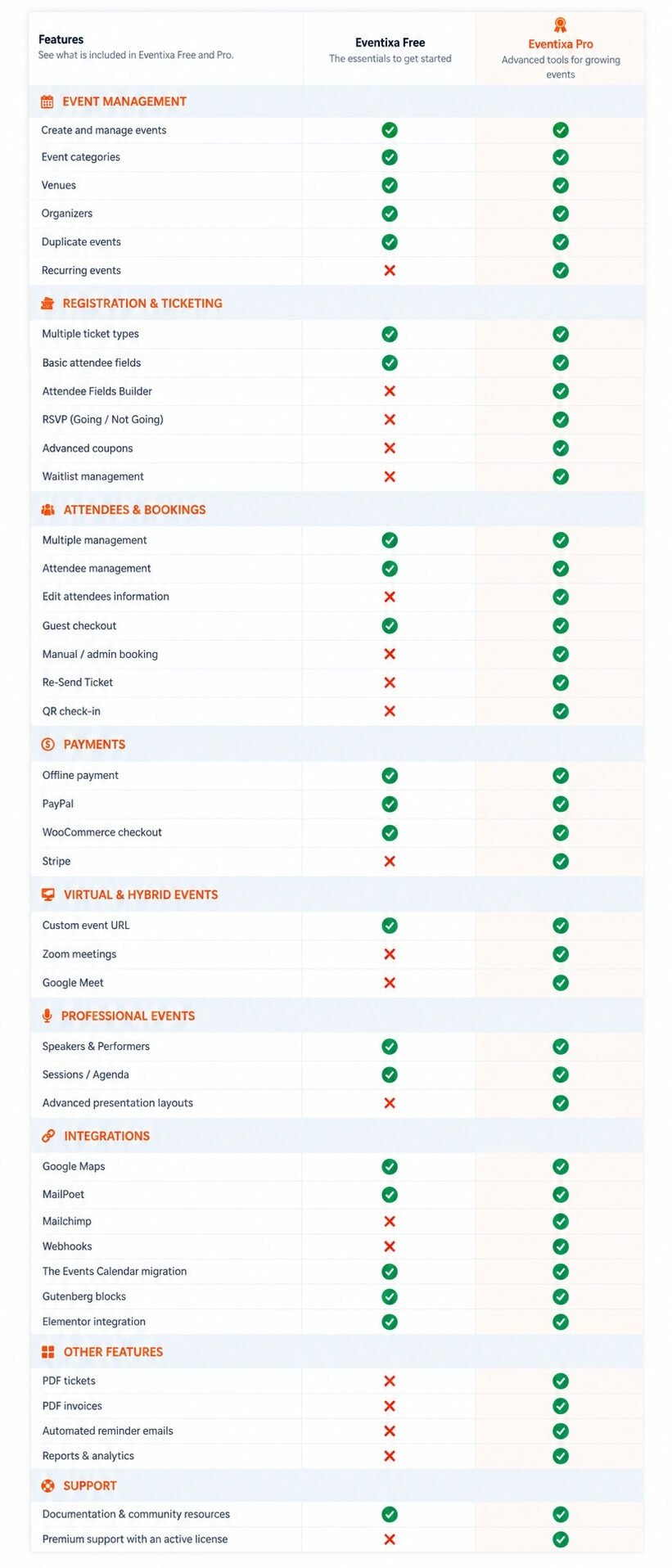
Eventixa Core provides the main event management, ticketing, booking, attendee, payment, and integration features. Eventixa Pro works alongside Core and adds advanced functionality for recurring events, payments, virtual meetings, QR tickets, check-in, waitlists, reports, and more.
Eventixa Core: Main Eventixa plugin
Eventixa Pro: Premium extension for Eventixa Core
Requires: Eventixa Core must remain active when using Eventixa Pro
Location: Eventixa → Free vs Pro
Core vs Pro Feature Comparison
| Feature | Eventixa Core | Eventixa Pro |
|---|---|---|
| Event Management | Yes | Extends Core |
| Event Categories | Yes | — |
| Venues | Yes | — |
| Organizers | Yes | — |
| Speakers & Performers | Yes | Enhanced |
| Sessions & Agenda | Yes | Advanced recurring support |
| Free Tickets | Yes | Enhanced |
| Paid Tickets | Yes | Enhanced |
| RSVP | Base functionality | Advanced |
| Attendee Fields | Yes | Advanced |
| Guest Checkout | Yes | — |
| Bookings | Yes | Advanced management |
| Attendees | Yes | Advanced management |
| Coupons | Yes | Advanced |
| PayPal | Yes | — |
| Offline Payment | Yes | — |
| Stripe | — | Yes |
| WooCommerce | Yes | Extended integration |
| Email Notifications | Yes | Additional features |
| Bulk Emails | Yes | Integration extensions |
| Custom Meeting URL | Yes | Yes |
| Zoom | — | Yes |
| Google Meet | — | Yes |
| Recurring Events | — | Yes |
| MailPoet | Yes | — |
| Mailchimp | — | Yes |
| Webhooks | — | Yes |
| QR Tickets | — | Yes |
| Event Check-In | — | Yes |
| PDF Tickets | — | Yes |
| PDF Invoices | — | Yes |
| Waitlist | — | Yes |
| Reports | — | Yes |
| Reminder Emails | — | Yes |
| Migration | Yes | Advanced Pro-aware migration |
| Shortcodes | Yes | Additional Pro shortcodes |
| Gutenberg Integration | Yes | Additional Pro functionality |
Event Management
Eventixa Core includes the main tools required to create and manage events.
You can use Core for:
- Event creation
- Date and time
- Categories
- Venues
- Organizers
- In-person events
- Virtual events using Custom Meeting URL
- Hybrid events
- Event listings
- Single event pages
Eventixa Pro extends the same event workflow with advanced functionality such as recurring events and managed virtual meeting integrations.
Tickets and Registration
Eventixa Core supports:
- Free tickets
- Paid tickets
- Ticket capacity
- Sale schedules
- Guest checkout
- Attendee information
- RSVP foundation
Eventixa Pro adds advanced ticket, RSVP, and attendee functionality where applicable.
Payments
Eventixa Core
Core can support:
- PayPal
- Offline Payment
- WooCommerce
Eventixa Pro
Pro adds:
- Stripe
The payment methods you enable appear within the existing Eventixa checkout workflow.
Virtual and Hybrid Events
Eventixa Core
Core includes:
- In-Person events
- Virtual events
- Hybrid events
- Custom Meeting URL
Eventixa Pro
Pro adds managed integrations such as:
- Zoom
- Google Meet
Recurring events can also use advanced meeting behavior when Pro is active.
Recurring Events
Requires: Eventixa Pro
Recurring events allow you to create multiple event occurrences from one event configuration.
Recurring functionality can work with:
- Tickets
- Sessions
- Event agendas
- Virtual meetings
- QR tickets
- Check-in
Speakers, Performers and Agenda
Eventixa Core includes the main Speakers & Performers and Sessions systems.
You can:
- Create participant profiles
- Assign participants to events
- Create sessions
- Build event agendas
Eventixa Pro extends these workflows for advanced and recurring event use cases.
Email and Marketing Integrations
Eventixa Core
Core includes:
- Event email notifications
- Bulk Emails
- MailPoet integration
Eventixa Pro
Pro adds:
- Mailchimp
- Reminder emails
- Additional email workflows for premium features
Automation and External Integrations
Eventixa Pro includes Webhooks for sending supported Eventixa activity to external applications.
Webhook triggers can include supported:
- Booking activity
- RSVP activity
- Check-in activity
QR Tickets and Check-In
Requires: Eventixa Pro
Eventixa Pro can generate individual QR tickets for attendees.
The check-in workflow can validate:
- Ticket
- Attendee
- Event
- Recurring occurrence where applicable
- Existing check-in status
Waitlist
Requires: Eventixa Pro
When an eligible event or ticket sells out, visitors can join the waitlist.
When capacity becomes available, Eventixa can:
- Select the next eligible waitlisted visitor.
- Reserve the available capacity.
- Send a protected booking link.
- Set a reservation expiration time.
- Release the reservation if it expires.
- Continue with the next eligible visitor.
Reports
Requires: Eventixa Pro
Reports help organizers review supported event data such as:
- Registrations
- Tickets
- Attendees
- Payments
- Revenue
Migration
Eventixa includes migration support for compatible data from The Events Calendar and related supported event data.
Eventixa Pro can extend migration behavior for advanced functionality such as recurring and virtual events.
How Core and Pro Work Together
Eventixa Pro does not create a separate event management system.
It extends the existing Eventixa screens.
For example:
- Events remain under Eventixa → Events
- Bookings remain under Eventixa → Bookings
- Attendees remain under Eventixa → Attendees
- Pro payments appear in Eventixa payment settings
- Pro integrations appear within the Eventixa integration system
This keeps the workflow consistent whether you use Core alone or Core with Pro.
Adding Eventixa Pro Later
You can start with Eventixa Core and add Pro later.
Existing Eventixa events remain in the same system.
After Pro is activated, you can edit existing events and enable supported premium features where needed.
For installation instructions, see How to Install and Activate Eventixa Pro.
Next Steps
Continue with:


