Skip to content
  • Home
  • Features
    • Event Management
    • Email Notifications
    • Payment Processing
    • Recurring Events
  • Documentation
  • Pricing
  • Contact Us
  • Live Demo
    • Simple Event
    • Recurring Event
    • Virtual Event
    • Free Event
    • Paid Event
    • RSVP Event
    • Waitlist Event

EARLY ADOPTER OFFER — Eventixa Pro: $49/year $0 (FREE) · First 100 Pro subscriptions only. Get Pro Free →

Eventixa – Events Calendar, Tickets and Bookings
  • Home
  • Features
    • Event Management
    • Email Notifications
    • Payment Processing
    • Recurring Events
  • Documentation
  • Pricing
  • Contact Us
  • Live Demo
    • Simple Event
    • Recurring Event
    • Virtual Event
    • Free Event
    • Paid Event
    • RSVP Event
    • Waitlist Event
Get Started

EARLY ADOPTER OFFER — Eventixa Pro: $49/year $0 (FREE) · First 100 Pro subscriptions only. Get Pro Free →

Eventixa – Events Calendar, Tickets and Bookings

Getting Started

  • Welcome to Eventixa
  • How to Install Eventixa on WordPress
  • How to Install and Activate Eventixa Pro
  • Setup Wizard
  • Eventixa Admin Dashboard Overview
  • Create Your First Event
  • Eventixa Core vs Pro

Event Management

  • Events Overview
  • Creating an Event
  • Editing and Managing Events
  • Duplicating an Event
  • Event Date and Time Settings
  • Event Categories
  • Venues
  • Organizers
  • Event Archive and Listings
  • Single Event Page
  • Event Templates & Overriding
  • Eventixa Design System

Speakers, Performers & Event Agenda

  • Creating Event Sessions
  • Speakers & Performers Overview
  • Speaker & Performer Groups
  • Creating Speakers & Performers
  • Adding Speakers & Performers to Events
  • Sessions & Event Agenda
  • Recurring Event Agendas

In-Person, Virtual & Hybrid Events

  • In-Person, Virtual & Hybrid Events
  • Virtual Event Access
  • Custom Meeting URL

Tickets & Registration

  • Ticket Management Overview
  • Creating Event Tickets
  • Free and Paid Tickets
  • RSVP Tickets
  • Ticket Capacity and Availability
  • Ticket Sale Schedule
  • Ticket Quantity Rules
  • Attendee Registration Fields
  • Advanced Attendee Fields

Recurring Events

  • Recurring Events Overview
  • Creating a Recurring Event
  • Managing Event Occurrences
  • Recurring Event Tickets
  • Recurring Virtual Events

Checkout & Bookings

  • Checkout Overview
  • Guest Checkout
  • Managing Bookings
  • Booking Details
  • Booking Statuses
  • Manual Bookings
  • Canceling and Refunding Bookings
  • Booking Emails

Attendees

  • Managing Attendees
  • Add and Edit Attendees
  • Resend Event Tickets

Coupons & Discounts

  • Event Coupons Overview
  • Creating a Coupon
  • Advanced Coupon Rules

Payments

  • Payment Overview
  • Currency Settings
  • Stripe Payment
  • PayPal Payment
  • WooCommerce Integration
  • Offline Payment
  • Payment Statuses
  • Transactions
  • Refunds

Emails & Bulk Emails

  • Email Notifications Overview
  • Customer Emails
  • Administrator Emails
  • Email Templates
  • Email Placeholders
  • Reminder Emails
  • Bulk Emails

QR Tickets & Check-In

  • QR Tickets
  • Event Check-In
  • QR Scanner

Waitlist

  • Event Waitlist Overview
  • Enable Waitlist for an Event
  • Waitlist Reservations & Offers
  • Managing the Waitlist
  • Waitlist Emails

Reports

  • Reports Overview
  • Event Reports
  • Ticket & Registration Reports
  • Revenue Reports
  • Filtering Reports

Integration

  • Integrations Overview
  • MailPoet Integration
  • Mailchimp Integration
  • WooCommerce Integration
  • Zoom Integration
  • Google Meet Integration
  • Webhooks

Migration

  • Migration Overview
  • Migration from The Events Calendar
  • Supported Migration Data
  • Recurring Event Migration
  • Migration Warnings & Troubleshooting

My Account & Customer Experience

  • Eventixa My Account
  • Viewing Event Bookings
  • Viewing Event Tickets

Shortcodes, Blocks & Display

  • Eventixa Shortcodes
  • Gutenberg Blocks
  • Elementor Integration

Settings

  • Eventixa Settings Overview
  • General Settings
  • Display Settings
  • Ticket Settings
  • Payment Settings
  • Email Settings
  • Integration Settings
  • License Settings

Troubleshooting

  • Troubleshooting Overview
  • Ticket Availability Problems
  • Checkout Problems
  • Payment Problems
  • Email Delivery Problems
  • Virtual Event Integration Problems
  • QR Ticket & Check-In Problems
View Categories
  • Home
  • Documentations
  • Getting Started
  • How to Install and Activate Eventixa Pro

How to Install and Activate Eventixa Pro

0:00 / 3:11
  • View as Markdown Open this page as plain Markdown (opens in a new tab)
  • Open in ChatGPT Ask questions about this page (opens in a new tab)
  • Open in Claude Ask questions about this page (opens in a new tab)
  • Open in Google AI Studio Ask questions about this page (Google account required) (opens in a new tab)

Eventixa Pro extends Eventixa Core with advanced features such as recurring events, Stripe, Zoom, Google Meet, QR tickets, check-in, waitlist, reports, and additional integrations.

Available in: Eventixa Pro
Requires: Eventixa Core
Location: Plugins → Add New Plugin
License: Eventixa → License

Before You Begin

Before installing Eventixa Pro, make sure:

  • Eventixa Core is installed.
  • Eventixa Core is active.
  • You have administrator access to WordPress.
  • You have downloaded the Eventixa Pro ZIP file from Customer Portal.
  • You have your Eventixa Pro license details if license activation is required.

Eventixa Pro works alongside Eventixa Core.

Do not remove or deactivate Core after installing Pro.

Install Eventixa Pro

  1. Go to Plugins → Add New Plugin.
  2. Click Upload Plugin.
  3. Select the Eventixa Pro ZIP file.
  4. Click Install Now.
  5. After installation, click Activate Plugin.

Do not extract the ZIP file before uploading it.
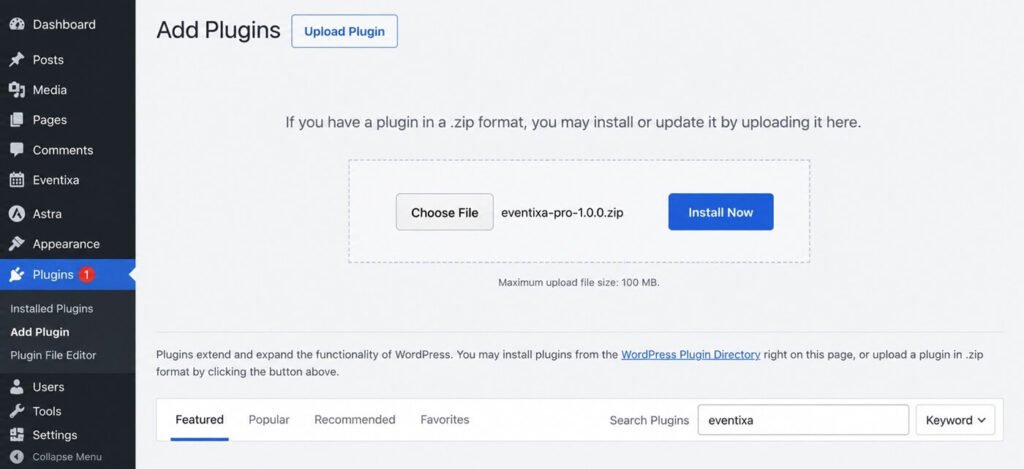
Upload Eventixa Pro plugin ZIP in WordPress
Upload the Eventixa Pro ZIP from Plugins → Add New Plugin → Upload Plugin.

Verify Core and Pro Are Active

Go to: Plugins → Installed Plugins

Confirm that both plugins are active:

  • Eventixa – Events Calendar, Tickets & Bookings
  • Eventixa Pro

If Eventixa Core is inactive, activate it before continuing.
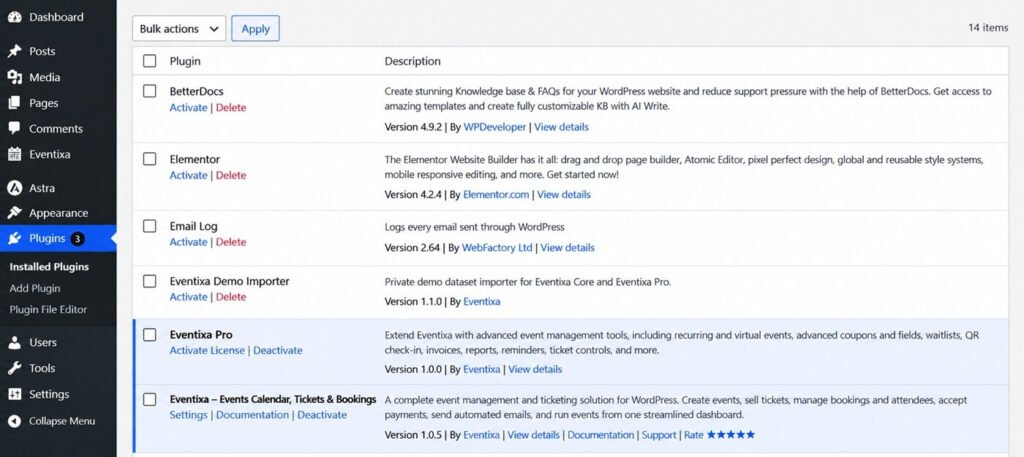
Eventixa Core and Eventixa Pro active in WordPress
Keep both Eventixa Core and Eventixa Pro active for premium features to work.

Activate the Eventixa Pro License

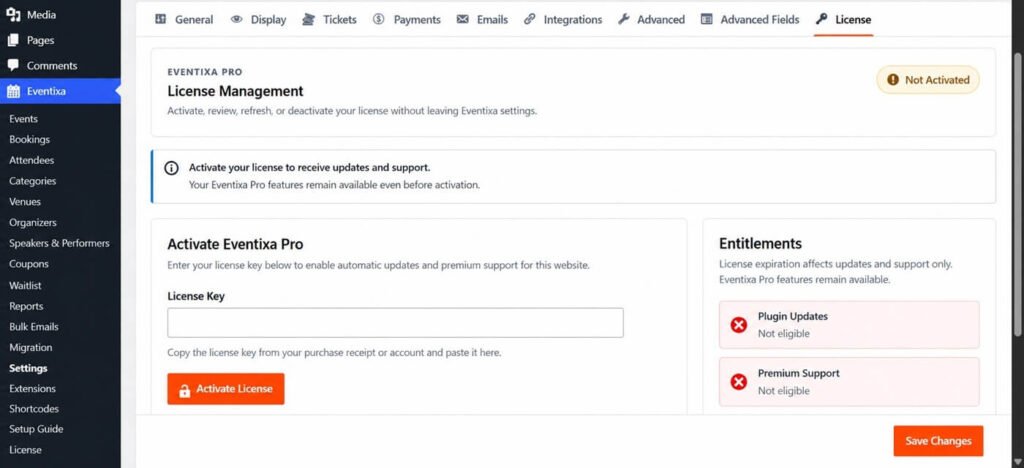
After Eventixa Pro is active, go to: Eventixa → License

Use the available license controls to activate your Eventixa Pro license.

A valid license can be required for features such as:

  • Product updates
  • License validation
  • Access to applicable premium services
Eventixa Pro license activation screen
Activate and manage the Eventixa Pro license from Eventixa → License.

Verify Eventixa Pro Is Working

When Eventixa Pro is active, additional Eventixa functionality becomes available.

Depending on the feature, you may see:

  • Waitlist
  • Reports
  • License
  • Recurring event controls
  • Stripe settings
  • Zoom integration
  • Google Meet integration
  • Mailchimp
  • Webhooks
  • QR tickets
  • Check-in
  • PDF ticket options
  • Reminder email settings

Pro features are added to the existing Eventixa interface instead of creating a separate Pro dashboard.

How Core and Pro Work Together

Eventixa Core remains the main plugin.

For example:

  • Events are still managed from Eventixa → Events.
  • Bookings remain under Eventixa → Bookings.
  • Attendees remain under Eventixa → Attendees.
  • Pro payment methods appear in Eventixa payment settings.
  • Pro integrations appear in the existing integrations area.

Eventixa Pro simply extends those existing workflows.

Features Added by Eventixa Pro

Eventixa Pro can add functionality such as:

  • Recurring events
  • Stripe payments
  • Zoom integration
  • Google Meet integration
  • Mailchimp integration
  • Webhooks
  • QR tickets
  • Event check-in
  • Waitlist
  • Reports
  • PDF tickets
  • PDF invoices
  • Reminder emails
  • Advanced attendee features
  • Advanced coupon features

For a complete feature comparison, see Eventixa Free vs Pro – Feature Differences Explained.

Troubleshooting

Eventixa Pro Cannot Be Activated

Check that Eventixa Core is installed and active.

Go to: Plugins → Installed Plugins

Activate Core first, then activate Eventixa Pro.

Pro Features Do Not Appear

Check that:

  • Eventixa Core is active.
  • Eventixa Pro is active.
  • Both plugins are compatible versions.
  • The feature does not require additional configuration.
  • Your WordPress user has the required permissions.

License Screen Is Missing

Confirm that Eventixa Pro is active.

The License menu should appear when the Pro licensing functionality is loaded correctly.

An Integration Is Available but Cannot Be Used

Some integrations require additional setup.

For example:

  • Zoom requires a Zoom connection.
  • Google Meet requires a Google connection.
  • Mailchimp requires connection credentials.
  • Stripe requires Stripe configuration.

Use the documentation for that integration to complete the setup.

Next Steps

Continue with:

  1. Eventixa Setup Wizard
  2. Eventixa Dashboard and WordPress Admin Overview
  3. Eventixa Free vs Pro – Feature Differences Explained
  4. Create Your First WordPress Event with Eventixa

Share This Article :

  • Facebook
  • X
  • LinkedIn
  • Pinterest
How to Install Eventixa on WordPressSetup Wizard

Eventixa is a modern WordPress event management plugin for creating events, selling tickets, managing attendees, and delivering seamless booking experiences—all from a single platform.

Help Center

  • Documentation
  • Starter Guide
  • Contact Us

Features

  • Event Management
  • Email Notifications
  • Payment Processing
  • Recurring Events
  • Live Demo

Company

  • Contact Us
  • Privacy Policy
  • Refund Policy
  • T&Cs

Copyright © 2026 - All rights reserved.