
MailPoet Integration
Eventixa Core integrates with MailPoet so event purchasers and/or attendees can be synchronized to selected MailPoet lists.
The integration uses a two-stage setup: first enable MailPoet globally in Eventixa, then configure the MailPoet lists and recipient types for each individual event.
Available in: Eventixa Core
Global Settings: Eventixa → Settings → Integrations → General
Event Settings: Eventixa → Events → Add/Edit Event → Integrations
Requires: MailPoet plugin installed and active
What Does the MailPoet Integration Do?
The Eventixa MailPoet integration can send registration identities from an Eventixa booking to one or more MailPoet lists.
For each event, you can choose whether to synchronize:
- Purchaser
- Attendees
- Both Purchaser and Attendees
Eventixa sends the available email address, first name, and last name to MailPoet.
MailPoet then controls its own subscriber confirmation, subscription state, welcome emails, and retention behavior.
MailPoet Is Included in Eventixa Core
The MailPoet integration is available in Eventixa Core and does not require Eventixa Pro.
You must still install and activate the MailPoet WordPress plugin before Eventixa can use the integration.
Install and Activate MailPoet
Before configuring Eventixa, make sure MailPoet is installed and active.
If MailPoet is unavailable, the Eventixa MailPoet setting remains disabled and displays a message explaining that MailPoet must first be activated.
Open the Global MailPoet Setting
Go to Eventixa → Settings → Integrations → General.
Locate the MailPoet section.
The global option is Enable MailPoet.
Enable MailPoet Globally
Enable Enable MailPoet to make MailPoet integration support available to Eventixa events.
The setting description explains that individual events must still configure MailPoet separately.
Enabling this option does not automatically synchronize every event.
MailPoet Must Be Available
Eventixa detects MailPoet through the MailPoet API.
If MailPoet is not installed or active, Eventixa shows the message MailPoet is not installed or active. Activate the MailPoet plugin before enabling this integration.
Save the Global Settings
After enabling MailPoet, save the Eventixa settings.
The event-level MailPoet controls then become available in the Event Integrations area.
Configure MailPoet for an Event
Go to Eventixa → Events and open the event you want to configure.
Open the event’s Integrations section and locate the MailPoet integration card.
The MailPoet event integration lets you configure:
- Whether MailPoet is enabled for that event
- One or more MailPoet lists
- Which recipient identities should be synchronized
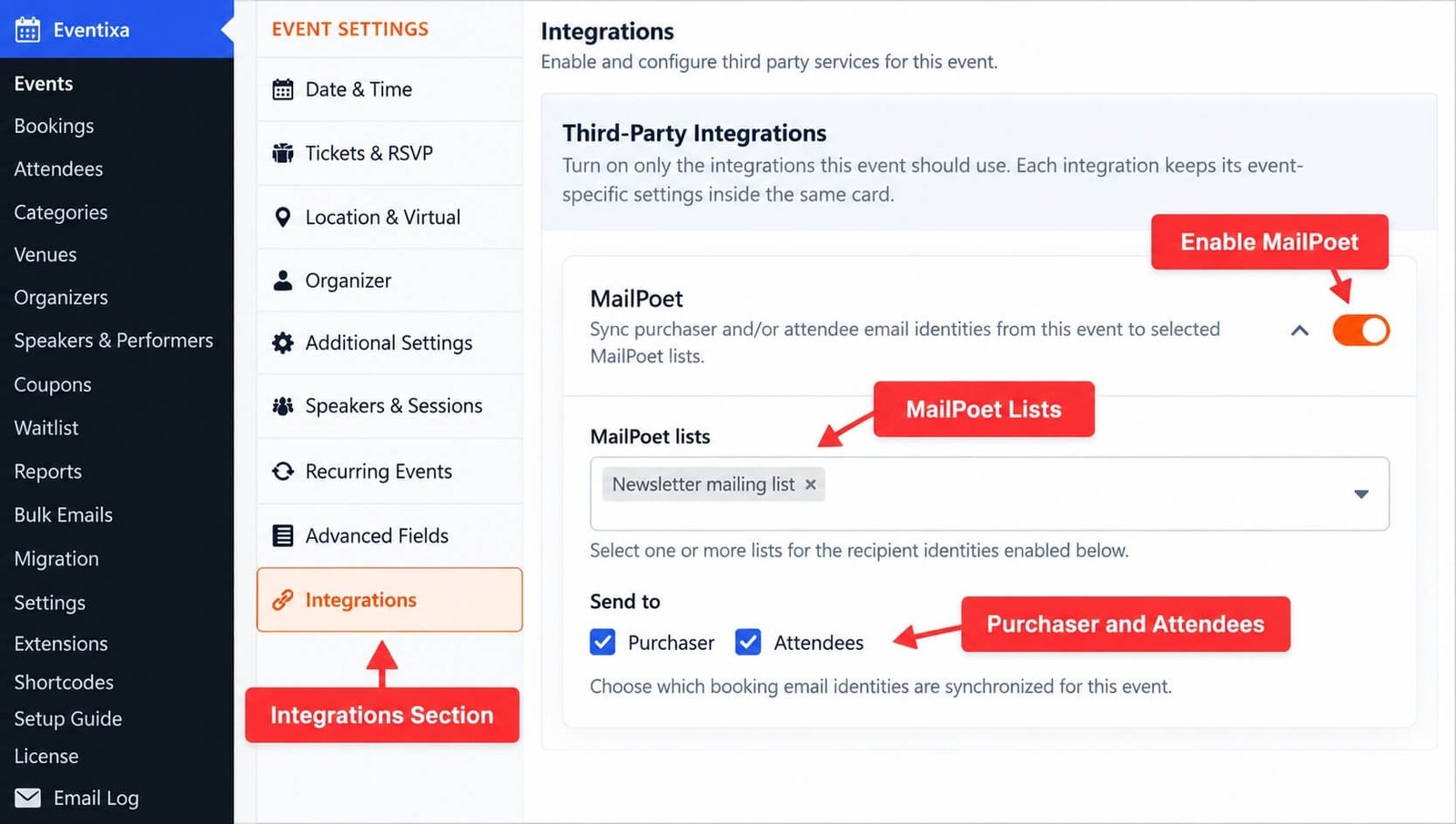
Enable MailPoet for the Event
Enable the MailPoet integration inside the event.
Global MailPoet enablement alone is not enough.
The event must explicitly have MailPoet enabled before Eventixa synchronizes its registrations.
Select MailPoet Lists
The event configuration includes a MailPoet lists field.
You can select one or more available MailPoet lists.
Eventixa synchronizes the selected recipient identities to all selected lists.
Select Multiple Lists
The MailPoet list selector supports multiple selections.
For example, the same event can synchronize recipients to both:
- Event Attendees
- Monthly Newsletter
provided both lists exist in MailPoet.
No Lists Available
If Eventixa cannot find any MailPoet lists, the event settings display the message No MailPoet lists are currently available. Configure MailPoet under Eventixa → Settings → Integrations → General.
Check MailPoet and confirm that usable lists exist.
Removed or Missing Lists
If a list that was previously selected is no longer available in MailPoet, Eventixa warns you to review the list selection before saving.
This helps prevent an event from silently relying on a deleted MailPoet list.
Choose Who Is Synchronized
The event MailPoet card includes a Send to section.
Available recipient types are:
- Purchaser
- Attendees
Choose the identities that should be synchronized for that event.
Purchaser
Select Purchaser when you want Eventixa to synchronize the email identity of the person who completed the booking.
The purchaser may be different from the actual event attendees.
Attendees
Select Attendees when you want Eventixa to synchronize the individual attendee identities attached to the booking.
Each eligible attendee is processed separately.
Purchaser and Attendees
You can enable both recipient types.
For example, a booking completed by one customer for three attendees can synchronize the purchaser plus the three attendee identities.
Eventixa avoids sending the same email more than once to the same list set within the same synchronization batch.
Default Recipient Behavior
For existing events that do not yet have an explicit recipient-type selection stored, Eventixa defaults to Purchaser.
Once the event settings are saved, the explicit Purchaser and Attendees selections are used.
An intentionally empty recipient selection remains empty.
Empty Recipient Selection
If neither Purchaser nor Attendees is selected, Eventixa has no recipient identities to synchronize for that event.
The MailPoet integration can remain enabled, but no booking recipients are sent until at least one recipient type is selected.
Save the Event
After selecting the MailPoet lists and recipient types, save or update the event.
The MailPoet configuration is then stored with that event.
What Information Is Sent to MailPoet?
For each eligible recipient, Eventixa can send:
- Email address
- First name
- Last name
The recipient must have a valid email address before Eventixa can synchronize them.
Existing MailPoet Subscribers
If the email already exists as a MailPoet subscriber, Eventixa subscribes that existing subscriber to the selected lists.
When the subscriber is not tied to a WordPress user, Eventixa can also update the available first and last name.
New MailPoet Subscribers
If the email does not already exist in MailPoet, Eventixa creates a new MailPoet subscriber and associates that subscriber with the selected lists.
MailPoet Confirmation Email
When Eventixa adds or subscribes a recipient, it requests MailPoet’s normal confirmation behavior.
MailPoet controls whether the subscriber receives its subscription confirmation email and how confirmation status is handled.
Eventixa does not bypass MailPoet’s subscription rules.
MailPoet Welcome Email
The integration also allows MailPoet to schedule its normal welcome email behavior when applicable.
The actual email content and delivery are managed by MailPoet.
When Synchronization Starts
For normal bookings, Eventixa queues MailPoet synchronization after attendee creation for the booking has completed.
This timing allows Eventixa to access both purchaser and attendee identities before processing the integration.
Background Synchronization
MailPoet synchronization is processed asynchronously.
Eventixa queues the work instead of requiring the entire MailPoet API operation to finish during the booking request.
This helps keep the registration workflow responsive.
Synchronization Batch Size
The current MailPoet synchronization service processes bookings in batches of up to 50.
This is primarily an internal performance detail, but it explains why large synchronization operations may complete progressively.
Automatic Retry
If MailPoet synchronization fails for one or more recipients, Eventixa can retry those booking IDs.
The current implementation performs up to two additional retry attempts after the initial attempt.
The retries use short delays before trying again.
Duplicate Email Protection
During a synchronization batch, Eventixa tracks the combination of email address and selected MailPoet lists.
If the same email appears more than once for the same list set in that batch, Eventixa skips the duplicate synchronization attempt.
This helps avoid unnecessary duplicate API operations.
RSVP Synchronization
Eventixa’s MailPoet integration also supports RSVP registrations.
For RSVP bookings, Eventixa synchronizes only when the RSVP response is Going.
RSVP Going
When an RSVP response changes to Going, Eventixa queues the booking through the normal MailPoet synchronization process.
The configured Purchaser and/or Attendee identities are then processed according to the event settings.
RSVP Not Going
An RSVP booking with a Not Going response is not synchronized through the normal MailPoet booking sync.
This prevents Not Going registrations from being treated like active event attendees for the integration workflow.
RSVP Status Changes
If an RSVP response changes to Going, Eventixa can trigger the MailPoet synchronization at that time.
This means an RSVP does not need to have been Going at its original creation time to become eligible later.
Booking Eligibility
Standard Eventixa bookings are eligible for the MailPoet synchronization workflow when the integration is properly configured.
RSVP bookings have the additional requirement that their normalized RSVP response must be Going.
MailPoet Synchronization Requirements
A booking can only synchronize successfully when all relevant conditions are satisfied:
- MailPoet is globally enabled in Eventixa.
- MailPoet is installed and active.
- MailPoet is enabled for the event.
- At least one MailPoet list is selected.
- At least one recipient type is selected.
- The recipient has a valid email address.
- An RSVP booking is Going when applicable.
What Happens If No List Is Selected?
If MailPoet is enabled for the event but no list is configured, Eventixa cannot synchronize the recipient.
The synchronization result reports No MailPoet list is configured for this event.
Review the event’s MailPoet list selection.
What Happens If MailPoet Is Disabled Globally?
When the global MailPoet integration is disabled, Eventixa stops registering its active MailPoet synchronization behavior.
Pending MailPoet synchronization tasks are also cancelled when the integration is turned off.
Event-Level Settings After Global Disable
Event MailPoet metadata can remain stored even when the global integration is disabled.
When MailPoet is later re-enabled, review the event configuration before relying on it again.
Duplicate Event Support
Eventixa’s Duplicate Event workflow copies the event-level MailPoet configuration.
This includes:
- MailPoet enabled state
- Selected MailPoet lists
- Recipient types
After duplicating an event, review the copied lists before publishing the new event.
Why Review Duplicated Lists?
A duplicated event may need a different marketing list from the original event.
The copied configuration is convenient, but it may not always match the purpose of the new event.
MailPoet and Bulk Emails
The MailPoet provider is also registered with Eventixa’s Bulk Email provider system when MailPoet is globally enabled and available.
This allows Eventixa’s supported email tooling to recognize MailPoet as an available provider where applicable.
The event registration synchronization described in this article remains controlled by the event’s own MailPoet settings.
MailPoet Controls Subscription State
Eventixa sends the recipient identity and selected list information to MailPoet.
MailPoet remains responsible for subscriber lifecycle behavior such as:
- Confirmation
- Subscription status
- Welcome email behavior
- Unsubscribe handling
- Subscriber retention
Do not treat Eventixa as the source of truth for MailPoet subscription status.
Privacy Considerations
When the MailPoet integration is enabled, Eventixa can send the selected purchaser and/or attendee identity information to MailPoet.
This can include the email address and available first and last name.
Make sure your site’s privacy information accurately describes the external services that receive registration information.
Test the Integration
Before using MailPoet with a live event, test the complete workflow.
A recommended test is:
- Install and activate MailPoet.
- Create a MailPoet list.
- Enable MailPoet globally in Eventixa.
- Open a test Eventixa event.
- Enable MailPoet for the event.
- Select the MailPoet list.
- Select Purchaser and/or Attendees.
- Save the event.
- Complete a test registration.
- Allow the background synchronization to run.
- Open MailPoet.
- Verify the expected subscriber appears in the selected list.
Test Purchaser Synchronization
To test Purchaser-only behavior:
- Select only Purchaser in the event MailPoet settings.
- Complete a booking containing one or more attendees.
- Verify that the purchaser appears in MailPoet.
- Confirm attendee-only addresses are not added unless they are also the purchaser.
Test Attendee Synchronization
To test attendee synchronization:
- Select only Attendees.
- Complete a booking with multiple attendee identities.
- Verify each eligible attendee appears in the selected MailPoet list.
- Confirm the purchaser is not added unless they are also represented as an attendee or Purchaser is selected.
Test Purchaser and Attendees Together
To synchronize both:
- Select Purchaser.
- Select Attendees.
- Complete a booking.
- Verify the purchaser and eligible attendees are processed.
- Check that duplicate email identities are not unnecessarily synchronized multiple times in the same batch.
Test RSVP Going
For RSVP:
- Configure MailPoet for the event.
- Submit a Going RSVP.
- Verify the configured recipient identities are synchronized.
- Change or test a separate RSVP as Not Going.
- Confirm Not Going is not processed through the normal MailPoet synchronization workflow.
Common Problems
MailPoet Setting Is Disabled
Confirm the MailPoet WordPress plugin is installed and active.
Eventixa does not allow the integration to be enabled while MailPoet is unavailable.
Event MailPoet Card Is Missing
Confirm Enable MailPoet is active under Eventixa → Settings → Integrations → General.
The event-level MailPoet integration is registered only when the global integration is enabled.
No MailPoet Lists Appear
Open MailPoet and confirm at least one normal MailPoet list exists.
Eventixa loads supported MailPoet lists through the MailPoet API.
A Previously Selected List Is Missing
The MailPoet list may have been deleted or become unavailable.
Eventixa warns when a previously stored list can no longer be found. Review the event configuration and save a valid selection.
Booking Completed but No Subscriber Appeared
Check that MailPoet is enabled globally, MailPoet is enabled for the event, at least one list is selected, and at least one recipient type is selected.
Also confirm the recipient has a valid email address.
Purchaser Was Added but Attendees Were Not
Open the event’s MailPoet settings and confirm Attendees is selected under Send to.
Attendees Were Added but Purchaser Was Not
Confirm Purchaser is selected under Send to.
RSVP Not Going Was Not Synchronized
This is expected because the MailPoet integration only processes RSVP bookings that are Going.
Subscriber Appears as Unconfirmed
MailPoet controls subscription confirmation and subscriber status.
Check MailPoet’s confirmation configuration and the subscriber’s MailPoet status.
Synchronization Does Not Appear Immediately
MailPoet synchronization runs asynchronously, so the subscriber may not appear at the exact moment checkout completes.
Allow the queued synchronization to run before treating the operation as failed.
MailPoet API Error Occurs
Confirm MailPoet itself is functioning correctly and that the selected lists still exist.
Eventixa retries failed synchronization work automatically for a limited number of attempts.
Recommended Configuration
For most events, configure MailPoet like this:
- Enable MailPoet globally.
- Enable MailPoet for the individual event.
- Select the exact MailPoet list or lists intended for that event.
- Select Purchaser, Attendees, or both based on your communication requirements.
- Save the event.
- Test a real registration before publishing.
Avoid selecting unnecessary recipient types or unrelated lists.
Important Notes
- MailPoet integration is included in Eventixa Core.
- The MailPoet WordPress plugin must be installed and active.
- MailPoet must be enabled globally before event-level integration controls become active.
- Each event must explicitly enable MailPoet.
- Events can select one or more MailPoet lists.
- Recipient choices are Purchaser and Attendees.
- Existing events without a saved recipient choice default to Purchaser.
- Eventixa sends email, first name, and last name when available.
- Standard booking synchronization runs after attendee creation.
- MailPoet synchronization is asynchronous.
- Failed synchronization can be retried automatically.
- RSVP synchronization requires a Going response.
- Not Going RSVP bookings are not synchronized through the normal MailPoet workflow.
- MailPoet controls confirmation, subscription status, welcome emails, unsubscribe behavior, and retention.
- Duplicate Event copies the MailPoet event configuration.
- Disabling MailPoet globally cancels pending Eventixa MailPoet synchronization tasks.


