
Webhooks
Eventixa Pro includes global Webhooks that can send booking, RSVP, and attendee check-in activity to external applications.
Each webhook connects one Eventixa trigger to one HTTP or HTTPS endpoint. Eventixa sends a signed JSON request when the selected lifecycle event occurs.
Available in: Eventixa Pro
Admin Location: Eventixa → Settings → Integrations → Webhooks
Configuration Scope: Global
Delivery Format: Signed JSON over HTTP POST
What Are Eventixa Webhooks?
A webhook allows Eventixa to notify another application automatically when something happens inside your event system.
For example, you could send Eventixa activity to:
- CRM systems
- Automation platforms
- External databases
- Custom applications
- Notification services
- Internal business systems
The receiving application must provide an HTTP or HTTPS endpoint that can accept Eventixa’s POST request.
Webhooks Are Managed Globally
Eventixa Webhooks are configured globally under Eventixa → Settings → Integrations → Webhooks.
They are not configured separately inside individual events.
A single active webhook definition can receive matching activity from events across the Eventixa installation.
Enable Webhooks Globally
Open Eventixa → Settings → Integrations → Webhooks and enable Enable Webhooks.
The setting allows Eventixa to send active webhook definitions when their selected trigger occurs.
If the global setting is disabled, queued webhook deliveries are not sent.
Webhook Manager
After Webhooks are enabled, Eventixa displays the Webhooks manager.
The manager lists existing webhook definitions and provides Add Webhook for creating a new one.
If no definitions exist, Eventixa displays No webhooks yet and prompts you to connect an Eventixa trigger to an external URL.
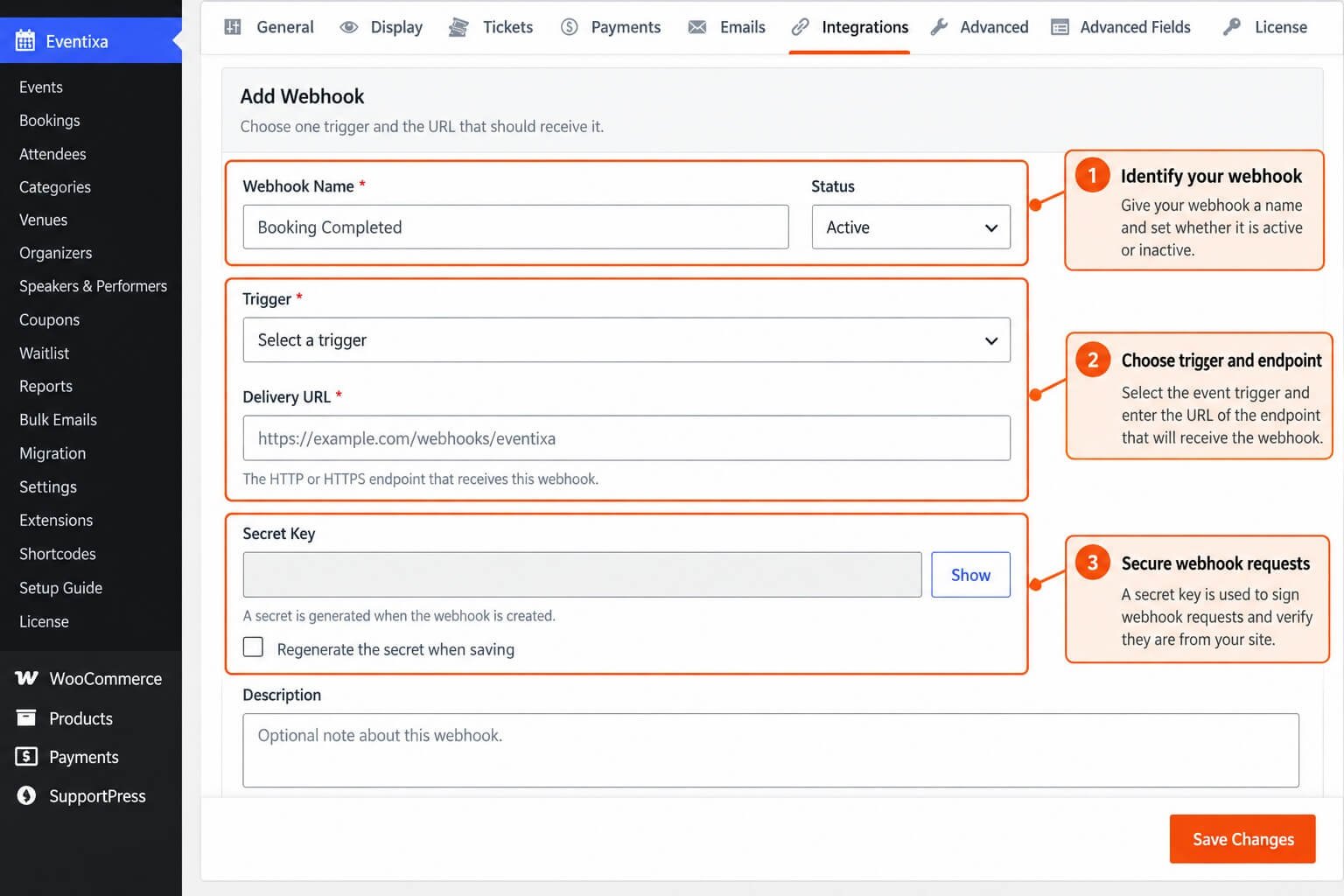
Add a Webhook
Select Add Webhook.
The editor includes:
- Webhook Name
- Status
- Trigger
- Delivery URL
- Secret Key
- Description
After saving the definition, you can also use Send Test.
Webhook Name
Enter a descriptive Webhook Name so administrators can recognize its purpose.
For example: Booking Completed CRM or Attendee Check-In Automation
The name is only used for administration and does not determine which Eventixa lifecycle event is sent.
Status
Each webhook can be:
- Active
- Inactive
Only active webhook definitions are eligible for normal delivery.
An inactive definition remains saved but does not receive matching Eventixa activity.
Trigger
Each webhook definition uses one trigger.
The current Eventixa Pro implementation supports these triggers:
- Booking Completed
- Booking Cancelled
- Booking Refunded
- RSVP Registered
- RSVP Response Updated
- RSVP Cancelled
- Attendee Checked In
Booking Completed
The Booking Completed trigger uses the topic: booking.completed
It is sent when an eligible Eventixa booking reaches the completed lifecycle event monitored by the webhook integration.
Booking Cancelled
The Booking Cancelled trigger uses: booking.cancelled
This can notify an external system when an Eventixa booking is cancelled.
Booking Refunded
The Booking Refunded trigger uses: booking.refunded
This can be used when another system needs to know that an Eventixa booking has moved into the refunded lifecycle.
RSVP Registered
The RSVP Registered trigger uses: rsvp.registered
It is intended for Eventixa RSVP registration activity.
RSVP Response Updated
The RSVP Response Updated trigger uses: rsvp.updated
Use this when an external application should be notified that an RSVP response has changed.
RSVP Cancelled
The RSVP Cancelled trigger uses: rsvp.cancelled
This notifies the endpoint when an Eventixa RSVP registration is cancelled.
Attendee Checked In
The Attendee Checked In trigger uses: attendee.checked_in
This is useful when another application needs real-time or near-real-time awareness of event entry activity.
One Trigger per Webhook
A webhook definition currently listens to one selected trigger.
If the same endpoint should receive several Eventixa topics, create multiple webhook definitions pointing to the same Delivery URL.
For example, you can create one definition for Booking Completed and another for Booking Refunded using the same endpoint.
Delivery URL
Enter the destination in Delivery URL.
The endpoint must use:
http://https://
A valid hostname is also required.
For production integrations, HTTPS is strongly recommended.
Secret Key
Eventixa automatically generates a Secret Key when the webhook is created.
The secret is used to sign Eventixa webhook requests so the receiving application can verify that the payload came from Eventixa and was not modified in transit.
Keep this secret private.
Show or Hide the Secret
The Webhook editor provides a Show control for viewing the stored Secret Key when necessary.
Avoid exposing it in screenshots, documentation, source repositories, or public support messages.
Regenerate the Secret
When editing an existing webhook, Eventixa can provide Regenerate the secret when saving.
Enable this option if the current secret has been exposed or you intentionally want to rotate it.
Regenerating the secret invalidates the previous signing secret.
Secret Rotation and Queued Deliveries
Eventixa validates the stored signature again before delivering a queued webhook.
If the webhook secret changes after a delivery has already been queued, that queued delivery is rejected rather than being sent with a signature that no longer matches the current secret.
This prevents stale signed requests from being delivered after a secret rotation.
Description
Use the optional Description field for internal notes about the webhook.
For example, you can document which application owns the endpoint or what workflow the webhook supports.
Create Webhook
After completing the required fields, select Create Webhook.
Eventixa generates the webhook ID and signing secret and adds the definition to the Webhooks list.
Editing a Webhook
Select the Edit action beside an existing webhook.
You can update its name, status, trigger, Delivery URL, description, and optionally regenerate the signing secret.
Changing a Trigger
Changing a webhook trigger affects future matching Eventixa activity.
Eventixa also protects queued deliveries from being sent if the webhook’s trigger changed after that delivery was queued.
Changing the Delivery URL
If you change the endpoint after a delivery has already been queued, Eventixa does not send the queued request to the new URL.
The queued delivery is rejected because its original endpoint no longer matches the current webhook definition.
This helps prevent old payloads from being unexpectedly delivered to a newly configured endpoint.
Delete a Webhook
Use the Delete action to permanently remove a webhook definition.
Eventixa asks for confirmation before deletion.
Once removed, that webhook no longer receives future matching activity.
Send Test
After the webhook has been saved, select Send Test to verify the endpoint.
The test request is sent immediately rather than being queued because the administrator needs the HTTP result in the current request.
Test Payload
The test uses the topic: webhook.test
The payload includes a short Eventixa test message and identifies the webhook definition used for the request.
Successful Test
A webhook test is treated as successful when the endpoint returns an HTTP status in the 200–299 range.
Eventixa can display a message such as: Webhook test delivered successfully (HTTP 200).
Failed Test
If the endpoint returns a non-success status, Eventixa reports the HTTP result.
For example: Webhook endpoint returned HTTP 404.
Network or request errors are also reported directly to the administrator.
Webhook Request Method
Normal Eventixa webhook deliveries use: HTTP POST
The request body is JSON.
Request Content Type
Eventixa sends: Content-Type: application/json; charset=utf-8 and Accept: application/json
The request also includes an Eventixa-specific User-Agent value.
Webhook Request Headers
Signed webhook requests include these Eventixa headers:
X-Eventixa-TopicX-Eventixa-DeliveryX-Eventixa-SignatureX-Eventixa-Version
X-Eventixa-Topic
X-Eventixa-Topic contains the trigger topic.
For example: booking.completed
X-Eventixa-Delivery
X-Eventixa-Delivery contains the unique delivery ID for that payload.
The ID can be useful for logging, deduplication, and troubleshooting on the receiving application.
X-Eventixa-Version
X-Eventixa-Version identifies the public webhook payload format version.
The current webhook payload version is: 1
X-Eventixa-Signature
X-Eventixa-Signature contains the HMAC signature generated from the exact raw JSON body and the webhook Secret Key.
The signature format is: sha256=<hash>
Signature Algorithm
Eventixa uses: HMAC-SHA256 to sign the exact JSON request body.
The receiver should calculate its own HMAC-SHA256 using the shared webhook Secret Key and compare the result with the X-Eventixa-Signature header.
Verify the Exact Raw Body
Signature verification should use the exact raw HTTP request body.
Do not parse the JSON and then re-encode it before verifying the signature because changes in whitespace or JSON encoding can produce a different HMAC value.
Example Signature Verification Logic
Your receiving application should conceptually:
- Read the raw request body.
- Read
X-Eventixa-Signature. - Generate HMAC-SHA256 using the stored Secret Key.
- Prefix the generated digest with
sha256=. - Compare the values using a timing-safe comparison.
- Reject the request if the signatures do not match.
Payload Structure
The public Eventixa webhook payload uses a stable envelope containing:
idtopicversioncreated_atevent_iddata
The exact contents of data depend on the webhook topic.
id
The id field contains the unique delivery ID.
It matches the value sent in X-Eventixa-Delivery.
topic
The topic field contains the Eventixa trigger topic, such as: booking.completed
version
The version field identifies the public payload format.
The current value is: 1
created_at
The created_at field records when the lifecycle delivery request was created.
event_id
The event_id field identifies the Eventixa event associated with the webhook activity.
data
The data object contains topic-specific information.
The current payload always begins with relevant Eventixa event data and then adds booking, RSVP, or attendee information according to the selected topic.
Booking Webhook Payloads
Topics beginning with booking. include both event data and booking data.
This applies to:
- Booking Completed
- Booking Cancelled
- Booking Refunded
RSVP Webhook Payloads
Topics beginning with rsvp. include event data and an RSVP object containing booking information and RSVP status information.
Attendee Check-In Payload
The attendee.checked_in topic includes event data together with attendee information.
This lets the receiving system identify both the event and the person who checked in.
Public Payload Data
Webhook payload builders are designed to expose Eventixa’s public integration data rather than simply dumping raw WordPress post metadata or internal plugin storage.
The exact object fields depend on the booking, event, attendee, and registration data available for the trigger.
Asynchronous Normal Delivery
Normal lifecycle webhooks are delivered through Eventixa’s background task system.
This means the booking, RSVP, or check-in action does not need to wait for the external webhook endpoint to finish responding.
Why Delivery Is Queued
Using the background task system helps prevent a slow external endpoint from unnecessarily slowing down the Eventixa lifecycle action that triggered the webhook.
The Eventixa booking or check-in workflow therefore does not depend on the receiving application being immediately available.
Delivery Timeout
The default webhook HTTP timeout is: 10 seconds
The current implementation constrains the delivery timeout to between 1 and 30 seconds.
HTTP Redirects
Webhook requests allow up to three HTTP redirects.
For integrations, it is still better to configure the final endpoint directly rather than relying on redirects.
Successful Delivery
Any HTTP response from 200 through 299 is treated as a successful webhook delivery.
Retryable HTTP Errors
Eventixa treats these delivery failures as retryable:
- HTTP 408
- HTTP 429
- HTTP 5xx responses
- Network/transport errors
- Response status 0
Non-Retryable HTTP Errors
Other HTTP client errors are not automatically treated as retryable.
For example, an endpoint returning HTTP 400 generally indicates that the receiver rejected the request rather than experiencing a temporary service failure.
Maximum Delivery Attempts
Normal webhook delivery tasks use a default maximum of: 3 attempts
This allows Eventixa to retry temporary failures while avoiding unlimited requests to an unavailable endpoint.
Endpoint Must Still Be Active During Delivery
Before a queued request is sent, Eventixa checks the current webhook definition again.
Delivery is stopped if the webhook was deleted, disabled, or otherwise no longer has an active endpoint.
Queued Delivery Integrity
Eventixa also confirms that the webhook’s current Trigger, Delivery URL, and Secret Key still match the immutable values associated with the queued delivery.
If any of these security-sensitive values changed, the stale delivery is rejected.
Delivery History Is Recorded Internally
Eventixa stores webhook delivery history internally.
Tracked states can include queued, delivered, retrying, and failed delivery information together with HTTP response details.
The current Webhooks manager does not expose a separate delivery-history interface to plugin users.
Delivery History Retention
The internal webhook delivery history uses a default retention period of: 90 days
Older history can be cleaned during Eventixa task cleanup.
No Per-Event Webhook Configuration
The current Eventixa webhook system does not provide per-event webhook definitions.
Webhooks are created globally.
Use the Eventixa event_id and event information inside the payload when your external application needs to handle different events differently.
Example — Booking Completed Automation
Suppose you want completed Eventixa bookings sent to an external CRM.
A typical setup is:
- Enable Webhooks globally.
- Click Add Webhook.
- Enter a name such as CRM Booking Completed.
- Set Status to Active.
- Select Booking Completed.
- Enter the CRM webhook URL.
- Create the webhook.
- Save the generated Secret Key securely in the CRM.
- Send a test.
- Complete a real Eventixa booking.
- Verify the CRM receives
booking.completed.
Example — Check-In Automation
To send check-in activity to another system:
- Add a new webhook.
- Select Attendee Checked In.
- Enter the receiving endpoint.
- Create the webhook.
- Configure signature verification on the external system.
- Send a test.
- Check in a test attendee.
- Verify the external system receives
attendee.checked_in.
Example — Multiple Triggers to One Endpoint
If the same service needs completed, cancelled, and refunded bookings, create three webhook definitions using the same Delivery URL:
- Booking Completed
- Booking Cancelled
- Booking Refunded
Each delivery contains its own X-Eventixa-Topic header and payload topic.
Your receiving endpoint can use the topic to decide what to do.
Recommended Endpoint Behavior
A reliable receiving endpoint should:
- Accept HTTP POST.
- Read the raw JSON body.
- Verify
X-Eventixa-Signature. - Validate
X-Eventixa-Topic. - Track
X-Eventixa-Deliveryto prevent duplicate processing. - Process the event safely.
- Return a 2xx response quickly.
- Move expensive work into its own background process when possible.
Idempotency
Because temporary delivery failures can be retried, the receiving system should be able to safely handle the same logical delivery more than once.
Use the unique X-Eventixa-Delivery ID as an idempotency key where possible.
Respond Quickly
Avoid making Eventixa wait for long-running processing inside your endpoint.
Validate and accept the request, return a successful 2xx response, and perform expensive work asynchronously on the receiving system when possible.
Security Recommendations
Always use HTTPS for production webhook endpoints.
Keep every Eventixa webhook Secret Key private and verify the HMAC signature before trusting the payload.
Do not use the webhook name or Delivery URL as proof that a request came from Eventixa.
Secret Exposure
If a webhook Secret Key becomes exposed:
- Edit the webhook.
- Enable Regenerate the secret when saving.
- Save the webhook.
- Update the receiver with the new Secret Key.
- Re-test the endpoint.
Old signatures no longer verify after the secret changes.
Test Before Going Live
Use Send Test before relying on a webhook for production automation.
A successful test verifies the endpoint and signing workflow, but you should also test the actual lifecycle trigger because test payloads use the separate webhook.test topic.
Recommended Production Test
For a Booking Completed webhook:
- Create the webhook.
- Send Test.
- Verify the test signature.
- Complete a real test booking.
- Confirm
booking.completedarrives. - Compare the real payload with your receiver’s expected fields.
- Confirm duplicate-delivery handling.
- Temporarily simulate a retryable error if your test environment allows it.
- Restore the endpoint to a 2xx response.
Common Problems
Webhooks Manager Is Not Visible
Confirm Eventixa Pro is active and Enable Webhooks is enabled under Eventixa → Settings → Integrations → Webhooks.
Send Test Is Missing
Save the webhook first. Eventixa requires an existing webhook definition before it can send a test.
Test Returns HTTP 404
Verify the Delivery URL and confirm the receiving route exists.
Test Returns HTTP 401 or 403
The receiving application may require authentication or may be rejecting Eventixa’s signature.
Check the endpoint’s authentication and HMAC verification logic.
Test Returns HTTP 500
The receiving application encountered a server-side error.
Review the external application’s logs.
Real Webhook Does Not Arrive
Check that the global webhook setting is enabled, the definition is Active, and the selected Trigger matches the Eventixa lifecycle action that occurred.
Endpoint Was Changed but an Older Delivery Failed
This can be expected because Eventixa refuses to send a queued delivery if its original endpoint no longer matches the current webhook definition.
New lifecycle events use the new endpoint.
Secret Was Regenerated and Queued Deliveries Failed
This can be expected because Eventixa refuses stale queued deliveries whose stored signature no longer matches the current Secret Key.
Webhook Is Inactive
Inactive webhook definitions remain saved but do not receive normal lifecycle deliveries.
Receiving System Processes an Event Twice
Normal webhook deliveries can be retried after temporary failures.
Use X-Eventixa-Delivery as an idempotency key so the receiver can safely ignore duplicate processing.
Signature Verification Fails
Verify that you are calculating HMAC-SHA256 over the exact raw request body and using the correct Secret Key.
Do not re-encode the parsed JSON before signature verification.
I Cannot Find Per-Event Webhooks
This is expected. The current Eventixa Webhooks system uses global definitions rather than event-level webhook settings.
Use the payload’s event_id and event data to route activity for specific events in your external application.
I Cannot Find Delivery History in the UI
The current implementation stores delivery history internally but does not expose a dedicated delivery-history screen in the Webhooks settings UI.
Recommended Configuration
For each external workflow:
- Enable Webhooks globally.
- Create one webhook per Eventixa trigger you need.
- Give the webhook a clear administrative name.
- Use HTTPS for the Delivery URL.
- Keep the generated Secret Key private.
- Implement HMAC-SHA256 verification on the receiver.
- Use
X-Eventixa-Deliveryfor idempotency. - Send a test.
- Trigger a real Eventixa lifecycle event.
- Verify the resulting payload and external workflow.
Important Notes
- Webhooks require Eventixa Pro.
- Webhooks are configured globally, not per event.
- The current triggers are Booking Completed, Booking Cancelled, Booking Refunded, RSVP Registered, RSVP Response Updated, RSVP Cancelled, and Attendee Checked In.
- Each webhook definition listens to one trigger.
- Delivery URLs must use HTTP or HTTPS.
- Eventixa automatically generates a Secret Key for each webhook.
- Requests are signed using HMAC-SHA256.
- The signature is sent in
X-Eventixa-Signature. - Eventixa also sends
X-Eventixa-Topic,X-Eventixa-Delivery, andX-Eventixa-Version. - The current public webhook payload version is 1.
- Normal webhook deliveries are processed asynchronously.
- Successful delivery requires an HTTP 2xx response.
- HTTP 408, 429, 5xx, and transport failures are retryable.
- Normal delivery tasks use up to three attempts by default.
- Changing a webhook’s trigger, endpoint, or secret can invalidate already queued deliveries.
- Eventixa stores delivery history internally for up to 90 days by default, but there is currently no dedicated delivery-history screen in the admin UI.
- Send Test uses the separate
webhook.testtopic and is delivered immediately.


