
Free and Paid Tickets
Eventixa supports both free and paid standard tickets.
The main difference is simple:
- A free ticket does not require payment.
- A paid ticket uses the Eventixa checkout and payment workflow.
Both ticket types can still use capacity, quantity rules, attendee information, sale schedules, and booking records.
Available in: Eventixa Core
Location: Eventixa → Events → Edit Event → Tickets & RSVP
Related features: Checkout, Payments, Bookings, Attendees
Create a Standard Ticket
Go to: Eventixa → Events → Edit Event → Tickets & RSVP
Click: Add New Ticket
The ticket editor opens.
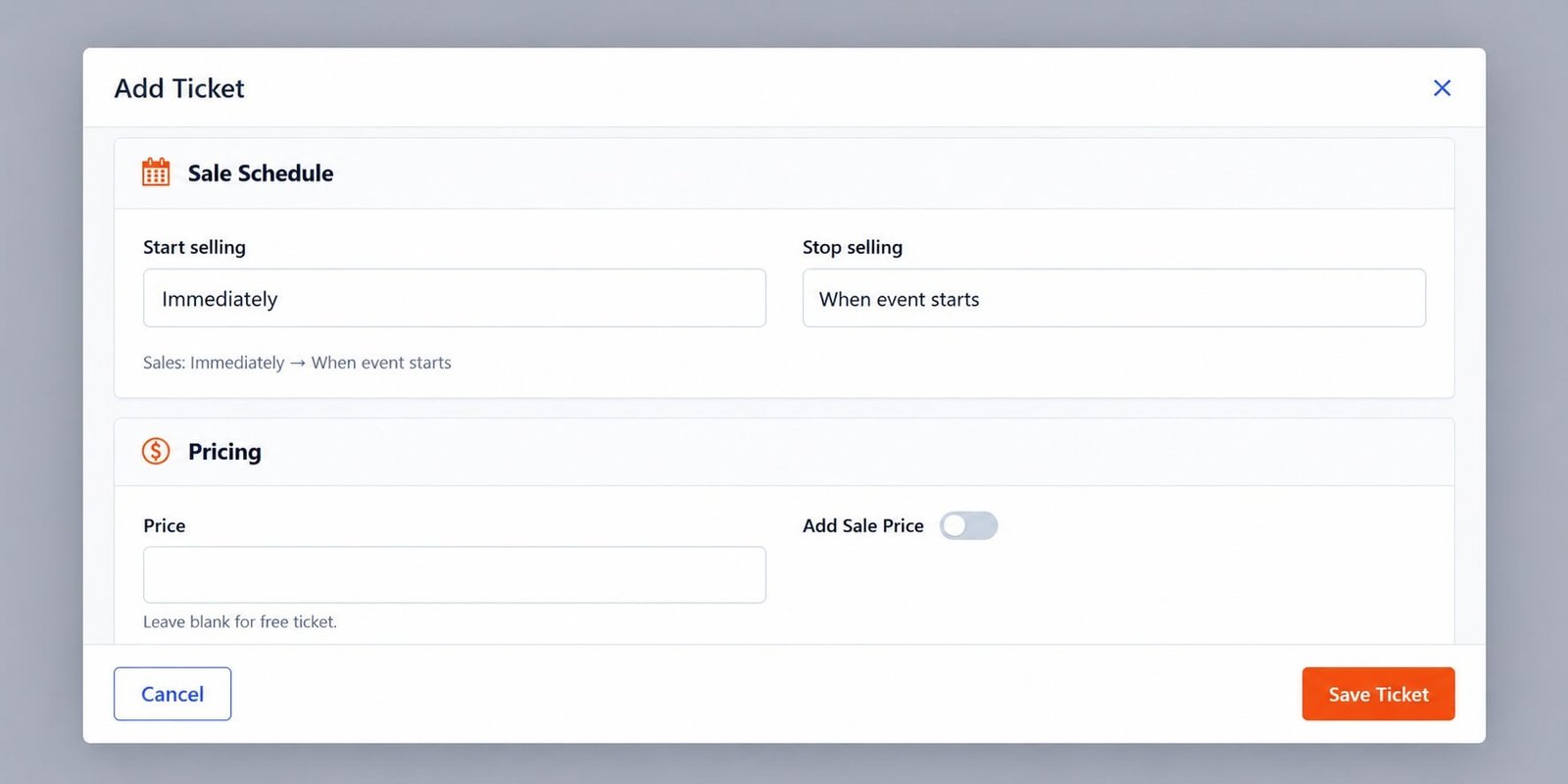
Use the Pricing section to decide whether the ticket is free or paid.
Create a Free Ticket
To create a free ticket, leave the Price field blank.
Eventixa indicates this directly below the field: Leave blank for free ticket.
You can then configure the rest of the ticket normally.
For example:
| Setting | Value |
|---|---|
| Ticket Name | Student Admission |
| Price | Blank |
| Capacity | 100 |
| Minimum quantity | 1 |
| Maximum quantity | 4 |
After saving, the frontend displays the ticket as Free.
Free Ticket Registration
A free ticket still creates a normal Eventixa registration.
The visitor typically:
- Selects the free ticket.
- Chooses the quantity.
- Enters required attendee information.
- Completes the registration.
- Receives the applicable confirmation.
No payment transaction is required.
What Free Tickets Still Support
Free tickets can still use:
- Ticket capacity
- Sale schedules
- Minimum and maximum quantities
- Ticket descriptions
- Individual attendee information
- Booking records
- Attendee records
- Confirmation emails
Free does not mean untracked.
Create a Paid Ticket
To create a paid ticket, enter an amount in the Price field.
For example: 19.00
The ticket then requires the applicable Eventixa payment workflow.
Example:
| Setting | Value |
|---|---|
| Ticket Name | Standard Event Pass |
| Price | $19 |
| Capacity | 250 |
| Minimum quantity | 1 |
| Maximum quantity | 4 |
Paid Ticket Registration
For a paid ticket, the visitor typically:
- Selects the ticket.
- Chooses the quantity.
- Provides attendee details.
- Proceeds to checkout.
- Selects an available payment method.
- Completes payment.
- Receives the booking confirmation.
Payment Methods for Paid Tickets
Paid tickets depend on the payment methods enabled in Eventixa.
Depending on your setup, these can include:
- PayPal
- Offline Payment
- WooCommerce
- Stripe with Eventixa Pro
The exact gateway available to the attendee depends on the site configuration.
Free and Paid Tickets on the Same Event
An event can contain both free and paid ticket types.
For example:
Student Admission
- Free
- Capacity: 100
Standard Event Pass
- $19
- Capacity: 250
Premium Experience Pass
- $79
- Unlimited capacity
This lets you serve different attendee groups from the same event.
Frontend Display
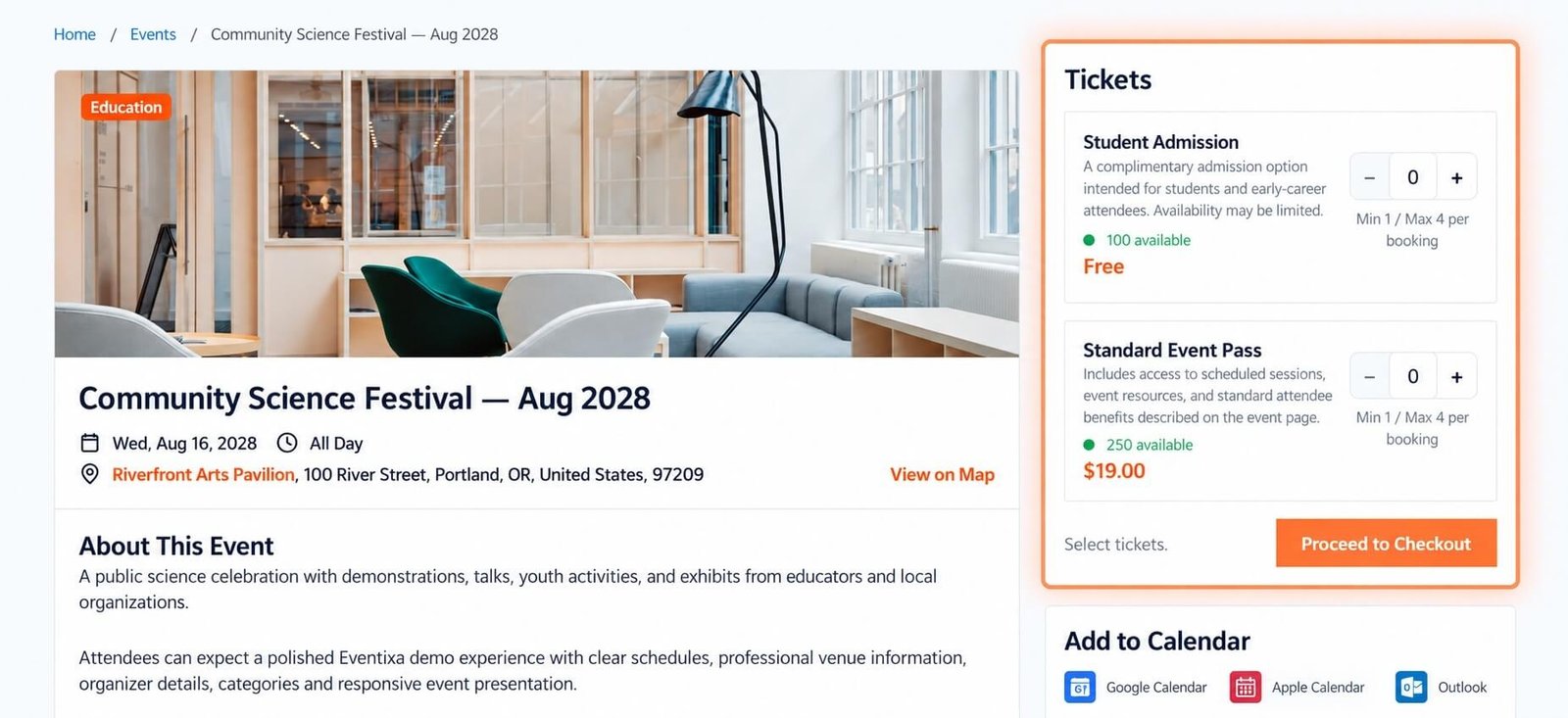
On the frontend, Eventixa clearly distinguishes free and paid tickets.
A free ticket can show: Free
A paid ticket can show: $19.00
or another configured price.
Both can also show:
- Availability
- Description
- Quantity controls
- Minimum and maximum booking limits
Sale Price
Where available, Eventixa can also support a sale price configuration.
This allows you to present a reduced price compared with the normal ticket price.
For example:
Regular price: $19
Sale price: $15
Use this when you want a temporary or promotional price.
When to Use Sale Price
Sale pricing can be useful for:
- Launch promotions
- Early registration
- Limited promotional campaigns
- Special attendee groups
Make sure the sale pricing strategy matches your ticket sale schedule.
Ticket Capacity
Free and paid tickets can both have:
- Unlimited capacity
- A fixed ticket capacity
For example:
Free Ticket
Capacity: 100
Paid Ticket
Capacity: 50
Eventixa tracks ticket availability separately according to the configured rules.
Unlimited Tickets
An unlimited ticket does not have a fixed stock limit.
This can be useful for:
- Online events
- Livestreams
- Large virtual sessions
However, quantity limits per booking can still apply.
Booking Quantity Limits
Free and paid tickets can both use:
- Minimum quantity per booking
- Maximum quantity per booking
For example:
Minimum: 1
Maximum: 4
This means one booking can contain between one and four tickets, subject to availability.
Ticket Sale Schedule
Both free and paid tickets can use a sale schedule.
For example:
Sale starts: September 14, 2026
Sale ends: Event start
Outside this window, the ticket should not be available for normal registration.
Attendee Information
Free and paid tickets can both collect attendee information.
When enabled:
Collect attendee information for each ticket
Eventixa can collect individual details for every ticket in the booking.
This is especially useful when one purchaser registers multiple people.
Ticket Descriptions
You can enable:
Show ticket description on frontend
This lets visitors see more information about each ticket tier before selecting it.
For example:
Student Admission
A complimentary admission option intended for students and early-career attendees.
Free Tickets and Payment Gateways
A free ticket does not require the attendee to complete an online payment.
Payment gateways matter only when payment is required.
This keeps free registration simpler for the attendee.
Paid Tickets and Checkout
A paid ticket continues through the normal Eventixa checkout process.
The attendee may need to choose a payment method depending on which gateways are enabled.
The booking status can then reflect the result of the payment workflow.
Offline Payment
A paid ticket can also use Offline Payment when that gateway is enabled.
This allows the booking to be created while payment is handled outside the website according to your instructions.
PayPal
PayPal can be used for paid ticket checkout when enabled in Eventixa.
The attendee completes payment using the configured PayPal workflow.
WooCommerce
When the WooCommerce payment workflow is enabled, Eventixa ticket checkout can use WooCommerce according to the site’s configuration.
Stripe
Requires Eventixa Pro
Stripe can be used for paid Eventixa tickets when the Eventixa Pro Stripe gateway is configured.
Booking Records
Both free and paid registrations create booking information.
The booking record can include:
- Ticket
- Quantity
- Registration type
- Attendees
- Payment method
- Payment status
- Booking status
This allows free and paid registrations to be managed through the same Eventixa booking system.
Attendee Records
Attendee records can be created regardless of whether the ticket is free or paid.
This allows Eventixa to support:
- Attendee management
- Emails
- Ticket delivery
- Check-in workflows
- Reporting
Capacity After Registration
Ticket capacity decreases according to successful or reserved registrations as defined by the Eventixa booking workflow.
For example:
Capacity: 100
Registered: 20
Available: 80
This applies whether the ticket is free or paid.
Capacity After Cancellation
When an eligible booking is cancelled, its reserved capacity can be released.
This allows the ticket to become available again.
Free vs RSVP
A free standard ticket is not the same as an RSVP registration.
Free Standard Ticket
Uses the normal ticket workflow but has no price.
RSVP
Uses the RSVP registration workflow, including options such as Going and Not Going.
Choose the registration type that matches the event experience.
Example: Free Community Event
Configuration:
| Setting | Value |
|---|---|
| Ticket | Community Registration |
| Price | Free |
| Capacity | 200 |
| Max quantity | 4 |
Visitors register without payment, and Eventixa still tracks their bookings and attendees.
Example: Paid Workshop
Configuration:
| Setting | Value |
|---|---|
| Ticket | Workshop Admission |
| Price | $30 |
| Capacity | 25 |
| Max quantity | 2 |
Visitors complete payment before the booking is finalized according to the active payment workflow.
Example: Mixed Ticket Event
An event can offer:
- Student Admission — Free
- Standard Pass — $19
- VIP Pass — $79
Each ticket can use its own capacity and registration rules.
Common Problems
Paid Ticket Shows as Free
Check that the Price field contains a valid non-zero amount and the ticket was saved.
Free Ticket Asks for Payment
Review the ticket price and confirm it is actually configured as free.
Also verify you are selecting the intended ticket.
Payment Gateway Does Not Appear
Check:
- The ticket has a price.
- The gateway is enabled.
- The gateway configuration is complete.
Sale Price Is Not Applied
Review:
- Regular price
- Sale price
- Related sale settings
- Ticket save state
Free Ticket Does Not Appear
Check:
- Ticket is saved.
- Sale schedule is active.
- Capacity remains.
- Event is published.
Paid Ticket Checkout Fails
Review:
- Payment gateway configuration
- Booking status
- Gateway credentials
- Eventixa payment settings
Recommended Workflow for a Free Ticket
- Open Tickets & RSVP.
- Click Add New Ticket.
- Enter the ticket name.
- Leave Price blank.
- Configure capacity.
- Set quantity limits.
- Configure the sale schedule.
- Configure attendee collection.
- Save the ticket.
- Complete a test registration.
Recommended Workflow for a Paid Ticket
- Open Tickets & RSVP.
- Click Add New Ticket.
- Enter the ticket name.
- Enter the ticket price.
- Configure capacity.
- Configure quantity limits.
- Set the sale schedule.
- Enable attendee information if needed.
- Save the ticket.
- Test the full checkout and payment flow.
Important Notes
- Leave Price blank for a free standard ticket.
- Free tickets still create bookings and attendees.
- Paid tickets require an applicable payment workflow.
- Free and paid tickets can exist on the same event.
- Capacity and quantity rules work for both.
- Always test the frontend registration flow.
- Test paid tickets with the actual enabled gateway before launch.


