
QR Tickets
Eventixa Pro can generate QR-based event tickets for eligible attendee registrations.
Each QR ticket belongs to an attendee registration and can be used with Eventixa’s check-in workflow to validate the attendee and record event entry.
Available in: Eventixa Pro
Location: Eventixa → Attendees → Open Attendee
Related features: Ticket PDF, Event Check-In, QR Scanner, Attendees, Recurring Events
What Is an Eventixa QR Ticket?
A QR ticket is an attendee ticket containing a QR code linked to that attendee’s Eventixa registration.
At the event, staff can scan the QR code to locate and validate the registration before checking the attendee in.
QR tickets help make event entry faster while reducing manual ticket searches.
How the QR Ticket Workflow Works
A typical Eventixa QR ticket workflow is:
- Customer completes an eligible registration.
- Eventixa creates the booking.
- Eventixa creates the attendee record.
- A ticket is generated for the eligible attendee.
- The ticket includes a QR code.
- The attendee brings the ticket to the event.
- Event staff scan the QR code.
- Eventixa validates the attendee.
- The attendee is checked in.
One QR Ticket per Attendee
QR tickets are attendee-oriented.
If one purchaser registers three attendees, each eligible attendee can have their own attendee record and corresponding ticket.
For example:
Purchaser: Jane Smith
Attendees:
- Jane Smith
- John Smith
- Alex Smith
Each attendee should use their own ticket at check-in.
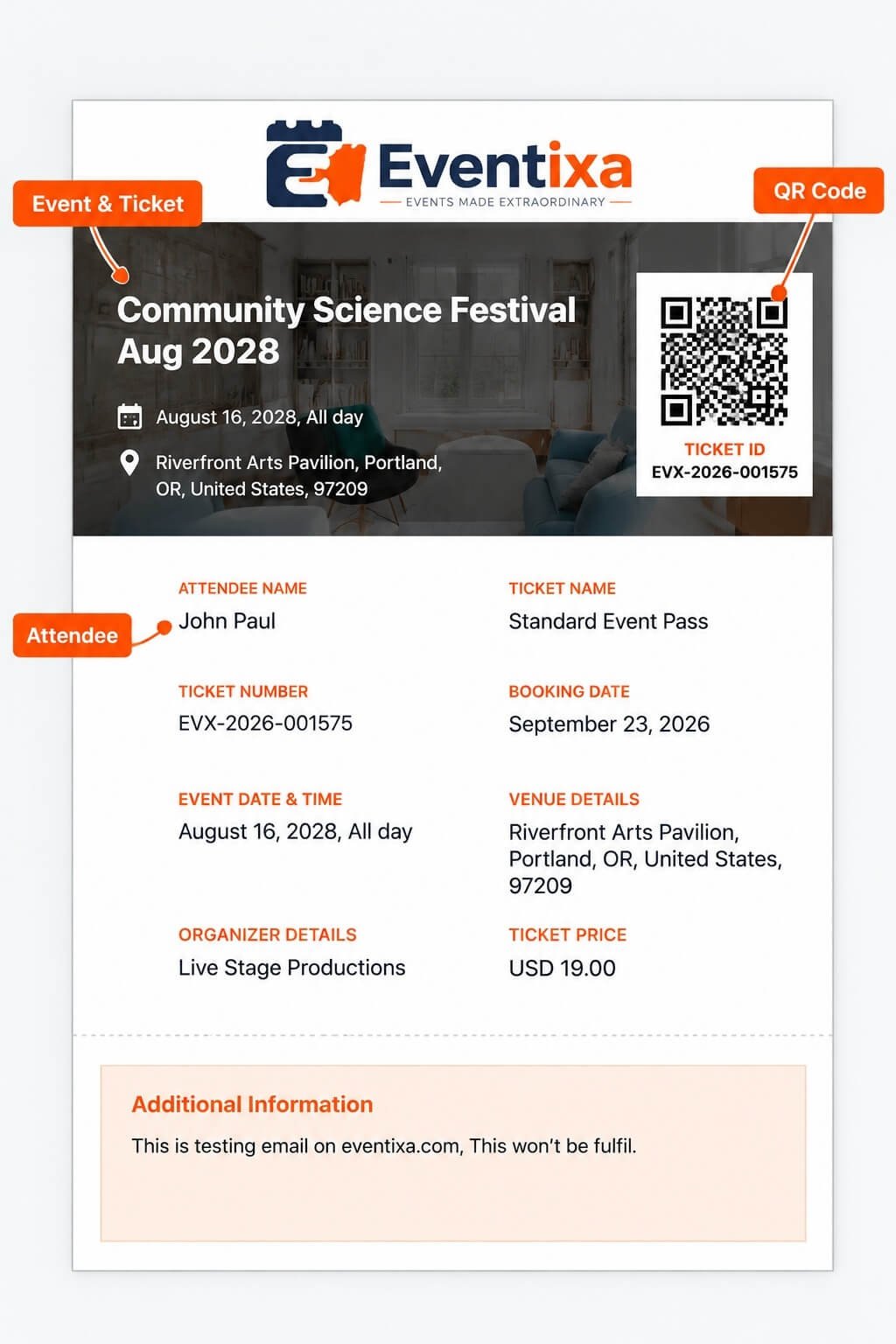
QR Ticket and Booking
The booking represents the overall registration transaction.
The QR ticket belongs to an individual attendee within that booking.
This distinction is important when one booking contains multiple attendees.
QR Ticket and Attendee ID
Each Eventixa attendee has an individual attendee record.
The QR ticket links the check-in process to that attendee rather than only identifying the overall booking.
This lets Eventixa track attendance at participant level.
Eligible Registrations
QR tickets should be used only for valid attendee registrations.
Before relying on a ticket, Eventixa can consider the associated attendee and booking state during validation.
A cancelled or otherwise invalid registration should not be treated as a valid active ticket.
Completed Registrations
A valid completed registration is the normal case for QR ticket use.
For example:
Attendee Status: Completed
The attendee can present their ticket for validation and check-in.
Cancelled Attendees
A cancelled attendee should not be treated as a valid active ticket holder.
If a cancelled ticket is presented, review the attendee and booking before allowing entry.
Free Tickets
Eligible free-ticket registrations can still use QR tickets.
A financial transaction is not required simply for a registration to have a ticket.
Paid Tickets
Paid ticket attendees can receive QR tickets after the applicable registration workflow is completed.
Check booking and payment status when a paid ticket does not appear valid.
RSVP Tickets
RSVP behavior is different from standard ticket registration.
An eligible RSVP Going attendee can participate in the appropriate attendance workflow where supported.
An RSVP attendee marked:
Not Going
should not be treated as an active attendee for check-in.
Ticket Delivery
QR tickets can be delivered through the applicable Eventixa ticket email workflow.
The attendee can then present the ticket from:
- Phone
- Downloaded ticket
- Printed copy where appropriate
Ticket PDF
Eventixa Pro supports downloadable ticket PDFs as part of the ticket workflow.
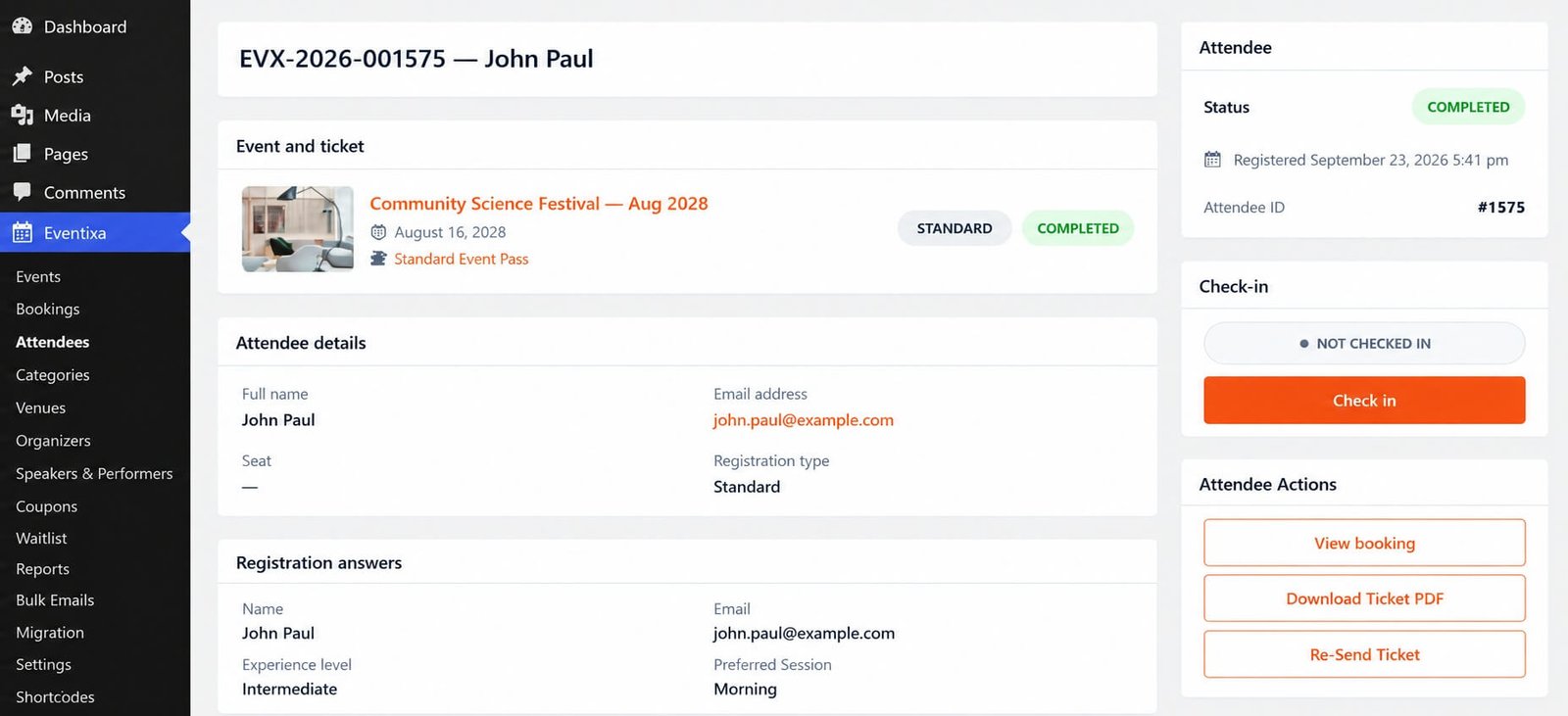
From the attendee details screen, an administrator can use: Download Ticket PDF where the action is available.
The PDF provides a portable version of the attendee’s event ticket.
Re-Send Ticket
Eventixa Pro also provides: Re-Send Ticket from the attendee actions area.
Use this when:
- Attendee lost the ticket email
- Email was corrected
- Original delivery failed
- Attendee requests another copy
Correct Email Before Re-Sending
If the email is incorrect:
- Open the attendee.
- Update the attendee email.
- Save the attendee fields.
- Verify the new email.
- Re-send the ticket.
QR Ticket Does Not Create Another Registration
Downloading or re-sending a ticket does not create:
- Another booking
- Another attendee
- Additional capacity
- Another payment
It provides another copy of the existing attendee ticket.
Ticket Re-Send and QR Identity
Re-sending a ticket should continue to represent the same attendee registration.
It does not create a second independent registration simply because another email was sent.
Event Check-In
The QR ticket becomes especially useful at the event entrance.
Staff can scan it using the Eventixa check-in workflow.
The next documentation article covers: Event Check-In
QR Scanner
Eventixa provides a QR Scanner workflow for quickly reading attendee ticket QR codes.
Instead of manually searching by:
- Name
- Booking reference
staff can scan the QR ticket directly.
Ticket Validation
Scanning is not only about reading a code.
Eventixa uses the ticket information to validate the associated attendee registration before check-in.
Validation helps determine whether the ticket belongs to a usable registration.
Successful Validation
A valid ticket can identify the expected attendee and allow the applicable check-in action.
Staff should still verify the displayed attendee/event information when necessary.
Duplicate Ticket Use
Once an attendee has already checked in, scanning the same ticket again should not be treated as a second independent attendee registration.
The attendee’s existing check-in state lets staff identify that the ticket has already been used.
Why Duplicate Protection Matters
Without attendee-level check-in state, one screenshot of a QR ticket could potentially be presented multiple times.
Eventixa’s attendee and check-in relationship helps prevent duplicate entry from being treated as separate attendance.
Already Checked In
If a QR ticket belongs to an attendee who is already checked in, staff should not check the same attendee in again as a new registration.
Review the current attendee status displayed by Eventixa.
Manual Check-In
QR scanning is not the only way to check in an attendee.
If scanning is unavailable, an administrator can open the attendee record and use the manual: Check in action where applicable.
Manual Search
If an attendee cannot find their QR ticket, staff can locate them using Eventixa attendee information.
Search can be useful when:
- Phone battery is dead
- Ticket email is unavailable
- Printed QR is damaged
- Camera cannot read the code
Check-In Status
The attendee details screen displays the current check-in state.
For example:
NOT CHECKED IN
After successful check-in, the attendee record reflects the updated attendance state.
QR Ticket vs Check-In Status
These are separate concepts.
QR Ticket
Provides the scannable attendee registration.
Check-In Status
Records whether that attendee has already entered the event.
A valid QR ticket can therefore belong to an attendee who is:
- Not checked in
- Already checked in
Recurring Events
QR tickets require extra attention for recurring events.
The attendee registration belongs to a specific event occurrence.
Staff should verify the ticket corresponds to the correct date before checking in the attendee.
Example Recurring Registration
An event may have:
Community Science Festival — April 15
and:
Community Science Festival — August 16
A registration for April 15 should not automatically be treated as an August 16 attendee.
Occurrence Information
For recurring events, the ticket and validation workflow should preserve the correct occurrence context.
This helps Eventixa track attendance accurately per event date.
Check-In for Recurring Events
Recurring-event check-in has additional considerations and is documented separately under:
Check-In for Recurring Events
Virtual Events
Virtual-only registrations usually do not require physical entrance scanning in the same way as an in-person event.
However, the ticket remains part of the attendee’s Eventixa registration where applicable.
Hybrid Events
Hybrid events can still use QR ticket check-in for attendees arriving at the physical venue.
Virtual access remains a separate Eventixa workflow.
QR Ticket and Capacity
Generating or scanning the ticket does not consume another ticket from capacity.
Capacity was already handled by the registration.
Check-in simply records attendance.
QR Ticket and Payment
The QR code itself does not prove that money was transferred.
If there is a payment concern, review:
Eventixa → Bookings → Open Booking
and verify:
- Booking Status
- Payment Status
- Gateway
- Transaction
QR Ticket and Refund
If a paid attendee is cancelled and refunded, their old QR ticket should not be treated as an active registration.
Always validate the current Eventixa attendee/booking state instead of relying only on a saved ticket image.
Screenshot of a QR Code
An attendee may present a screenshot of their ticket.
The important part is not whether the QR came from:
- Live email
- Screenshot
- Printed copy
The important part is whether Eventixa validates the attendee registration.
Printed Tickets
Printed QR tickets can also be scanned if:
- The QR is clear
- Printing quality is sufficient
- The scanner can read it
Avoid resizing or damaging the QR code unnecessarily.
Mobile Tickets
Mobile tickets are convenient for event entry.
Ask attendees to:
- Open the ticket before reaching the desk
- Increase screen brightness if necessary
- Keep the QR code fully visible
This can speed up entry.
Scanning Environment
For reliable scanning:
- Use sufficient lighting
- Keep the camera lens clean
- Hold the QR steadily
- Avoid glare
- Keep the full code inside the scanner area
QR Cannot Be Scanned
If a QR code cannot be read:
- Try again with better lighting.
- Increase phone brightness.
- Open the original ticket.
- Use the attendee search.
- Verify attendee manually.
- Check in manually if appropriate.
Ticket Is Not Found
If the scanned ticket cannot be matched, verify:
- Correct event
- Correct occurrence
- Attendee registration
- Booking status
- Ticket validity
Do not automatically admit an attendee because they possess an image that looks like a ticket.
Wrong Event
A valid Eventixa ticket for one event should not automatically grant entry to another event.
Always verify the event shown by the validation workflow.
Wrong Occurrence
The same principle applies to recurring events.
A ticket for one occurrence must not automatically validate for a different date.
Attendee Name Does Not Match
If the ticket shows unexpected attendee information:
- Open the attendee record.
- Review the booking.
- Verify ticket assignment.
- Correct attendee information only through the supported edit workflow.
Ticket Was Re-Sent
Re-Sending a ticket does not create an additional seat.
If both the old and new email copies are presented, they still relate to the same attendee registration.
QR Ticket Security
Treat attendee tickets as event-access credentials.
Attendees should avoid publicly sharing QR codes.
Publishing a ticket QR code on social media can allow another person to attempt to use it.
Documentation Screenshots
When creating public Eventixa documentation, avoid displaying real attendee QR tickets if those codes point to actual registrations.
Use:
- Test data
- Demo registrations
- Sanitized screenshots
Check-In Permissions
Only trusted event staff should have access to Eventixa’s check-in tools.
Check-in modifies attendee attendance records.
Attendance Tracking
After attendees are checked in, Eventixa can use the attendee check-in state for operational attendance tracking.
This lets administrators distinguish registered attendees from those who actually attended.
Attendee Details
To review an individual attendee, go to:
Eventixa → Attendees
Open the attendee.
The screen provides related information such as:
- Event
- Ticket
- Registration answers
- Booking
- Status
- Check-in
- Ticket actions
Recommended Pre-Event QR Ticket Test
Before your event:
- Create a test event or test booking.
- Complete an eligible registration.
- Verify attendee record.
- Open/download the ticket.
- Confirm the QR code is visible.
- Re-send the ticket.
- Test scanning.
- Verify attendee details.
- Check in the test attendee.
- Scan again to verify already-checked-in behavior.
Recommended Event-Day Workflow
For each attendee:
- Ask them to open their QR ticket.
- Scan the QR code.
- Verify event and occurrence.
- Verify attendee.
- Review validation result.
- Check the attendee in.
- Move to the next attendee.
Backup Event-Day Workflow
If scanning fails:
- Search attendee by name/email.
- Open attendee record.
- Verify event and ticket.
- Verify attendee status.
- Use manual Check in where appropriate.
Always have a manual backup process available.
Common Problems
QR Code Is Missing from Ticket
Check:
- Eventixa Pro is active.
- Ticket/QR functionality is available.
- Registration is eligible.
- Ticket was generated correctly.
Attendee Did Not Receive Ticket
Check:
- Email address
- Spam folder
- SMTP
- Attendee status
Then use Re-Send Ticket.
QR Code Does Not Scan
Try:
- Better lighting
- Higher screen brightness
- Original ticket instead of a low-quality screenshot
- Manual attendee search
Ticket Shows Already Checked In
The attendee record has already been checked in.
Verify before allowing another entry.
QR Ticket Belongs to Wrong Event
Do not check the attendee in for the current event.
Review their registration.
QR Ticket Belongs to Wrong Occurrence
Verify the registered recurring date before check-in.
Cancelled Ticket Still Exists in Email
Old ticket files or emails can remain with the attendee after cancellation.
Always rely on current Eventixa validation rather than the existence of the old email.
Re-Sent Ticket Creates Concern About Duplicate Entry
A re-sent ticket represents the existing registration rather than another attendee seat.
Use check-in state to identify duplicate use.
QR Works but Payment Is Pending
Review Booking Details.
QR availability should not replace payment verification for a paid registration.
Recommended QR Ticket Workflow
- Enable the required Eventixa Pro ticket/check-in functionality.
- Create an event.
- Create an eligible ticket.
- Complete a test booking.
- Verify attendee creation.
- Verify ticket generation.
- Verify QR code.
- Test ticket email.
- Test PDF download where used.
- Test ticket re-send.
- Open the QR Scanner.
- Scan the ticket.
- Verify attendee.
- Complete check-in.
- Test repeat scanning.
- Test manual attendee lookup as a backup.
Important Notes
- QR Tickets require Eventixa Pro.
- QR tickets are associated with individual attendee registrations.
- QR scanning helps identify and validate the attendee before check-in.
- Re-sending or downloading a ticket does not create another registration.
- Check-in state helps prevent the same attendee from being treated as multiple entries.
- Cancelled or invalid registrations should not be treated as valid tickets.
- Recurring-event tickets must be validated against the correct occurrence.
- QR tickets do not replace payment verification when a financial issue exists.
- Always test scanning before the event.
- Keep manual attendee search available as a backup.


