
Attendee Registration Fields
Eventixa can collect information for the purchaser and for each individual attendee included in a booking.
This is especially useful when one person purchases multiple tickets but you still need accurate names, email addresses, attendee records, and check-in information for every participant.
Available in: Eventixa Core
Location: Eventixa → Events → Edit Event → Tickets & RSVP
Related features: Tickets, RSVP, Checkout, Attendees, Advanced Fields
Purchaser vs Attendee
Eventixa distinguishes between the person making the booking and the people actually attending the event.
For example:
A purchaser buys three tickets.
The purchaser may be: John Smith
while the attendees are:
- John Smith
- Sarah Smith
- Michael Smith
This distinction is important for attendee management.
Why Collect Individual Attendee Information?
Individual attendee information helps with:
- Attendee lists
- Ticket delivery
- Event communication
- Check-in
- QR tickets
- Reporting
- RSVP tracking
- Custom registration information
Without individual attendee data, one multi-ticket booking may only identify the purchaser clearly.
Enable Attendee Information
Open the event and go to: Event Settings → Tickets & RSVP
Create a new ticket or edit an existing ticket.
Where available, enable: Collect attendee information for each ticket
This tells Eventixa to request attendee details for every ticket included in the booking.
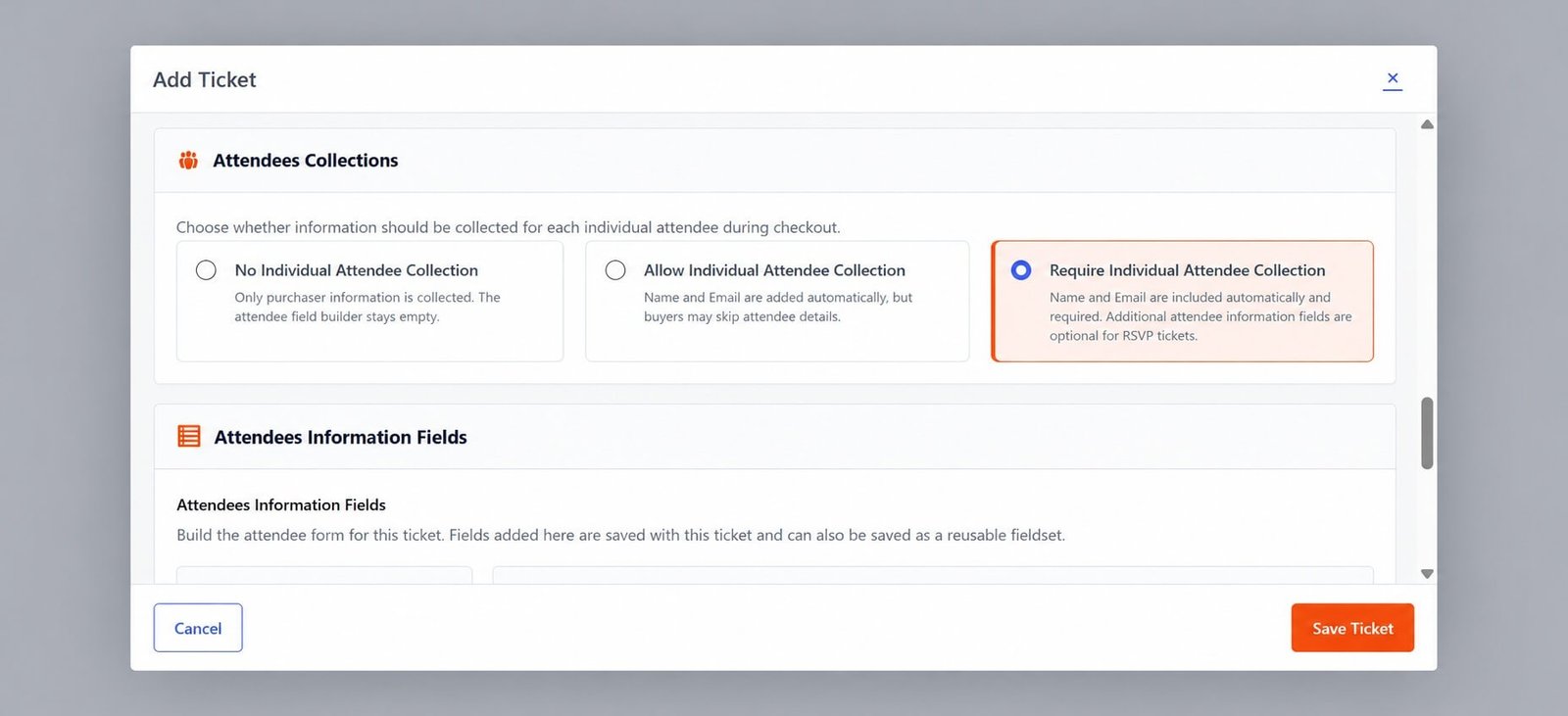
Basic Attendee Fields
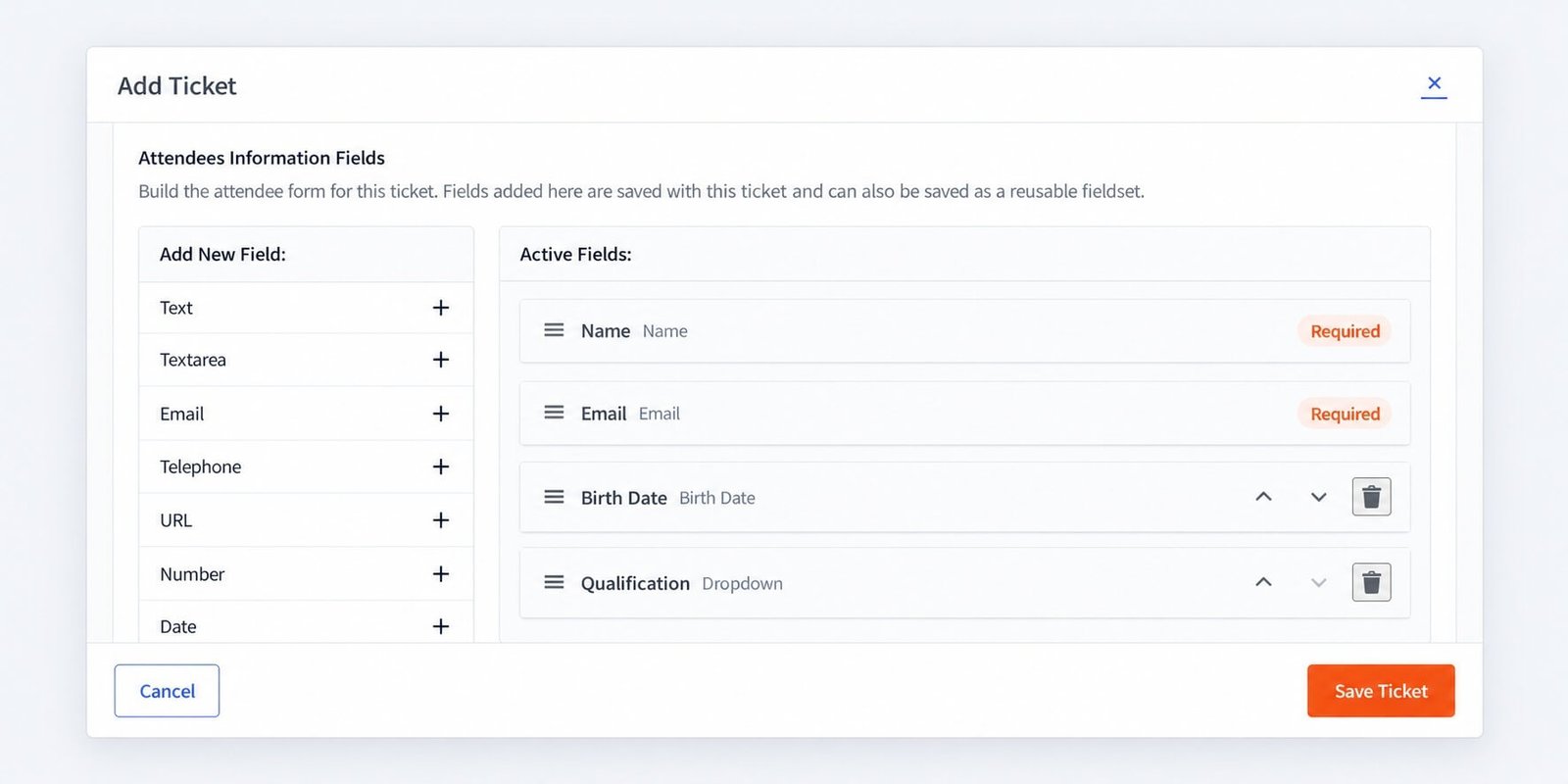
Eventixa can collect basic attendee information such as:
- Name
These fields form the core attendee record.
For workflows that require attendee-specific communication or tickets, accurate email addresses are especially important.
Required Fields
Required fields must be completed before registration can continue.
Use required fields only when the information is genuinely necessary.
Typical required attendee fields include:
- Name
Avoid forcing unnecessary data collection.
Multi-Ticket Booking Example
Suppose a visitor selects: General Admission × 3
With attendee information enabled, Eventixa can collect details for:
Attendee 1
- Name
Attendee 2
- Name
Attendee 3
- Name
This creates three distinct attendee records under one booking.
Purchaser Information
The purchaser is the person completing the booking.
Purchaser details can be used for:
- Booking communication
- Payment-related correspondence
- Order ownership
- Booking management
The purchaser does not always need to be one of the attendees.
Purchaser Is Also an Attendee
In many bookings, the purchaser is also attending.
For example:
The purchaser buys two tickets:
- One for themselves
- One for a colleague
Eventixa can still maintain individual attendee records for both participants.
Purchaser Is Not Attending
A purchaser may buy tickets for other people without attending.
Examples:
- Employer purchasing staff tickets
- Parent registering children
- Assistant booking for executives
- Organizer entering registrations
Individual attendee information keeps the actual participant records accurate.
Logged-In Customer Email
For logged-in users, purchaser information can be connected to the authenticated user workflow.
Where Eventixa locks or pre-fills the logged-in email, this helps maintain account consistency.
Guest Checkout
If Guest Checkout is enabled, visitors can register without an existing WordPress account.
Guest purchasers still provide the information required for the booking.
Attendee fields remain independent of whether the purchaser is logged in.
Attendee Fields and Free Tickets
Free tickets can collect individual attendee information.
For example:
Free Workshop × 4
Eventixa can collect four attendee records even though no payment is required.
Attendee Fields and Paid Tickets
Paid tickets work the same way.
The purchaser can select multiple paid tickets, enter attendee information, and then complete payment.
The booking remains associated with all registered attendees.
RSVP Attendee Information
RSVP registrations can also collect individual attendee details.
For example: Going × 3
Eventixa can require:
- Attendee 1 name/email
- Attendee 2 name/email
- Attendee 3 name/email
This keeps RSVP counts and attendee records aligned.
Going Attendees
Going RSVP participants are treated as attending registrants.
Their attendee information can be used for:
- Registration records
- Check-in
- Communication
- Capacity
Not Going Attendees
If Not Going is enabled, Eventixa can also maintain attendee records associated with the decline response.
These attendees should not be treated as active attending ticket holders.
Quantity and Attendee Fields
The number of attendee forms depends on the selected ticket quantity.
For example:
Quantity: 4
Eventixa can show four attendee information sections.
If the quantity changes, the attendee collection interface should reflect the new number of attendees.
Ticket-Level Behavior
Different ticket types can have different registration requirements depending on your Eventixa configuration.
For example:
VIP Pass
Collect individual attendee information
General Admission
Collect individual attendee information
Simple Access Ticket
Use only basic purchaser information where appropriate
Choose the workflow that matches the event’s operational needs.
Attendee Information at Checkout
After ticket quantities are selected, attendee information becomes part of the booking flow.
A typical process is:
Select Tickets → Enter Attendee Information → Checkout → Payment if required → Booking Created
Validation
Required attendee fields must be completed before the booking can proceed.
For email fields, visitors should enter valid email addresses.
This prevents incomplete attendee records from being created.
Duplicate Emails
Whether multiple attendees may use the same email depends on your event workflow and data requirements.
Whenever unique communication or attendee-specific ticket delivery is important, use accurate individual email addresses.
Attendee Records After Booking
After registration, attendee records can be reviewed from: Eventixa → Attendees
The attendee listing can include information such as:
- Attendee name
- Event
- Registration type
- Status
- Check-in state
Booking and Attendee Relationship
One booking can contain multiple attendees.
For example: Booking #1001
contains:
- Attendee A
- Attendee B
- Attendee C
This is why booking count and attendee count are not always the same.
Attendee Count vs Booking Count
Suppose:
- 10 bookings exist
- Each booking contains 2 attendees
Then:
Bookings: 10
Attendees: 20
Capacity calculations should reflect attendee quantity rather than only the number of bookings.
Editing Attendee Information
Pro functionality may apply depending on the workflow
Attendee details can be reviewed in Eventixa administration.
Where attendee editing is supported, administrators can correct information after registration.
Use editing carefully if ticket emails or check-in data have already been generated.
Re-Send Ticket
Requires Eventixa Pro
Where supported, attendee ticket information can be re-sent after correcting attendee details.
This is useful when an attendee:
- Entered the wrong email
- Lost their ticket
- Needs the ticket delivered again
Advanced Attendee Fields
Requires Eventixa Pro
Eventixa Pro adds Advanced Fields for collecting additional attendee information.
Examples include:
- Company
- Job title
- Dietary requirements
- T-shirt size
- Phone number
- Custom questions
Advanced Fields are documented separately.
Basic Fields vs Advanced Fields
Basic Attendee Fields
Designed for essential registration information such as:
- Name
Advanced Fields
Used for additional event-specific information.
Use advanced fields only when the extra information serves a real event requirement.
Attendee Fields and QR Check-In
Requires Eventixa Pro
Individual attendee records are important for QR Check-In.
Each attendee can have their own ticket/check-in state rather than treating an entire multi-person booking as one attendee.
Attendee Fields and PDF Tickets
Requires Eventixa Pro
Individual attendee information can also appear in attendee-specific ticket workflows where PDF Tickets are enabled.
Attendee Fields and Recurring Events
For recurring events, attendee information should remain associated with the correct occurrence.
For example:
April 15 occurrence
- Alice
- Bob
April 29 occurrence
- Chris
- Diana
These attendees belong to different event dates even if they use the same ticket type.
Attendee Information and Capacity
Every attendee consumes one place where the registration type represents attending capacity.
For example:
Booking quantity: 3
Three attendee records consume three places.
This applies even though only one purchaser completed the booking.
Changing Attendee Requirements
Be careful when changing attendee field requirements after registration has opened.
Existing bookings may not contain information for newly required fields.
Consider whether the new field is essential before changing active registration forms.
Privacy Considerations
Only collect information you actually need.
For example, if name and email are enough for event operations, avoid adding unnecessary personal fields.
This keeps registration simpler and reduces unnecessary data collection.
Example: Conference Registration
A purchaser buys:
3 General Admission tickets
Eventixa collects:
Attendee 1
Jane Doe
jane@example.com
Attendee 2
Robert Doe
robert@example.com
Attendee 3
Emma Smith
emma@example.com
One booking now contains three distinct attendees.
Example: Free Workshop
Ticket: Free Workshop Registration
Quantity: 2
Attendee information:
- Participant 1
- Participant 2
No payment is required, but both attendee records are still created.
Example: RSVP
Visitor selects: Going × 4
Eventixa collects information for four attendees.
The RSVP summary counts four Going attendees, not simply one booking.
Common Problems
Only Purchaser Information Is Collected
Check whether:
Collect attendee information for each ticket is enabled for the registration workflow.
Only One Attendee Form Appears
Check the selected ticket quantity.
If quantity is one, only one attendee record is required.
Required Field Is Missing
Review the attendee registration configuration and ensure the field is enabled and required as intended.
Attendee Count Is Higher Than Booking Count
This is normal when bookings contain multiple tickets.
Wrong Email Was Entered
Review the attendee record and use the supported editing workflow where available.
Recurring Event Attendee Appears Under Wrong Date
Check the booking’s occurrence association.
Recommended Workflow
- Create the ticket or RSVP.
- Decide whether individual attendee information is required.
- Enable attendee collection.
- Configure required basic fields.
- Set ticket quantity limits.
- Save the registration type.
- Preview the frontend.
- Select multiple tickets.
- Verify one attendee form appears per attendee.
- Complete a test booking.
- Open Eventixa → Attendees.
- Verify all individual attendee records were created.
Important Notes
- Purchaser and attendee are not always the same person.
- One booking can contain multiple attendees.
- Individual attendee data is important for ticket delivery and check-in.
- Name and email should be required when your workflow depends on attendee identity.
- Free, paid, and RSVP registration can all use attendee collection.
- Attendee quantity affects capacity.
- Collect only information genuinely needed for the event.
- Use Advanced Fields for additional custom information.


