
Supported Migration Data
Eventixa Migration can move much more than the event title and date. Depending on the source plugins installed, destination capabilities available, and options selected during migration, Eventixa can migrate event configuration, tickets, related entities, attendee fields, virtual-event information, recurring schedules, and optional historical transactional data.
The current built-in migration source is The Events Calendar ecosystem, including compatible data from The Events Calendar, Events Calendar Pro, Event Tickets, and Event Tickets Plus.
Admin Location: Eventixa → Migration
Base Migration: Event configuration, supported dependencies, tickets, attendee fields, and reconciliation
Optional Historical Migration: Bookings, attendees, RSVP responses, and historical check-in state
Migration Data Is Divided into Two Main Groups
Eventixa separates migration into:
- Configuration and event data
- Historical transactional data
Configuration data is included in the normal migration workflow.
Historical transactional data must be explicitly enabled in Migration Scope.
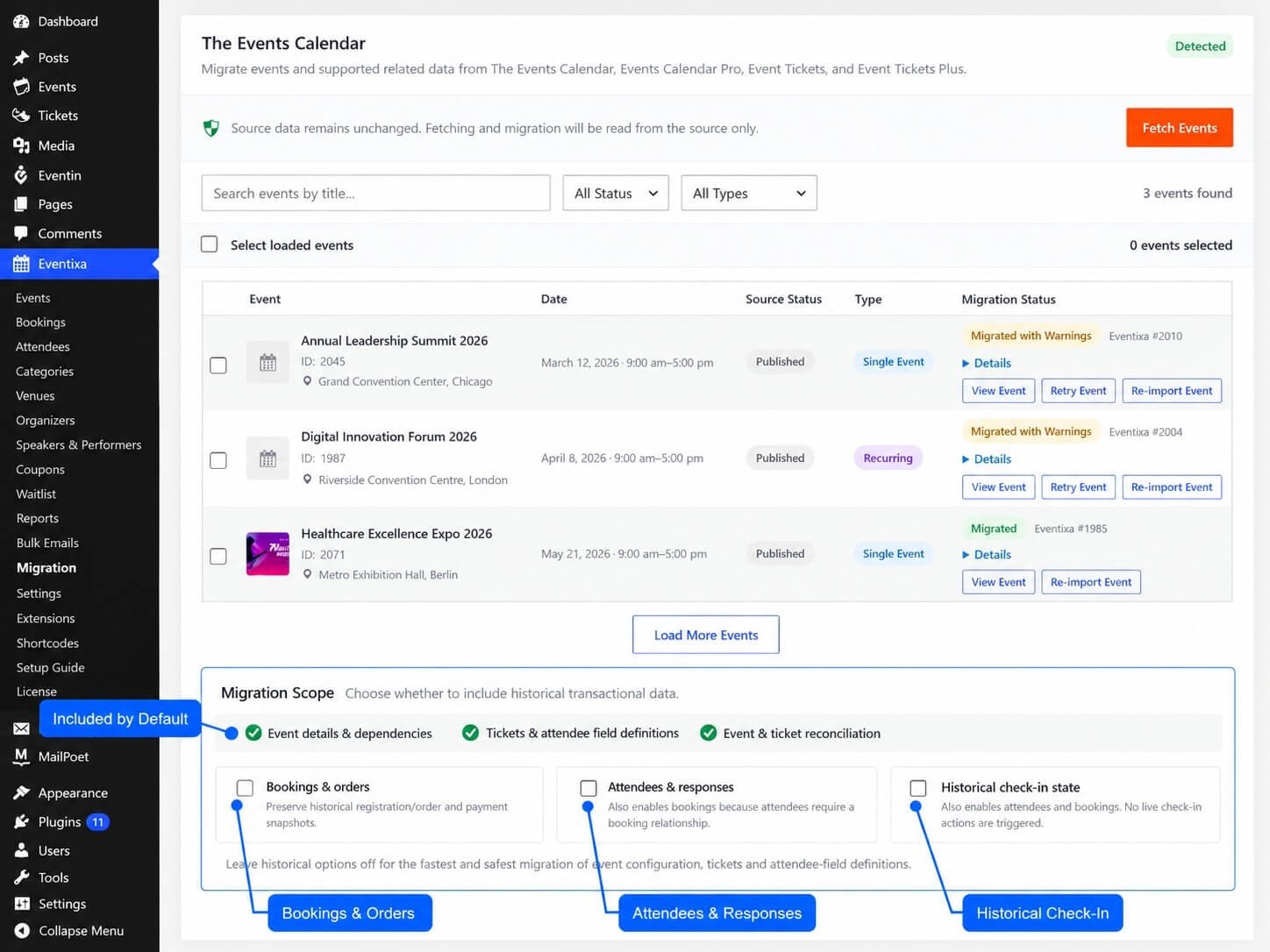
Data Included by Default
The standard migration scope includes:
- Event details & dependencies
- Tickets & attendee field definitions
- Event & ticket reconciliation
These are migrated without enabling the historical options.
Optional Historical Data
Historical migration can include:
- Bookings & orders
- Attendees & responses
- Historical check-in state
These options are disabled by default.
Event Data
Eventixa can migrate supported core event information from The Events Calendar.
Supported event data includes information such as:
- Event title
- Event description/content
- Event excerpt
- Event status
- Start date
- End date
- Start time
- End time
- All-day status
- Timezone
- Event website
- Featured image
- Categories
- Tags
- Venue
- Organizers
- Supported map-related configuration
- Supported virtual-event information
The exact fields available depend on the source event.
Event Title
The source event title becomes the Eventixa event title.
Event Description
Supported source event content is copied into the Eventixa event content.
Event Excerpt
When the source event contains an excerpt, Eventixa can preserve it as part of the destination event data.
Event Status
Supported WordPress event statuses can be carried into the destination workflow.
Source statuses visible in the Migration browser include:
- Published
- Draft
- Pending
- Private
- Scheduled
Event Dates and Times
Eventixa reads the source event start and end information and maps it into the Eventixa date/time structure.
This includes:
- Start date
- End date
- Start time
- End time
All-Day Events
The source all-day state can be preserved where available.
Timezone
Eventixa reads the source timezone and validates it before using it.
If the source timezone is invalid or cannot be recognized safely, Eventixa can continue the migration with a warning rather than silently storing incorrect timezone data.
Event Website
Supported event website URLs can be migrated into Eventixa.
Featured Image
When the source event has a WordPress featured image, Eventixa can associate the same media attachment with the migrated event.
Categories
The Events Calendar event categories can be mapped into Eventixa event categories.
Eventixa stores source-to-destination mappings so categories can be reused consistently across migrated events.
Tags
Supported WordPress event tags can also be assigned to the migrated Eventixa event.
Venue Data
TEC venues can be migrated into Eventixa venues.
Supported venue information can include data such as:
- Venue name
- Address
- City
- Country
- State or province
- Postal code
- Phone
- Website
- Supported map/location information
The exact fields depend on the source venue record.
Venue Reuse
If several source events reference the same venue, Eventixa uses migration mappings to avoid unnecessarily creating duplicate Eventixa venues.
Organizer Data
TEC organizers can be migrated into Eventixa organizers.
Supported organizer information can include:
- Organizer name
- Phone
- Website
Multiple Organizers
If the source event contains multiple organizers, Eventixa preserves the available migration relationships where possible.
If the destination event structure cannot represent the full source relationship exactly, Eventixa may migrate the usable data and report a warning.
Ticket Data
Supported Event Tickets ticket definitions can be migrated into Eventixa tickets.
Ticket configuration is part of the normal migration scope and does not require historical booking migration.
Supported Ticket Information
Depending on the source provider and available data, migrated ticket information can include:
- Ticket name
- Ticket type
- Price
- Capacity
- Availability
- Sale start
- Sale end
- Ticket SKU
- RSVP configuration
- Supported quantity rules
- Supported attendee-field relationships
Ticket SKU
When the source ticket includes an SKU, Eventixa preserves it as migration-related ticket data so the source ticket can be reconciled with the destination ticket.
Free Tickets
Supported free ticket definitions can be migrated.
Paid Tickets
Supported paid ticket definitions can also be migrated.
Historical payment transactions are handled separately through optional historical booking migration.
RSVP Tickets
Supported RSVP ticket definitions can be migrated.
This includes compatible RSVP configuration from Event Tickets.
RSVP Going and Not Going
Historical RSVP response data can also be migrated when the required historical attendee/response scope is enabled.
The exact destination status depends on the source RSVP record and Eventixa’s supported RSVP model.
Ticket Capacity
Supported ticket capacity information can be mapped into the Eventixa ticket.
Ticket Availability
Eventixa uses migrated ticket configuration and historical reconciliation to preserve supported availability relationships.
Ticket Sale Schedule
Supported ticket sale start and end dates can be migrated into Eventixa ticket sale scheduling.
Ticket Reconciliation
Eventixa performs ticket reconciliation after migration.
This helps confirm that the Eventixa ticket corresponds to the intended source ticket and that important source values were mapped correctly.
Attendee Field Definitions
Supported Event Tickets registration fields can be migrated into Eventixa attendee field definitions.
This is included in the normal migration scope.
Standard Attendee Fields
Fields that have a direct Eventixa destination can be migrated normally.
For example, supported text-based or selection-style attendee fields can be converted when Eventixa has an equivalent field type.
Advanced Attendee Fields
Some attendee-field types depend on advanced Eventixa capabilities.
When Eventixa Pro provides the required destination field capability, the migration can use it.
If a source field cannot be safely mapped, Eventixa can skip that field and report a warning instead of unnecessarily failing the entire event migration.
Historical Bookings
Historical bookings are optional.
Enable:
Bookings & orders
under Migration Scope when existing source registration/order records should also be migrated.
Historical Booking Relationships
A migrated booking must be connected to the correct:
- Event
- Ticket
- Customer or registration data
- Historical source record
Eventixa uses source mappings to preserve these relationships.
Historical Booking Status
Supported historical booking status information can be preserved.
The exact destination status depends on the source state and Eventixa’s booking-status mapping.
Historical Payment Status
Supported historical payment status can also be recorded.
Historical migration preserves the source state; it does not attempt to charge the customer again.
Payment Method
When available, supported payment method information can be preserved as historical booking data.
Transaction or Order Reference
Supported source order or transaction references can be retained for historical reconciliation.
Historical Financial Data
When the source provides the required values, Eventixa can preserve historical financial snapshots such as:
- Subtotal
- Discount
- Tax
- Total
- Currency
The exact set of values depends on the source provider and transaction data available.
Historical Currency
Supported booking currency is migrated and reconciled where applicable.
Historical Ticket Quantities
Eventixa can preserve and validate ticket quantities associated with historical bookings.
Historical Attendees
Enable:
Attendees & responses
to migrate supported historical attendee records.
Because every Eventixa attendee belongs to a booking, enabling attendee migration also requires booking migration.
Attendee Information
Supported historical attendee data can include:
- First name
- Last name
- Ticket relationship
- Booking relationship
- Event relationship
- RSVP response where applicable
- Registration fields where supported
Attendee Relationships
Eventixa does not intentionally create standalone attendee records when their required booking or ticket relationship cannot be resolved.
The parent relationships must be available for the attendee to migrate correctly.
Historical RSVP Responses
Supported RSVP response information can be preserved when historical attendees are included.
This can include supported Going or Not Going response state from the source.
Historical Check-In
Historical check-in migration is optional.
Enable:
Historical check-in state
when you want supported previous check-in information preserved.
This capability requires the appropriate Eventixa Pro destination support.
Historical Check-In Dependencies
Historical check-in depends on:
- Attendee
- Booking
- Event
For this reason, selecting historical check-in also enables the required attendee and booking scope.
Imported Check-In Does Not Trigger Live Check-In
Historical check-in migration only restores the previous state.
It does not fire the normal live Eventixa check-in workflow as if the attendee had just arrived.
Recurring Event Data
Recurring migration requires Eventixa Pro.
Eventixa can translate supported recurrence rules from The Events Calendar into Eventixa recurring events.
Supported Recurrence Frequencies
Compatible recurrence can include:
- Daily
- Weekly
- Monthly
- Yearly
Support depends on whether the source rule can be represented safely by Eventixa.
Recurrence Interval
Supported recurrence intervals can be preserved.
For example:
- Every day
- Every 2 weeks
- Every month
- Every year
when the source rule fits Eventixa’s recurrence model.
Weekly Recurrence Days
Supported weekly recurrence can preserve selected weekdays.
For example:
- Monday
- Wednesday
- Friday
when defined by a compatible TEC recurrence rule.
Recurrence Start and End
Supported recurrence windows and series dates can be mapped into Eventixa recurrence settings.
Recurrence Exclusions
Simple date-based exclusions can be migrated.
This allows specific dates to remain excluded from the recurring Eventixa schedule.
Additional Occurrences
Supported explicit additional dates can also be represented where they are compatible with Eventixa’s recurrence model.
Unsupported Recurrence Structures
Some TEC recurrence rules cannot be represented safely.
Examples can include:
- Certain positional monthly rules
- Complex custom monthly patterns
- Complex yearly positional rules
- Multiple-month yearly structures
- Non-date-based recurrence exclusions
- Per-occurrence timing variations that cannot be represented by the destination model
Eventixa reports these instead of guessing.
Occurrence Reconciliation
For supported recurring migration, Eventixa compares generated Eventixa occurrence dates against source occurrence dates.
A mismatch is reported instead of silently accepting an inaccurate recurring schedule.
TEC Series Data
The Events Calendar may use Series data independently of recurrence.
Eventixa distinguishes a recurrence-backed series from a standalone TEC Series structure.
Standalone/manual Series that do not have a compatible Eventixa destination are not silently converted into recurring Eventixa events.
Virtual Event Data
Supported virtual-event information can be migrated.
This can include:
- Event format
- Meeting provider information
- Custom meeting URL
- Supported meeting identifiers
- Attendee-facing access information where safe
Custom Meeting URL
A usable source meeting link can be migrated into Eventixa’s Custom Meeting URL provider when appropriate.
Zoom Data
Eventixa can inspect supported Zoom-related source data.
Managed Zoom configuration is adopted only when Eventixa can safely represent the destination meeting relationship.
Google Meet Data
Supported Google Meet source information can also be inspected and mapped where a safe destination relationship can be established.
Managed Provider Fallback
If Eventixa cannot safely adopt the original managed Zoom or Google Meet relationship, it can preserve usable attendee access as a Custom URL when sufficient source information exists.
This prevents migration from pretending that Eventixa owns or manages a remote meeting that it cannot safely control.
Virtual Event Format
Supported source data can be mapped into Eventixa event formats such as:
- Virtual
- Hybrid
The exact result depends on the source configuration.
Core Migration Capabilities
Eventixa Core provides migration support for these destination areas:
- Events
- Event Categories & Tags
- Venues
- Organizers
- Tickets
- Attendee Fields
- Bookings
- Attendees
- Virtual Events
Some of these, such as bookings and attendees, remain optional through Migration Scope.
Eventixa Pro Migration Capabilities
Eventixa Pro extends migration support with capabilities including:
- Recurring Events
- Advanced Event Fields
- Attendee Check-In
Pro also extends source migration logic for supported recurring, advanced-field, historical check-in, and managed virtual-event workflows.
Data That May Produce Warnings
Some source data may migrate while producing warnings.
Examples include:
- Invalid source timezone
- Unsupported attendee field
- Partially representable organizer data
- Virtual provider fallback
- Unsupported optional field
- Source/destination reconciliation mismatch
A warning means you should review the destination record.
Data That Can Be Unsupported
Eventixa marks data unsupported when it cannot represent it safely.
Examples can include:
- Unsupported recurrence rule
- Unsupported standalone TEC Series structure
- Source feature with no destination equivalent
- Recurrence timing that cannot be reproduced accurately
Unsupported is intentionally different from a temporary failure.
Migrated with Warnings
An event can receive Migrated with Warnings when the main destination event exists but one or more supported migration checks require attention.
Always open Details for events with this status.
Failed Migration
A failed migration means Eventixa could not complete the required destination workflow.
Failures can be retried after the underlying issue is resolved.
Source-to-Destination Mapping
Eventixa stores mappings between source records and destination records.
Mappings can apply to entities such as:
- Events
- Tickets
- Venues
- Organizers
- Bookings
- Attendees
These mappings help with retries, reimports, reconciliation, and duplicate prevention.
Reimporting Data
When an event has already been migrated, Eventixa can use its existing mapping during reimport.
This allows the migration system to recognize the existing destination record rather than blindly creating duplicates.
Deleted Destination Records
If a previously migrated Eventixa record no longer exists, the stale mapping can be detected.
The source event can then be migrated again when appropriate.
Migration Reconciliation
Reconciliation verifies important source and destination relationships after data is written.
Checks can cover:
- Event mapping
- Ticket mapping
- Booking relationship
- Attendee relationship
- Booking status
- Payment status
- Ticket quantities
- Financial values
- Currency
- Recurring occurrences
What Is Not Automatically Migrated?
Eventixa does not automatically guarantee migration of every piece of metadata stored by The Events Calendar ecosystem or third-party extensions.
Data is migrated only when Eventixa has an explicit, supported destination mapping.
Examples that may not migrate automatically include:
- Arbitrary third-party TEC metadata
- Unsupported custom recurrence rules
- Unsupported custom field types
- Third-party add-on configuration with no Eventixa equivalent
- Remote meeting-management ownership that cannot be safely established
- Standalone TEC Series with no compatible destination structure
Third-Party Add-On Data
If another WordPress plugin stores additional information against TEC events, Eventixa does not automatically treat that custom metadata as supported migration data.
Only data explicitly handled by the migration adapter should be considered supported.
Migration Support Does Not Mean Exact Structural Duplication
The Events Calendar and Eventixa use different data structures.
Migration focuses on preserving the supported meaning and relationship of the source data rather than reproducing TEC’s internal database structure exactly.
Recommended Verification by Data Type
After migration, verify the destination according to the data you migrated.
For core events, check:
- Title
- Content
- Dates
- Times
- Timezone
- Venue
- Organizer
For tickets, check:
- Ticket name
- Type
- Price
- Capacity
- Sale schedule
For attendee fields, check:
- Field labels
- Field types
- Required state
For recurring events, check:
- Recurrence rule
- Occurrence dates
- Exceptions
For historical records, check:
- Booking counts
- Attendee counts
- Statuses
- Ticket quantities
- Currency
- Check-in state
For virtual events, check:
- Event format
- Provider
- Meeting URL
- Attendee access
Use Migration Details for Exceptions
When Eventixa reports a warning, failure, Requires Pro, or Unsupported status, expand Details for that source event.
The migration details provide the event-specific information needed to understand what could or could not be migrated.
Common Questions
Are Venues Migrated?
Yes, supported TEC venues can be migrated and associated with Eventixa events.
Are Organizers Migrated?
Yes, supported TEC organizer data can be migrated.
Are Categories and Tags Migrated?
Yes, supported event categories and tags are included in the event migration workflow.
Is the Featured Image Migrated?
The existing WordPress featured-image attachment can be associated with the migrated Eventixa event.
Are Tickets Migrated?
Yes, supported Event Tickets ticket definitions are included in the normal migration scope.
Do I Need Historical Bookings Enabled to Migrate Tickets?
No. Ticket configuration is included by default.
Historical booking records are a separate optional scope.
Are Attendee Fields Migrated?
Supported attendee-field definitions can be migrated.
Unsupported field types can produce warnings.
Are Existing Bookings Migrated?
Only when Bookings & orders is enabled.
Are Existing Attendees Migrated?
Only when Attendees & responses is enabled.
Are Historical Check-Ins Migrated?
Only when Historical check-in state is enabled and the required destination capability is available.
Are Recurring Events Migrated?
Supported recurring-event migration is available with Eventixa Pro.
Are Every TEC Recurrence Rule Supported?
No. Eventixa migrates recurrence rules only when they can be represented safely.
Are Virtual Events Migrated?
Supported virtual-event information can be migrated.
Managed provider data is only adopted when Eventixa can safely represent it.
Are Zoom and Google Meet Meetings Recreated Automatically?
Not necessarily.
Eventixa avoids claiming management of an existing remote meeting unless the relationship can be established safely. A usable meeting URL can be preserved through a supported fallback where appropriate.
Is Custom Metadata from Other Plugins Migrated?
Only when that data has an explicit supported migration mapping.
Arbitrary third-party metadata is not automatically imported.
Are Old Payments Processed Again?
No. Historical payment information is preserved as migration data and does not recharge customers.
Does Historical Check-In Trigger Emails or Live Check-In Actions?
No. It restores historical state rather than performing a new check-in.
Important Notes
- Eventixa migrates supported data, not every arbitrary source metadata field.
- Event configuration, dependencies, tickets, attendee-field definitions, and reconciliation are part of the base migration.
- Historical bookings, attendees, responses, and check-in state are optional.
- Attendees require bookings.
- Historical check-in requires attendees and bookings.
- Recurring-event migration requires Eventixa Pro.
- Advanced destination fields may require Eventixa Pro.
- Historical check-in support requires the corresponding Pro migration capability.
- Unsupported recurrence rules are not silently converted.
- Source-to-destination mappings are maintained for reconciliation and reimport.
- Virtual provider relationships are only adopted when they can be represented safely.
- A migration warning should always be reviewed before removing the source plugin.


