
Payment Overview
Eventixa supports multiple payment workflows for selling paid event tickets.
Depending on your setup, customers can pay directly through supported Eventixa payment gateways or use an integrated checkout such as WooCommerce.
Available in: Eventixa Core + Eventixa Pro
Location: Eventixa → Settings → Payments
Used for: Paid standard tickets
Related features: Checkout, Bookings, Coupons, Refunds
How Eventixa Payments Work
For paid Eventixa tickets, the normal payment flow is:
- Visitor selects one or more paid tickets.
- Visitor proceeds to checkout.
- Purchaser and attendee information is collected.
- The visitor reaches the Payment step.
- An available payment method is selected.
- Payment is completed according to the selected gateway.
- Eventixa receives the payment result.
- Booking and payment statuses are updated.
Only enabled and properly configured payment methods are available during checkout.
Open Payment Settings
From the WordPress dashboard, go to: Eventixa → Settings → Payments
The available payment configuration depends on your Eventixa setup and active extensions.
From here, you can enable and configure the payment methods used for paid ticket checkout.
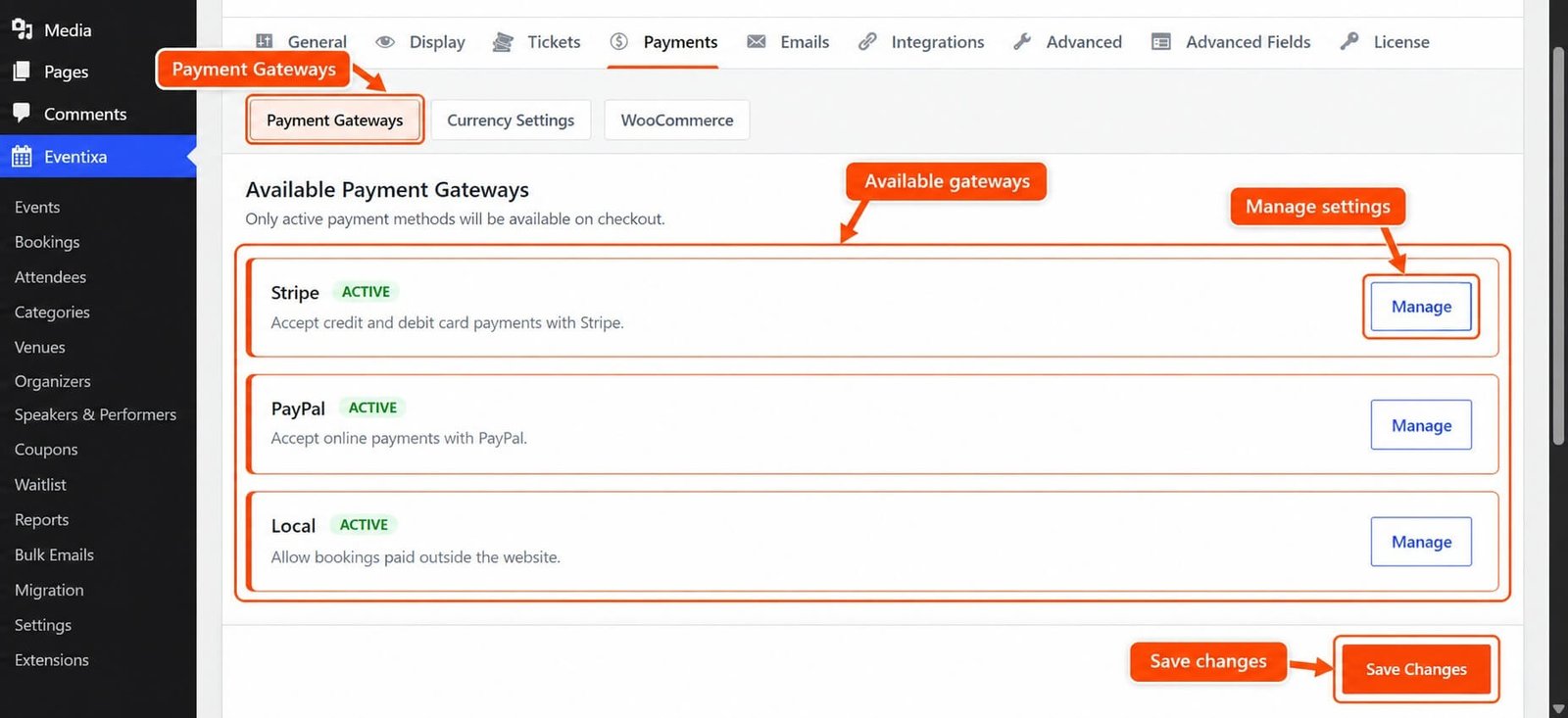
Payment Methods in Eventixa
Eventixa supports several payment workflows across Core and Pro.
Eventixa Core
Eventixa Core includes:
- PayPal
- Local / Offline Payment
- WooCommerce integration where enabled
Eventixa Pro
Eventixa Pro adds:
- Stripe
This lets event organizers choose the payment setup that fits their site.
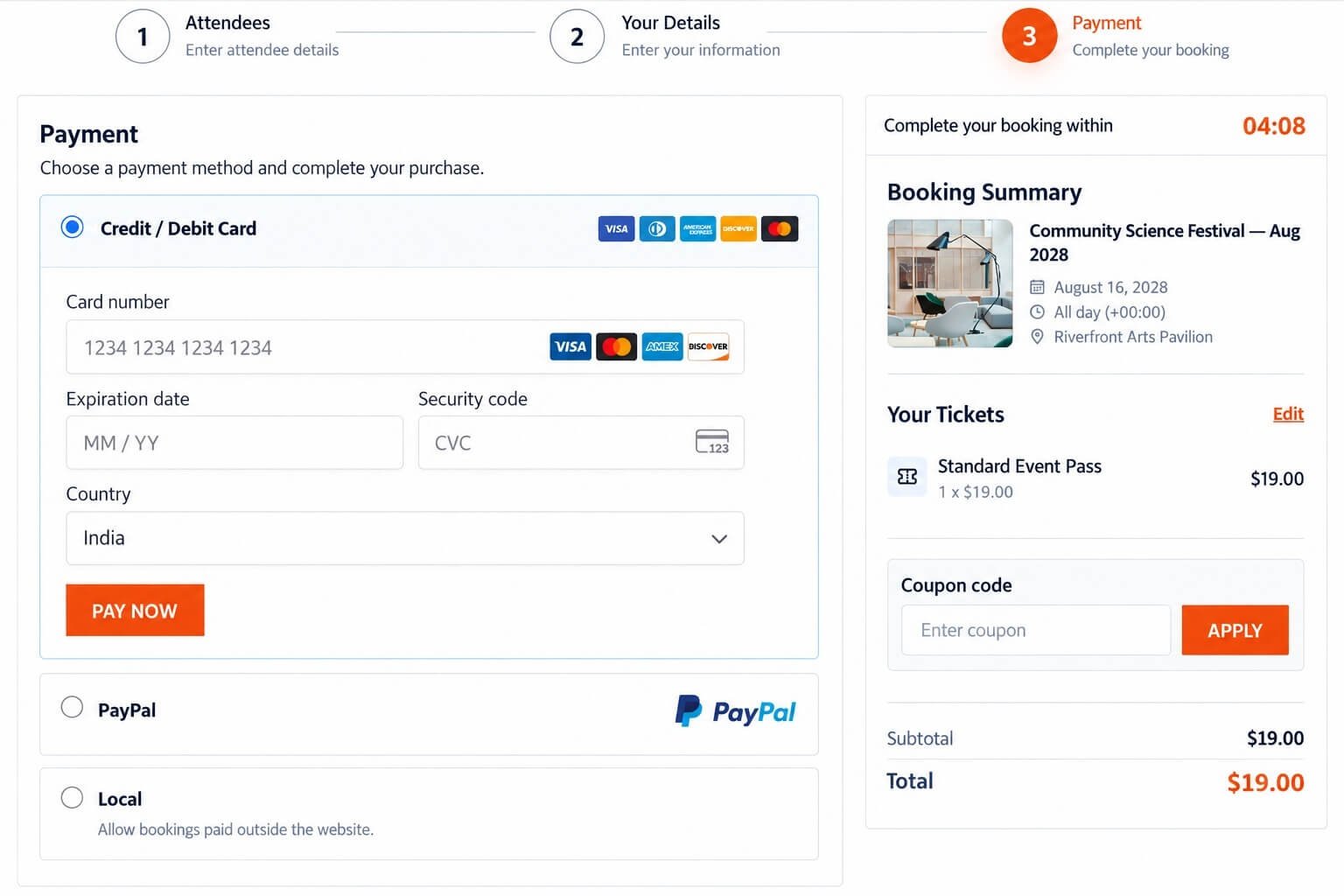
Payment Step at Checkout
After purchaser and attendee information is completed, customers reach the Payment step.
Depending on the active configuration, they may see options such as:
- Credit / Debit Card
- PayPal
- Local / Offline Payment
- WooCommerce-based checkout
The exact methods shown depend on which gateways are enabled.
PayPal
PayPal is available in Eventixa Core.
When enabled and configured, customers can choose PayPal for eligible paid tickets.
A typical PayPal flow is:
- Customer selects a paid ticket.
- Customer completes attendee and purchaser details.
- Customer selects PayPal.
- PayPal processes the payment.
- Eventixa receives the applicable result.
- The booking is updated accordingly.
When to Use PayPal
PayPal is useful when you want:
- A familiar online payment method
- PayPal account payments
- Supported card payments through PayPal
- Payment confirmation connected to Eventixa bookings
Always test the gateway before accepting live registrations.
PayPal Payment Failure
If PayPal does not complete successfully, the booking should not be treated as successfully paid.
The purchaser may need to:
- Retry payment
- Return to checkout
- Select another available method
Verify the PayPal transaction before manually changing a booking to a paid state.
Local / Offline Payment
Eventixa Core includes a Local / Offline Payment workflow.
This is useful when payment is handled outside the website.
Examples include:
- Cash at venue
- Bank transfer
- Manual invoice
- Organizer-collected payment
- Payment at registration desk
How Offline Payment Works
A typical offline payment flow is:
- Customer selects Local / Offline Payment.
- Eventixa creates the applicable booking.
- Payment is completed outside Eventixa.
- Administrator confirms and manages the payment state manually where required.
Offline Payment Instructions
Provide clear payment instructions to customers.
For example:
- Bank details
- Payment reference
- Payment deadline
- Cash payment instructions
- Organizer contact information
The customer should understand exactly how to complete payment after booking.
Stripe
Requires Eventixa Pro
Stripe adds online card payments for paid Eventixa tickets.
Depending on your Stripe account and region, customers can use supported payment cards through the secure Stripe interface.
Stripe Payment Flow
A typical Stripe flow is:
- Customer selects a paid ticket.
- Customer enters purchaser and attendee information.
- Customer selects Credit / Debit Card.
- Card information is entered through Stripe’s supported payment interface.
- Stripe processes the transaction.
- Eventixa receives the payment result.
- Booking and payment status are updated.
Secure Card Handling
Sensitive card information should be handled by the payment provider’s secure payment components.
Eventixa does not require administrators to manually store raw card numbers.
Stripe Payment Failure
If Stripe rejects or fails the payment, Eventixa should not treat it as successfully paid.
Possible causes include:
- Card declined
- Invalid payment information
- Authentication failure
- Gateway error
- Network interruption
The purchaser can retry using valid payment information where appropriate.
WooCommerce Integration
Eventixa can also use WooCommerce for eligible ticket checkout.
This is useful when your website already relies on WooCommerce for:
- Payments
- Orders
- Billing information
- Tax configuration
- Customer checkout
- Existing payment gateways
Why Use WooCommerce?
WooCommerce can provide access to a broader payment ecosystem already configured on the site.
Instead of managing every payment gateway directly inside Eventixa, eligible ticket bookings can participate in the WooCommerce workflow.
WooCommerce Payment Behavior
When WooCommerce handles checkout, some parts of the payment process are controlled by WooCommerce.
Review both:
- Eventixa configuration
- WooCommerce configuration
before launching ticket sales.
Free Tickets
Free standard tickets do not require payment.
For example:
Ticket price: $0
The booking can proceed through:
Select Ticket → Enter Details → Complete Registration
No online payment transaction is required.
RSVP Registration
RSVP registrations do not require payment.
Going and Not Going responses are registration responses rather than paid transactions.
Mixed Free and Paid Tickets
An event can contain both free and paid ticket types.
For example:
Student Admission: Free
Standard Event Pass: $19
Premium Experience Pass: $79
The payment requirement depends on the tickets selected for the booking.
Ticket Quantity and Payment
The checkout total is calculated using the selected ticket quantity.
For example:
Ticket price: $19
Quantity: 3
Subtotal: $57 before any applicable coupon or discount.
Coupons and Payment
When an eligible coupon is applied, Eventixa calculates the discount before payment.
For example:
Subtotal: $100
Coupon discount: $20
Total: $80
The payment method should process the resulting amount: $80
100% Discounts
A coupon can potentially reduce the payable total to zero.
For example:
Subtotal: $50
Discount: 100%
Total: $0
When this happens, an online payment may no longer be necessary depending on the supported Eventixa checkout workflow.
Test full-discount bookings before using them publicly.
Checkout Session
During checkout, Eventixa temporarily protects selected ticket capacity.
The standard checkout session lasts: 10 minutes
Refreshing the checkout page does not reset the timer.
Why the Checkout Session Matters
Suppose only one ticket remains.
Visitor A proceeds to checkout.
Eventixa can temporarily reserve that final ticket so Visitor B cannot purchase it at the same time.
If Visitor A does not finish checkout before the session expires, the capacity can be released.
Payment and Capacity
A successful booking consumes ticket capacity according to attendee quantity.
For example:
Ticket capacity: 100
Paid booking quantity: 4
Remaining capacity becomes: 96
subject to other active reservations.
Pending Payment and Capacity
Relevant pending bookings can temporarily affect availability.
This helps prevent capacity already involved in an active checkout or payment process from being sold again.
Payment Status
Payment status describes the financial state of the booking.
Examples can include:
- Pending
- Paid
- Failed
- Refunded
The exact payment states depend on the applicable workflow.
Booking Status vs Payment Status
Booking status and payment status are different.
For example:
Booking status: Completed
Payment status: Paid
or:
Booking status: Expired
Payment status: Pending
Always review both when investigating a booking.
Payment Method vs Payment Status
Payment method identifies how the customer attempted or completed payment.
Examples:
- PayPal
- Stripe
- WooCommerce
- Local / Offline
- Free
Payment status identifies the current financial outcome.
These are separate values.
Successful Paid Booking
A successfully completed paid booking can show:
Booking: Completed
Payment: Paid
The registration can then continue through normal workflows such as:
- Attendee creation
- Capacity confirmation
- Ticket delivery
- Confirmation email
Pending Payment
A payment can remain Pending while Eventixa waits for a gateway or offline-payment result.
Do not manually mark a Pending payment as Paid unless the transaction has actually been verified.
Failed Payment
A Failed payment should not be treated as successfully paid.
Before making any manual changes, review:
- Gateway
- Transaction
- Booking Notes
- Payment provider
Expired Checkout
If payment is not completed before the allowed checkout hold expires, the booking can become: Expired
Temporary capacity can then be released according to the checkout workflow.
Payment Transaction ID
Online payments can include a transaction reference.
This can be useful when comparing Eventixa with the external payment provider.
For example:
Transaction ID: pi_...
Use transaction IDs for administrative reconciliation.
Protect Payment Information
Transaction identifiers can be useful for support and reconciliation, but avoid exposing them unnecessarily.
Never store or share sensitive payment-card information in Eventixa notes or public documentation.
Payment Information in Booking Details
Open: Eventixa → Bookings → Open Booking
The Payment panel can provide information such as:
- Payment status
- Gateway
- Amount
- Transaction ID
This helps administrators investigate payment-related issues.
Payment Method Badges
The Eventixa Bookings screen can display payment-method badges.
Examples include:
- PayPal
- Stripe
- WooCommerce
- LOCAL / OFFLINE
- FREE
- RSVP
These make the booking list easier to scan.
Guest Checkout and Payment
When Guest Checkout is enabled, visitors can complete eligible paid bookings without creating a WordPress account.
Guest purchasers still follow the same:
- Ticket rules
- Payment rules
- Capacity rules
- Checkout-session behavior
Logged-In Checkout
Logged-in customers can also complete paid ticket checkout.
The purchaser workflow remains associated with the authenticated account.
Payment and Recurring Events
Paid tickets can be used with recurring events.
The booking must remain linked to the occurrence selected during registration.
Always verify:
- Event
- Occurrence
- Ticket
- Payment
when troubleshooting a recurring booking.
Payment and Virtual Events
Virtual and Hybrid events use the same payment principles.
A successful payment does not automatically override virtual-access rules.
Meeting access can still depend on:
- Booking validity
- Attendee eligibility
- Reveal timing
- Occurrence
Payment and Waitlist
Requires Eventixa Pro
For sold-out tickets with Waitlist enabled, released capacity can be reserved for a waitlisted visitor.
If payment is required, that visitor completes the applicable Eventixa checkout and payment workflow during the protected reservation period.
Payment Mismatch Protection
A payment must belong to the correct Eventixa booking.
Eventixa validates applicable payment references to prevent a payment from one booking being incorrectly applied to another.
This is especially important in:
- Waitlist reservations
- Protected checkout links
- Multiple simultaneous booking attempts
Booking Cancellation
An administrator can cancel an applicable Eventixa booking.
Cancellation affects the registration and can release capacity.
It does not necessarily refund the payment automatically.
Cancellation vs Refund
These are separate actions.
Cancellation
Changes the Eventixa booking state and releases applicable capacity.
Refund
Returns money to the purchaser.
Do not treat them as the same action.
Manual Refund Workflow
A typical refund workflow is:
- Open the booking.
- Verify the payment.
- Cancel the booking.
- Confirm the applicable capacity is released.
- Process the monetary refund through the payment provider.
- Verify the refund succeeded.
- Mark the Eventixa booking Refunded.
PayPal Refunds
For PayPal bookings, process the actual financial refund using the applicable PayPal workflow unless the active Eventixa integration explicitly handles it automatically.
Then keep the Eventixa booking status aligned with the real payment outcome.
Stripe Refunds
For Stripe payments, use the supported Stripe workflow to process the financial refund.
Verify the transaction and refund amount before marking the Eventixa booking Refunded.
Offline Refunds
Offline payments are refunded outside Eventixa.
Examples:
- Return cash
- Return bank transfer
- Cancel invoice
Then update the Eventixa booking to reflect the result.
WooCommerce Refunds
If WooCommerce handled payment, the refund process can involve:
- Eventixa booking
- WooCommerce order
- WooCommerce payment gateway
Keep the systems consistent.
Refund Amount
Always refund based on the amount actually paid.
For example:
Original subtotal: $100
Coupon: -$20
Amount paid: $80
The applicable refund is based on the real $80 transaction, not the original $100 subtotal.
Duplicate Payment Concerns
If a customer reports being charged twice:
- Locate the booking.
- Check payment references.
- Verify both transactions with the provider.
- Determine which payment is valid.
- Refund the unintended duplicate if required.
- Add an internal note.
Do not assume two charges occurred based only on two booking records.
Customer Says They Were Charged but Booking Failed
If Eventixa shows Failed, Pending, or Expired but the customer says they were charged:
- Do not ask them to pay again immediately.
- Open the booking.
- Review the transaction ID.
- Verify the transaction with the gateway.
- Reconcile Eventixa with the actual payment result.
Test Mode
Use sandbox or test mode whenever the gateway supports it.
Before going live, test:
- Successful payment
- Failed payment
- Cancelled payment
- Pending state
- Checkout expiration
- Browser refresh
- Booking creation
- Capacity
- Confirmation email
- Refund workflow
PayPal Testing
Verify:
- Correct credentials
- Successful checkout
- Payment cancellation
- Payment failure
- Return to Eventixa
- Booking status
Stripe Testing
Requires Eventixa Pro
Verify:
- Test card payments
- Failed cards
- Authentication flow
- Booking result
- Payment status
- Refund process
Offline Payment Testing
Test the full administrator workflow:
- Booking created
- Payment instructions visible
- Payment confirmed manually
- Booking status updated appropriately
WooCommerce Testing
Verify:
- Eventixa ticket reaches WooCommerce correctly
- Final amount is correct
- WooCommerce order is created
- Payment gateway succeeds
- Eventixa booking reflects the result
Going Live
Before accepting real payments:
- Confirm payment gateway configuration.
- Replace test credentials with live credentials where required.
- Verify the correct gateway environment.
- Complete a controlled live transaction if appropriate.
- Verify Eventixa booking.
- Verify payment status.
- Verify attendee records.
- Verify ticket capacity.
- Verify confirmation email.
- Verify the refund procedure.
Common Problems
No Payment Methods Appear
Check:
- The selected ticket is paid.
- At least one payment method is enabled.
- Required gateway credentials are configured.
- The required Eventixa extension is active.
PayPal Does Not Appear
Confirm PayPal is enabled and configured in Eventixa.
Stripe Does Not Appear
Confirm:
- Eventixa Pro is active.
- Stripe is enabled.
- Stripe credentials are configured.
Offline Payment Does Not Appear
Check that Local / Offline Payment is enabled.
Payment Succeeded but Booking Is Pending
Verify the real gateway transaction before making manual changes.
Customer Was Charged but Booking Failed
Check the external payment provider first.
Do not ask the customer to pay again until you know the first transaction outcome.
Booking Was Cancelled but Customer Was Not Refunded
Cancellation does not automatically mean a monetary refund occurred.
Process the actual refund through the payment provider.
Refunded Booking Still Shows Paid
Verify whether the payment status was updated after the real refund.
Wrong Payment Method Is Displayed
Open the Booking Details screen and verify which gateway actually processed the payment.
Amount Does Not Match
Review:
- Ticket quantity
- Ticket price
- Coupon
- Final booking total
- Gateway transaction
Recommended Payment Setup Workflow
- Create a paid Eventixa ticket.
- Go to Eventixa payment settings.
- Enable the required payment method.
- Enter the required credentials.
- Save the settings.
- Use test mode where available.
- Open the event as a visitor.
- Select the paid ticket.
- Complete attendee and purchaser information.
- Select the payment method.
- Complete payment.
- Verify the Eventixa booking.
- Verify payment status.
- Verify attendees.
- Verify ticket capacity.
- Verify confirmation email.
- Test cancellation.
- Test the refund workflow.
- Switch to live payment credentials only after testing succeeds.
Important Notes
- Eventixa Core includes PayPal and Local / Offline Payment.
- Stripe requires Eventixa Pro.
- WooCommerce can provide an integrated checkout workflow.
- Free tickets and RSVP do not require online payment.
- Payment method and payment status are different values.
- Booking status and payment status are separate.
- The checkout session temporarily protects ticket capacity.
- Failed or expired payments must not be treated as successfully paid.
- Cancelling a booking and refunding money are separate actions.
- Always verify the payment provider before manually changing financial status.
- Refund the amount actually paid after discounts.
- Test every payment gateway before accepting live registrations.


