
Recurring Event Migration
Eventixa Pro can migrate supported recurring events from The Events Calendar into the Eventixa recurring-event system.
Instead of simply copying the source event as a single event, Eventixa reads the source recurrence configuration, translates supported recurrence rules, generates Eventixa occurrences, and validates the resulting dates against the source.
Available in: Eventixa Pro
Admin Location: Eventixa → Migration
Source: The Events Calendar / Events Calendar Pro
Important: Unsupported recurrence structures are reported rather than silently converted.
How Recurring Event Migration Works
Recurring-event migration follows a more careful workflow than normal single-event migration.
Eventixa needs to:
- Identify the canonical recurring source event.
- Read the TEC recurrence rules.
- Determine whether the rules can be represented by Eventixa.
- Convert the compatible schedule.
- Create the Eventixa recurring event.
- Generate destination occurrences.
- Compare the generated occurrence dates with the source.
- Report success, warnings, or unsupported rules.
This validation is important because two recurrence systems can describe schedules differently even when they appear similar in the WordPress admin.
Recurring Migration Requires Eventixa Pro
Recurring-event migration depends on the Eventixa Pro recurrence capability.
If a recurring TEC event is selected while the required Pro capability is unavailable, Eventixa can mark it as:Requires Pro rather than converting it into an incorrect single event.
Find Recurring Source Events
Go to: Eventixa → Migration
Click Fetch Events for The Events Calendar.
Use the Event Type filter and select: Recurring Events
The event browser then lets you focus on recurring source events.
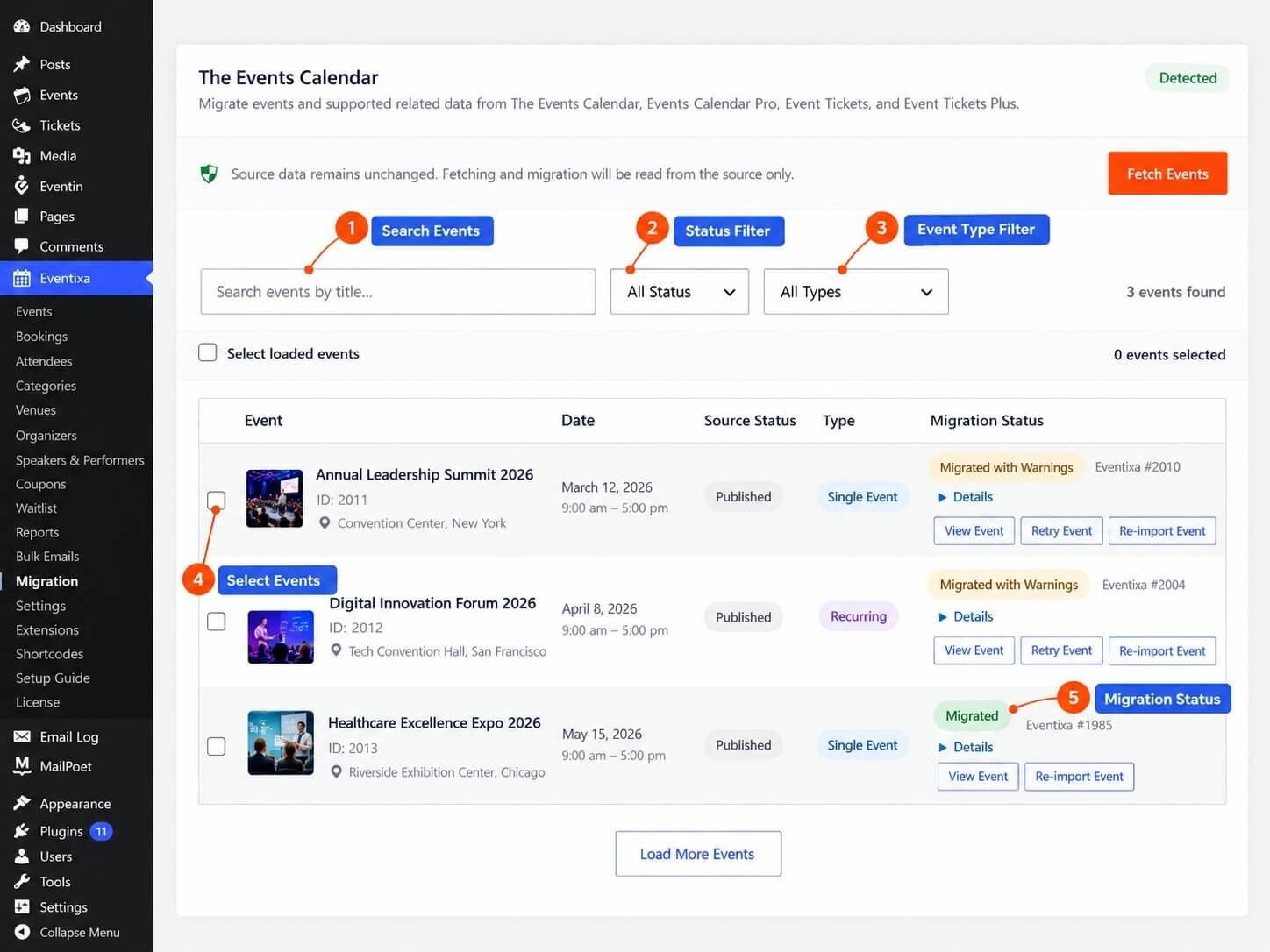
Recurring Series Are Listed as Canonical Events
The Events Calendar may generate multiple occurrences for one recurring series.
Eventixa does not treat each generated occurrence as an unrelated source event during discovery.
The migration adapter identifies the canonical recurring event and processes the recurrence configuration as one migration unit.
Supported Recurrence Frequencies
Eventixa can migrate compatible recurrence rules based on:
- Daily
- Weekly
- Monthly
- Yearly
Support depends on whether the exact TEC recurrence rule can be represented safely by Eventixa.
Daily Recurrence
A compatible daily recurrence can be translated into an Eventixa daily recurring schedule.
For example: Every 2 days can be preserved when the source rule is represented by a standard interval.
Weekly Recurrence
Supported weekly recurrence can preserve:
- Weekly frequency
- Recurrence interval
- Selected weekdays
- Recurrence date range
For example:
Every week on Monday and Wednesday can be translated when the source rule maps cleanly to Eventixa.
Weekly Intervals
A source rule such as: Every 2 weeks on Tuesday can be migrated when the interval and selected weekday are compatible with the Eventixa recurrence model.
Monthly Recurrence
Compatible monthly rules can be migrated when the source schedule can be represented using Eventixa’s monthly recurrence structure.
Simple month-based recurrence is supported more reliably than complex positional rules.
Yearly Recurrence
Compatible yearly recurrence can also be migrated.
The source rule must fit Eventixa’s supported yearly scheduling model.
Recurrence Interval
Eventixa can preserve supported recurrence intervals.
Examples include:
- Every day
- Every 2 days
- Every week
- Every 2 weeks
- Every month
- Every 3 months
- Every year
The resulting destination interval must produce the intended occurrence dates.
Recurrence Start
Eventixa reads the beginning of the source recurrence schedule and uses it when building the destination recurrence.
Recurrence End
Supported recurrence-ending information can also be migrated.
The destination recurring event uses the supported source recurrence window to determine the generated occurrences.
Event Start and End Time
The recurring schedule also depends on the event’s time configuration.
Eventixa migrates the supported event start and end time together with the recurrence rule.
Occurrence Duration
The event duration is preserved across generated Eventixa occurrences when the source recurrence uses a consistent schedule.
Weekly Day Selection
TEC weekly recurrence can specify one or more weekdays.
Eventixa translates compatible selected days into its recurring event configuration.
For example:
- Monday
- Wednesday
- Friday
can remain part of one recurring schedule when supported by the source rule.
Date-Based Exclusions
Eventixa can migrate supported recurrence exclusions that represent specific excluded dates.
This lets you preserve exceptions such as:
Repeat every Monday except December 25.
The excluded date remains outside the generated Eventixa occurrence set.
Additional Dates
Supported explicitly added occurrence dates can also be migrated when they fit Eventixa’s recurrence model.
This is useful when the source recurrence contains an additional occurrence outside the regular rule.
Additional Dates Must Be Compatible
An additional source occurrence is only safe to migrate when Eventixa can represent it without changing the intended event timing or recurrence behavior.
If the source contains an occurrence structure that cannot be reproduced reliably, Eventixa reports the limitation.
Recurring Event Dependencies
A recurring event can migrate with the same supported dependencies as a normal Eventixa migration.
These can include:
- Venue
- Organizers
- Categories
- Tags
- Featured image
- Tickets
- Attendee fields
- Virtual-event information
The recurrence itself is handled separately by the Pro migration capability.
Tickets on Recurring Events
Supported tickets associated with a recurring source event can be migrated with the event.
Ticket migration still follows the normal Eventixa ticket-mapping and reconciliation workflow.
Recurring Event Agenda and Other Event Data
Migration preserves only source data for which Eventixa has an explicit migration mapping.
The existence of an Eventixa recurring event does not mean arbitrary TEC add-on data is automatically converted.
Unsupported Recurrence Rules
Not every TEC recurrence rule can be safely translated.
Eventixa deliberately rejects recurrence structures that would create an inaccurate destination schedule.
Complex Monthly Positional Rules
Certain monthly recurrence patterns based on positional logic may be unsupported.
For example, a source rule that depends on a recurrence structure Eventixa cannot reproduce exactly should not be approximated.
Complex Yearly Positional Rules
Certain yearly positional patterns can also be unsupported when they do not map to the current Eventixa recurrence model.
Multiple-Month Yearly Rules
A source yearly rule that depends on multiple distinct month conditions may be unsupported if the destination cannot represent the same logic in one recurrence definition.
Complex Recurrence Exclusions
Simple excluded dates can be supported.
More complex exclusion rules that themselves use recurrence logic may not be safely representable.
Per-Occurrence Time Changes
A recurring source series may contain occurrence-specific timing that differs from the main recurrence pattern.
If those timing changes cannot be represented accurately by the Eventixa recurrence model, migration can report the rule as unsupported.
Unsupported Rules Are Not Guessed
Eventixa does not simplify a complex recurrence rule just to produce a migrated event.
For example, it should not convert a complicated monthly rule into a basic monthly event if doing so would generate the wrong dates.
The migration result instead tells you that the rule needs review.
Occurrence Generation
After saving a supported recurring event, Eventixa generates the destination occurrences using its own recurrence system.
Migration is not considered fully validated merely because the recurrence settings were saved successfully.
Occurrence Reconciliation
Eventixa compares the generated destination occurrence dates against the source occurrence dates.
This is one of the most important stages of recurring-event migration.
Why Occurrence Reconciliation Matters
A recurrence rule can look correct in the admin while producing different dates.
For example, differences in:
- Interval handling
- Weekday interpretation
- Month boundaries
- Excluded dates
- Additional dates
- Recurrence end boundaries
can produce unexpected destination occurrences.
Eventixa therefore checks the actual dates.
Occurrence Mismatch
If the generated Eventixa occurrences do not match the expected source occurrence set within the migration window, Eventixa reports an occurrence mismatch.
This prevents an inaccurate recurring event from being treated as fully migrated.
Recurrence Migration Status
A recurring source event can end with statuses such as:
- Migrated
- Migrated with Warnings
- Failed
- Requires Pro
- Unsupported
The exact result depends on the source rule and destination capabilities.
Migrated
Migrated means the supported recurrence and destination occurrence validation completed successfully.
Migrated with Warnings
Migrated with Warnings means the main recurring event was created, but one or more related migration details require review.
The warning may involve another part of the event rather than the recurrence itself.
Requires Pro
Requires Pro means the recurring source event needs the Eventixa Pro recurrence capability.
Unsupported
Unsupported means Eventixa determined that the recurrence rule cannot currently be represented safely.
This is intentionally different from a technical migration failure.
Failed
Failed means the migration encountered an error while processing a recurrence rule that was otherwise expected to be migratable.
Failed items can be retried after the underlying issue is resolved.
TEC Series and Recurring Events
The Events Calendar can associate events with a Series.
A TEC Series is not automatically the same thing as a recurrence rule.
Eventixa distinguishes recurrence-backed event series from standalone/manual Series structures.
Recurrence-Backed Series
When the source Series is part of a compatible recurring event structure, Eventixa uses the actual recurrence data to build the destination recurring event.
Standalone TEC Series
A source event can belong to a manually managed TEC Series without having recurrence data that maps to an Eventixa recurring event.
Eventixa does not automatically convert that relationship into recurrence.
If there is no compatible destination entity, the migration can mark the source structure unsupported.
Recurring Virtual Events
Recurring TEC events can also contain virtual-event information.
Eventixa can migrate the recurring event and supported virtual configuration when the source data can be represented safely.
Shared Meeting Configuration
If the source virtual configuration maps to a shared meeting relationship that can be preserved, Eventixa can use the supported destination virtual-event configuration.
Managed Zoom or Google Meet Data
Managed remote meeting information is only adopted when Eventixa can safely establish the destination relationship.
Migration does not blindly claim management of an existing remote meeting.
Custom URL Fallback
When a managed meeting relationship cannot be adopted safely but a usable attendee meeting URL exists, Eventixa can preserve access through the supported Custom URL fallback.
Duplicate Join URL Protection
Managed meeting attendee URLs are treated carefully during Eventixa workflows to avoid unintentionally reusing access information in unrelated event records.
Historical Data for Recurring Events
Historical migration options can also apply to supported recurring-event records.
These include:
- Bookings & orders
- Attendees & responses
- Historical check-in state
The normal historical-data dependency rules still apply.
Occurrence Relationship in Historical Data
When the source provides occurrence information, historical records need to remain associated with the correct event occurrence where supported.
This is important for recurring booking and attendee reporting.
Missing Source Occurrence
If a historical record refers to a recurring occurrence that cannot be resolved safely in the migrated destination, Eventixa should not silently attach it to an unrelated occurrence.
The migration reports the relationship problem instead.
Step-by-Step Recurring Event Migration
Step 1 — Activate Eventixa Pro
Confirm Eventixa Pro is active before attempting recurring-event migration.
Step 2 — Open Migration
Go to:
Eventixa → Migration
Step 3 — Fetch The Events Calendar Events
Click Fetch Events.
Step 4 — Filter Recurring Events
Select Recurring Events from the event-type filter.
Step 5 — Select a Test Series
Choose one representative recurring event first.
For your first migration, avoid selecting every recurrence series at once.
Step 6 — Review Migration Scope
Choose whether historical bookings, attendees, and check-in state should also be migrated.
Step 7 — Start Migration
Click Migrate Selected Events.
Step 8 — Monitor the Result
Watch the migration status and progress.
Step 9 — Open the Event
After migration, click View Event.
Step 10 — Verify Recurrence
Compare the Eventixa recurrence settings with the TEC source.
Step 11 — Verify Occurrences
Check the actual generated dates, not only the recurrence settings.
Step 12 — Review Warnings
Expand Details if the migration reports any warning.
What to Verify After Migration
Check:
- Recurrence frequency
- Interval
- Selected weekdays
- Start date
- End date
- Event times
- Excluded dates
- Additional dates
- Generated occurrence count
- First occurrence
- Middle occurrences
- Final occurrence
- Ticket configuration
- Virtual-event configuration if applicable
Verify More Than the First Occurrence
Do not validate a recurring event using only its first date.
A recurrence error may appear later in the schedule.
For example, monthly recurrence problems can become visible only after crossing into another month.
Check dates across the entire series or at least several representative points.
Retry a Failed Recurring Migration
If a recurring event fails because of a temporary issue, use Retry Event after resolving the cause.
Eventixa uses the existing source mapping rather than blindly creating another unrelated destination event.
Re-import a Recurring Event
Use Re-import Event when you intentionally want to process the source event again.
This is useful after:
- Changing the TEC recurrence rule
- Correcting source data
- Resolving destination configuration
- Deleting the previous Eventixa destination event
Deleted Destination Recurring Event
If the migrated Eventixa event is deleted, Eventixa can detect that the destination mapping no longer points to a valid event.
The source can then be migrated again.
Common Problems
Recurring Event Shows Requires Pro
Recurring migration requires Eventixa Pro.
Activate Eventixa Pro and retry the event.
Recurring Event Shows Unsupported
The source recurrence rule may not map safely to Eventixa.
Expand Details to review the unsupported recurrence reason.
Some Occurrence Dates Are Missing
Compare the source recurrence rule, exclusions, additional dates, and recurrence end.
An occurrence mismatch should be investigated before relying on the migrated event.
Eventixa Generated Extra Occurrences
Review the recurrence interval, weekday selection, ending rule, and exclusion dates.
If migration reconciliation reports a mismatch, do not treat the recurrence as verified.
Weekly Dates Are Wrong
Check the selected weekdays and interval in both TEC and Eventixa.
Monthly Recurrence Is Unsupported
The TEC rule may use positional or custom monthly logic that Eventixa cannot currently reproduce safely.
Yearly Recurrence Is Unsupported
The source rule may use a complex yearly structure outside Eventixa’s supported recurrence model.
Excluded Dates Were Not Preserved
Only supported date-based exclusions can be migrated automatically.
Complex recurrence-based exclusions may require manual recreation.
Added Occurrence Was Not Migrated
The source additional occurrence may use timing or recurrence behavior that cannot be safely represented.
Review the migration details.
TEC Series Is Unsupported
The event may belong to a standalone TEC Series rather than a recurrence-backed series.
Eventixa does not automatically turn an unrelated Series grouping into recurring-event behavior.
Virtual Recurring Event Uses Custom URL
The original managed meeting could not be safely adopted by Eventixa.
When possible, migration preserves usable attendee access through Custom URL instead.
Historical Booking Cannot Resolve an Occurrence
The source record may point to an occurrence that does not exist or cannot be mapped in Eventixa.
Review the migration details and destination recurrence dates.
Best Practices for Large Recurring Migrations
Start with one example from every recurrence pattern your site uses.
For example:
- Daily recurrence
- Weekly recurrence
- Weekly recurrence with multiple weekdays
- Monthly recurrence
- Yearly recurrence
- Recurrence with excluded dates
- Recurrence with additional dates
- Recurring virtual event
- Recurring event with tickets
- Recurring event with historical attendees
Verify each pattern before migrating the remaining events of the same type.
Do Not Remove TEC Before Verification
Keep The Events Calendar and Events Calendar Pro available until your recurring schedules have been verified.
Recurring schedules are one of the areas where small mapping differences can have significant consequences.
Migration Is Not Recurring Sync
Migrating a recurring event does not create an ongoing synchronization relationship between TEC and Eventixa.
If you later change the TEC recurrence, Eventixa does not automatically receive the new schedule.
Use re-import intentionally when needed.
Important Notes
- Recurring-event migration requires Eventixa Pro.
- The current source is The Events Calendar / Events Calendar Pro.
- Eventixa processes the canonical source series rather than treating generated occurrences as independent events.
- Compatible Daily, Weekly, Monthly, and Yearly recurrence can be migrated.
- Supported recurrence intervals are preserved.
- Supported weekly weekday selection can be migrated.
- Simple date-based exclusions can be migrated.
- Compatible additional dates can be migrated.
- Complex recurrence rules are not silently simplified.
- Eventixa generates destination occurrences and reconciles them against the source.
- Occurrence mismatch prevents an inaccurate recurrence from being treated as fully verified.
- Standalone TEC Series data is not automatically converted into Eventixa recurrence.
- Recurring virtual events can preserve supported meeting information.
- Historical recurring data still depends on correct event, ticket, booking, attendee, and occurrence relationships.
- Always verify multiple occurrence dates before removing the source plugin.


