
Guest Checkout
Eventixa can allow visitors to register for events without creating or signing into a WordPress account.
Guest Checkout keeps registration simple for public events while still creating the appropriate Eventixa booking and attendee records.
Available in: Eventixa Core
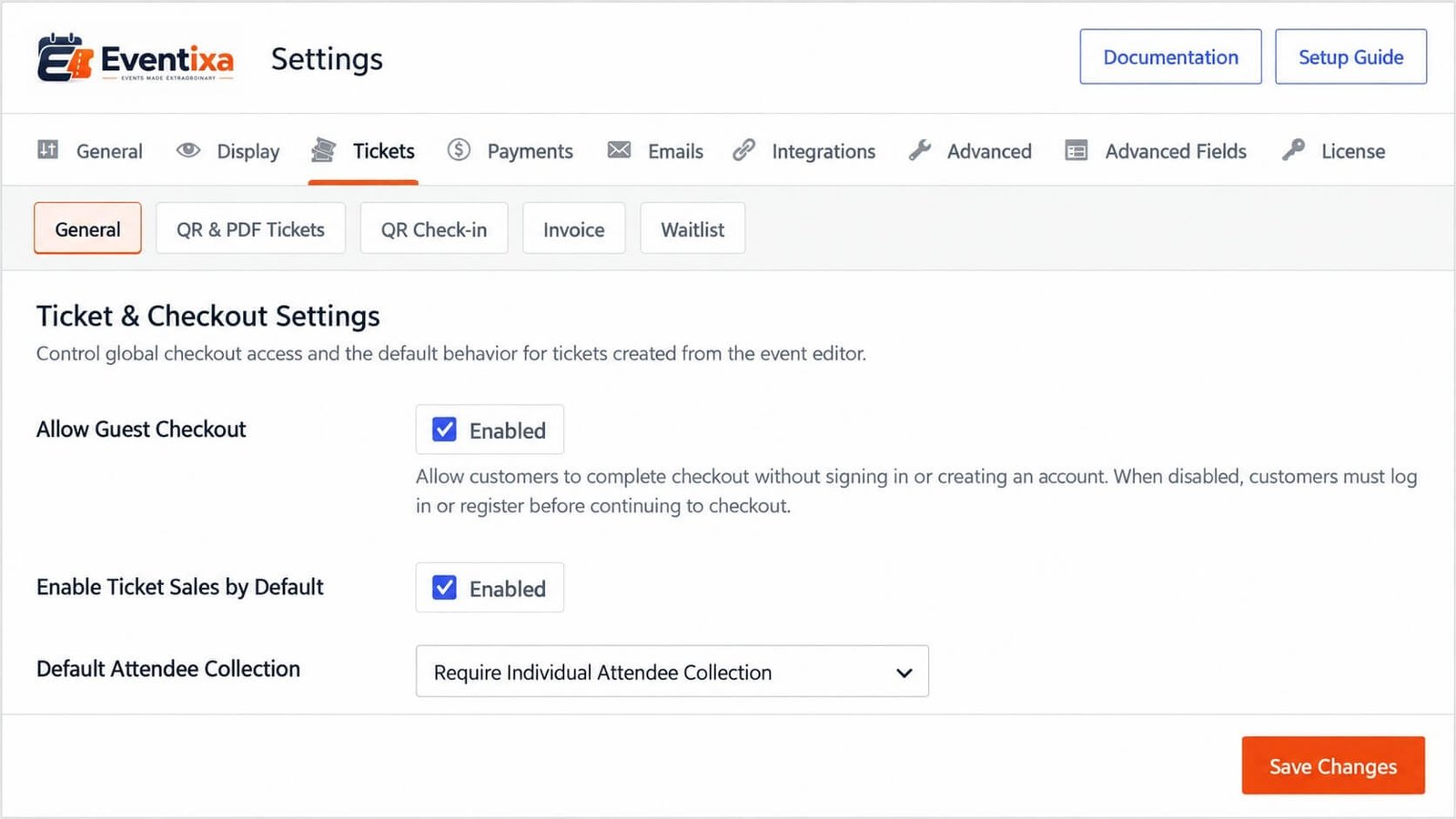
Location: Eventixa → Settings → Tickets → General
Related features: Checkout, Tickets, Bookings, Attendees, Payments
What Is Guest Checkout?
Guest Checkout allows a visitor to complete an Eventixa booking without logging into WordPress.
When enabled, visitors can:
- Select tickets
- Proceed to checkout
- Enter purchaser information
- Enter attendee information where required
- Complete payment for paid tickets
- Receive booking confirmation
without creating a WordPress user account first.
When to Use Guest Checkout
Guest Checkout is useful for:
- Public conferences
- Workshops
- Community events
- Festivals
- One-time registrations
- Events with many first-time visitors
Removing the login requirement can reduce friction during registration.
Open Guest Checkout Settings
In WordPress administration, go to: Eventixa → Settings → Tickets → General
Find the Guest Checkout setting.
Enable it when visitors should be allowed to register without signing in.
Enable Guest Checkout
Turn on: Allow Guest Checkout
Then save the Eventixa settings.
Once enabled, eligible visitors can continue through checkout without logging into an existing WordPress account.
Disable Guest Checkout
Turn off Guest Checkout when registration should be limited to authenticated WordPress users.
This can be useful for:
- Member-only events
- Customer-only events
- Internal events
- Sites where bookings must remain linked to user accounts
When disabled, unauthenticated visitors may need to log in before completing checkout.
Guest Checkout Workflow
A typical guest registration works like this:
- Visitor opens an event.
- Selects one or more tickets.
- Clicks Proceed to Checkout.
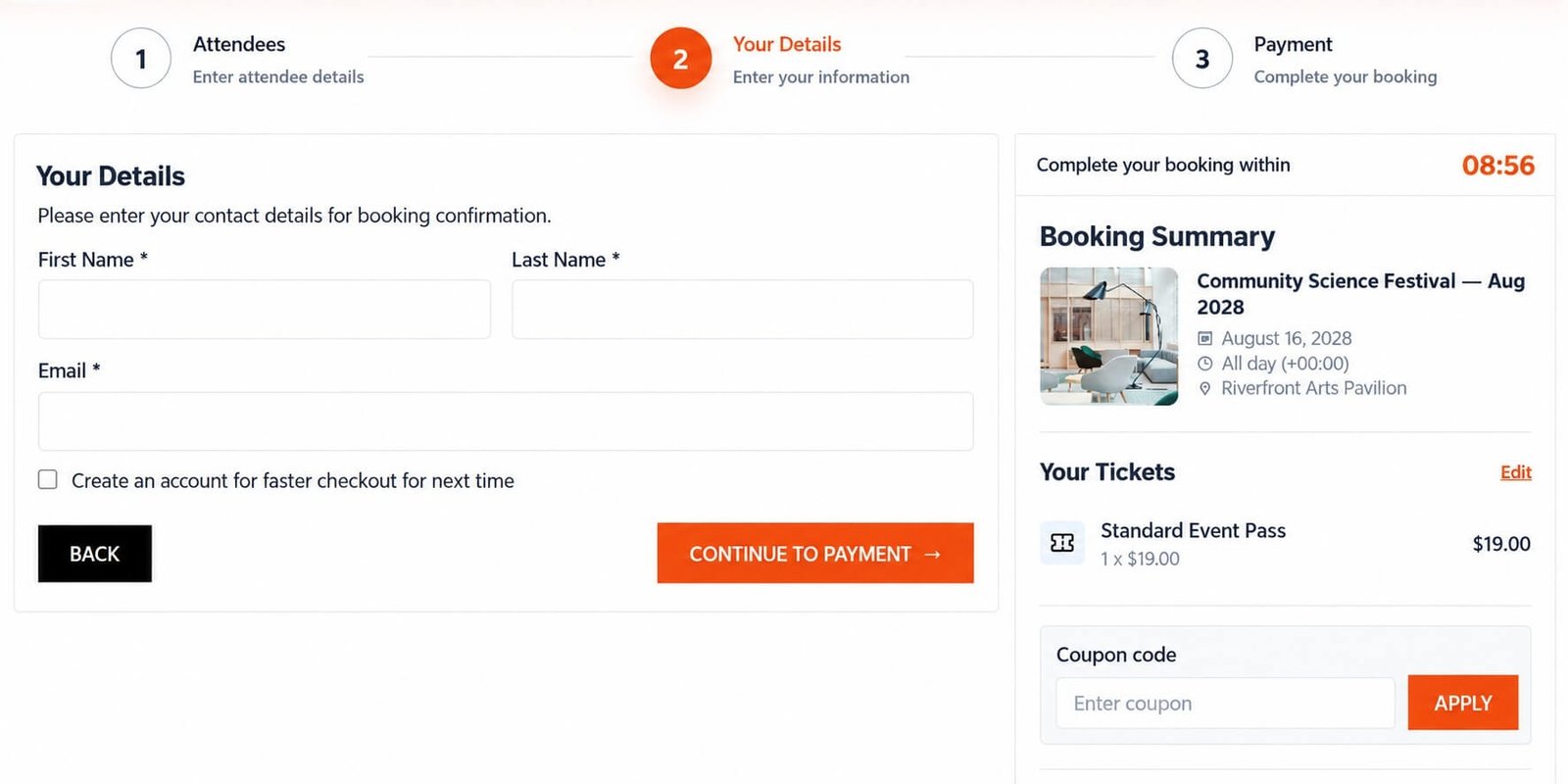
- Enters purchaser information.
- Enters attendee details if required.
- Selects a payment method for paid tickets.
- Completes checkout.
- Eventixa creates the booking and attendee records.
- Confirmation is sent to the supplied email where configured.
Guest Purchaser Information
Because the visitor is not logged in, Eventixa needs purchaser information directly from the checkout form.
This commonly includes:
- Name
The purchaser email is especially important because it can be used for:
- Booking confirmation
- Ticket delivery
- Event communication
- Virtual-event access information
- Booking-related emails
Use an email address the purchaser can access.
Guest Purchaser vs Attendees
The guest purchaser and the attendees are not necessarily the same people.
For example:
A guest purchaser can buy three tickets for:
- Themselves
- A colleague
- A friend
If individual attendee collection is enabled, Eventixa can store separate attendee information for each participant.
Guest Checkout and Individual Attendee Collection
Guest Checkout works alongside the ticket’s attendee collection mode.
Depending on configuration, Eventixa can collect:
- Purchaser information only
- Optional individual attendee information
- Required individual attendee information
This behavior is configured at ticket level.
Guest Checkout with Free Tickets
Guest Checkout can be used with free standard tickets.
The visitor typically:
- Selects the free ticket.
- Proceeds to checkout.
- Enters purchaser details.
- Enters attendee details where required.
- Completes registration.
No payment transaction is required.
Guest Checkout with Paid Tickets
Guest visitors can also purchase paid tickets.
The workflow becomes:
Ticket selection → Guest details → Attendee details → Payment → Booking confirmation
The available payment methods depend on the site’s Eventixa payment configuration.
PayPal
When PayPal is enabled, an eligible guest purchaser can complete the payment through the configured PayPal workflow.
A WordPress account is not required merely because the ticket is paid when Guest Checkout is enabled.
Offline Payment
Guest Checkout can also work with Offline Payment.
The purchaser enters their contact details and completes the Eventixa booking while payment is handled according to the organizer’s offline instructions.
WooCommerce Checkout
If the event uses WooCommerce checkout, the final customer-account behavior can also depend on WooCommerce configuration.
Review both Eventixa and WooCommerce checkout requirements before launching the event.
Stripe
Requires Eventixa Pro
Guest purchasers can use Stripe for eligible paid tickets when Stripe is configured and the checkout workflow allows guest registration.
Logged-In Checkout
When a visitor is already logged into WordPress, Eventixa can use the authenticated user’s account information.
For logged-in users, the account email remains connected to the authenticated user workflow.
This helps keep booking ownership consistent.
Logged-In Email
For authenticated customers, Eventixa keeps the logged-in purchaser email tied to the current account.
The email is not intended to be replaced with a different purchaser email during normal logged-in checkout.
Guest visitors, however, provide their purchaser email directly during checkout.
Guest Booking Records
A guest booking is still a normal Eventixa booking.
It can contain:
- Event
- Ticket
- Quantity
- Purchaser name
- Purchaser email
- Attendees
- Payment method
- Booking status
The absence of a WordPress user account does not prevent the booking from being managed in Eventixa.
Guest Attendee Records
Individual attendees created through Guest Checkout appear in the Eventixa attendee system.
They can participate in supported workflows such as:
- Attendee management
- Ticket delivery
- Email communication
- Check-in
- Reporting
depending on the active Eventixa features.
Confirmation Emails
Guest Checkout relies heavily on a valid email address.
After successful registration, Eventixa can send supported confirmation emails to the purchaser and/or attendees according to the event’s email configuration.
Before opening registration, test email delivery with a real guest checkout.
Guest Checkout and Ticket Delivery
For ticketed events, ticket delivery can use the email information collected during checkout.
Make sure the purchaser or attendee email is correct before completing the registration.
Guest Checkout and Virtual Events
Guest Checkout can also be used for eligible Virtual and Hybrid events.
Access to online meeting information still follows the event’s virtual access rules.
Guest status does not automatically bypass:
- Registration requirements
- Join-link reveal timing
- Attendee access rules
- Event occurrence rules
Guest Checkout and Recurring Events
Guest registration can also be used with recurring events.
The booking must still remain associated with the correct event occurrence.
Always test Guest Checkout on more than one occurrence if the recurring event accepts registrations across several dates.
Guest Checkout and Coupons
Guests can use eligible coupon codes where the Eventixa checkout workflow permits them.
Coupon rules apply independently of whether the visitor has a WordPress account.
Guest Checkout and Capacity
Guest registrations consume capacity just like logged-in registrations.
For example:
Ticket capacity: 100
Guest booking quantity: 3
The booking consumes three attendee places.
Guest Checkout and Quantity Limits
Guest purchasers must follow the same ticket quantity rules as logged-in visitors.
For example:
Minimum per booking: 1
Maximum per booking: 4
A guest cannot exceed the configured maximum simply because they are not logged in.
Checkout Session
Guest Checkout uses the normal Eventixa checkout-session behavior.
When limited ticket capacity is temporarily reserved during checkout, the same session rules apply whether the purchaser is logged in or a guest.
The standard checkout session lasts: 10 minutes
Refreshing the checkout page does not restart that timer.
Checkout Session Expiration
If a guest does not finish checkout within the active session period, the temporary ticket reservation can expire.
The held capacity can then become available to other visitors.
The guest may need to start the registration process again.
Account Creation
Guest Checkout does not require Eventixa to create a WordPress account merely to complete the booking.
This keeps the registration flow lightweight for visitors who only need to attend an event.
If your business requires customer accounts, disable Guest Checkout instead.
Guest Checkout vs Logged-In Checkout
The main difference is authentication.
Guest Checkout
The visitor:
- Does not need a WordPress account
- Enters purchaser information during checkout
- Can still create normal Eventixa bookings
- Can still register individual attendees
Logged-In Checkout
The visitor:
- Uses an authenticated WordPress account
- Uses the account-linked purchaser workflow
- Keeps the booking associated with that logged-in account
Ticket, capacity, attendee, and payment rules still apply in both workflows.
When Guest Checkout Should Be Disabled
Consider disabling Guest Checkout when:
- Events are available only to registered members.
- Booking history must be tied to WordPress accounts.
- Access depends on user roles.
- Your organization requires authenticated purchasers.
- Another connected checkout system requires login.
Choose the setting based on your event and account-management requirements.
Example: Public Conference
For a public conference, Guest Checkout can reduce registration friction.
A visitor can:
- Open the conference page.
- Select General Admission.
- Enter their email and attendee information.
- Pay.
- Receive confirmation.
No account setup is required before registration.
Example: Members-Only Training
For a private training program, you may disable Guest Checkout.
Visitors must then authenticate before completing the booking.
This helps ensure that registrations are tied to recognized site accounts.
Example: Free Community Event
A free community event can enable Guest Checkout so visitors can register with only the required contact and attendee information.
This avoids forcing users to create accounts for a one-time free event.
Example: Multiple Attendees
A guest purchaser selects: Standard Event Pass × 3
If individual attendee collection is required, Eventixa can collect:
Attendee 1
- Name
Attendee 2
- Name
Attendee 3
- Name
The result is one guest booking containing three attendee records.
Guest Checkout and Booking Management
Administrators manage guest bookings from the same Eventixa booking screens used for authenticated purchasers.
Guest bookings do not require a separate booking-management system.
Administrators can still review information such as:
- Event
- Purchaser
- Attendee quantity
- Registration type
- Payment method
- Booking status
Guest Checkout and Cancellations
Guest bookings follow the normal Eventixa cancellation workflow.
When an eligible booking is cancelled, its capacity can be released.
If Eventixa Pro Waitlist is active, released capacity may participate in the waitlist reservation workflow.
Guest Checkout and Refunds
Cancelling a guest booking and refunding its payment are separate actions.
For paid guest bookings:
- Cancel the applicable Eventixa booking.
- Process the actual refund through the payment provider where needed.
- Update the Eventixa booking to the appropriate refund state.
The fact that the purchaser was a guest does not change this distinction.
Privacy Considerations
Guest Checkout makes registration easier, but you should still collect only the data required for the event.
Keep forms focused on necessary information such as:
- Purchaser contact details
- Attendee identity
- Event-specific registration fields
Avoid asking for unnecessary personal information.
Common Problems
Checkout Asks Guests to Log In
Go to: Eventixa → Settings → Tickets → General and confirm Guest Checkout is enabled.
Save the settings after making the change.
Guest Checkout Is Enabled but Login Is Still Required
Review whether another checkout system, such as WooCommerce, has its own account or guest-checkout requirements.
Also confirm the visitor is using the intended Eventixa checkout flow.
Guest Does Not Receive Confirmation
Check:
- Purchaser email
- Eventixa email settings
- WordPress email delivery
- Spam or junk folder
- Email logging if available
Guest Email Is Wrong
The guest purchaser email is entered during checkout.
Make sure visitors verify it before completing registration.
Logged-In User Cannot Change the Email
This is expected in the account-linked checkout workflow.
Eventixa keeps the logged-in purchaser email associated with the authenticated account.
Guest Booking Is Missing from Eventixa
Guest bookings should still appear in Eventixa booking management.
Review the checkout result and booking status.
Attendee Fields Are Missing
Review the ticket’s attendee collection mode.
Guest Checkout itself does not determine whether individual attendee information is collected.
Guest Cannot Select More Tickets
Check:
- Maximum quantity per booking
- Remaining ticket capacity
- Ticket availability
Guest users must follow the same quantity restrictions.
Guest Checkout Expired
The Eventixa checkout session may have reached its expiration time.
The visitor may need to return to the event and begin checkout again.
Recommended Workflow
- Go to Eventixa Settings.
- Open Tickets → General.
- Enable Allow Guest Checkout.
- Save changes.
- Log out of WordPress or open a private browser window.
- Open the event.
- Select a ticket.
- Proceed to checkout.
- Enter guest purchaser information.
- Enter attendee information where required.
- Select a payment method for a paid ticket.
- Complete the booking.
- Verify the booking in Eventixa.
- Verify attendee records.
- Verify capacity.
- Confirm email delivery.
- Test a paid gateway if applicable.
Recommended Testing
Before launching Guest Checkout, test:
- Free ticket registration
- Paid ticket registration
- Purchaser information
- Individual attendee information
- Multiple ticket quantities
- Maximum quantity restrictions
- Confirmation emails
- Capacity updates
- Checkout session expiration
- Coupons if enabled
- Recurring occurrences if applicable
- Virtual-event access if applicable
Important Notes
- Guest Checkout is available in Eventixa Core.
- Guest purchasers do not need a WordPress account.
- Guest registrations still create normal Eventixa bookings.
- Individual attendee records can still be created for guest bookings.
- A valid purchaser email is important for communication.
- Logged-in users keep their authenticated account email in the account-linked checkout workflow.
- Guest registrations consume capacity normally.
- Ticket quantity rules apply equally to guests.
- Payment gateway requirements still apply to paid tickets.
- The normal Eventixa checkout-session rules apply to Guest Checkout.
- Test Guest Checkout while logged out before opening registration.


