
Waitlist Reservations & Offers
Eventixa Pro can automatically promote waiting customers when ticket capacity becomes available.
When seat reservation is enabled, Eventixa protects the released seat during the offer window so another visitor cannot purchase it while the selected waitlisted customer is completing checkout.
Available in: Eventixa Pro
Settings: Eventixa → Settings → Tickets → Waitlist
Admin: Eventixa → Waitlist
Related features: Ticket Capacity, Booking Cancellation, Waitlist Emails, Checkout
What Is a Waitlist Reservation?
A waitlist reservation is a temporary hold placed on an available ticket for a promoted waitlisted customer.
It is not yet a completed booking.
A typical sequence is:
- A ticket is sold out.
- Customers join the waitlist.
- Capacity becomes available.
- Eventixa promotes an eligible waiting customer.
- A seat is reserved for that customer.
- The customer receives a booking offer.
- They complete checkout before the reservation expires.
- The waitlist entry becomes converted when the booking succeeds.
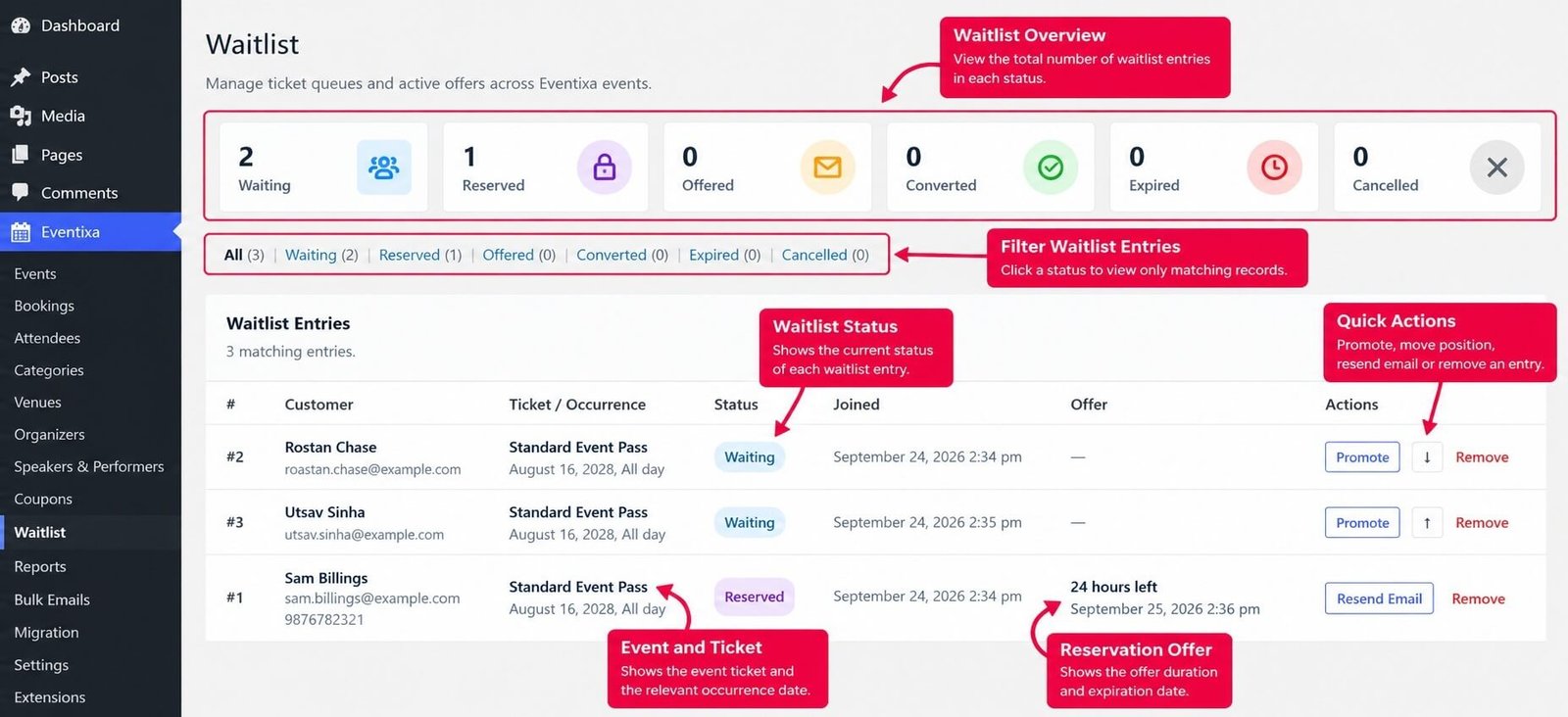
Waiting vs Reserved vs Offered
Eventixa distinguishes between several waitlist states.
Waiting
The customer is still in the queue.
No offer has been created.
Reserved
A customer has been promoted and Eventixa is actively protecting one seat for that offer.
This state is used when: Reserve Seat During Offer Window is enabled.
Offered
The customer has been promoted and received an offer, but the seat itself is not protected by the waitlist reservation system.
This state can occur when seat reservation is disabled.
Converted
The customer successfully used the offer to create a booking.
Expired
The customer did not complete the offer before its expiration time.
Cancelled
The waitlist entry was removed or cancelled.
Configure Reservation Behavior
Go to: Eventixa → Settings → Tickets → Waitlist
The most important settings for reservations and offers are:
- Enable Waitlist
- Enable Automatic Promotion
- Reserve Seat During Offer Window
- Reservation Expiry
Enable Waitlist
The main: Enable Waitlist setting controls frontend waitlist signup and waitlist automation.
If this setting is disabled, normal waitlist joining is unavailable.
Enable Automatic Promotion
Enable: Enable Automatic Promotion to let Eventixa respond automatically when capacity becomes available.
The current setting description is: Automatically offer available seats to waiting users when capacity opens.
When enabled, Eventixa can process waiting customers without requiring an administrator to promote every entry manually.
Reserve Seat During Offer Window
Enable: Reserve Seat During Offer Window to protect the seat while the promoted customer has an active offer.
The current setting description is: Reduce public availability while a waitlist offer is active.
This is the safer configuration for normal waitlist use.
Why Seat Reservation Matters
Suppose:
Ticket Capacity: 100
Booked: 100
Waiting: 5
One booking is cancelled. Without reservation, that released seat could become publicly bookable while the first waitlisted customer is still reading their email.
With seat reservation enabled:
- One seat is released.
- Eventixa promotes the next waiting customer.
- The seat becomes reserved.
- Public availability remains protected.
- The promoted customer receives the offer.
- They get the configured period to complete checkout.
Reservation Reduces Public Availability
An active reserved waitlist offer is counted against publicly available ticket capacity.
This means other visitors should not see that protected seat as normally available.
For example:
Physical capacity: 100
Existing bookings: 99
Active waitlist reservation: 1
Public availability effectively remains: 0 until the reservation is converted, cancelled, or expired.
One Reservation Per Promoted Entry
A waitlist offer currently creates checkout for: 1 ticket
The promoted customer receives access to one protected ticket for that waitlist entry.
The waitlist checkout is not a general ticket-selection flow for purchasing an arbitrary quantity from the reservation.
When Does Automatic Promotion Run?
Eventixa monitors several capacity-changing situations.
Promotion can be triggered when ticket availability opens because of events such as:
- Ticket sold quantity decreasing
- Ticket inventory being updated
- A completed booking becoming Cancelled
- A completed booking becoming Failed
- A completed booking becoming Expired
- A paid payment state becoming Cancelled
- A paid payment state becoming Failed
- Ticket capacity-related settings being updated
Eventixa then evaluates whether waiting customers exist for the affected ticket and occurrence.
Immediate Reservation After Capacity Release
When an eligible booking releases stock, Eventixa can reserve that newly released capacity immediately.
This is important because it prevents a short period where the public booking form could take the seat before the waitlist system processes it.
Queue Order
Waiting entries have a queue position.
Eventixa selects the next eligible waiting entry based on that position.
For example:
- Customer A — Position 1
- Customer B — Position 2
- Customer C — Position 3
When one seat becomes available, Customer A is normally the next entry considered.
Admin Queue Reordering
From: Eventixa → Waitlist administrators can move waiting entries up or down where those actions are available.
Changing the position affects which waiting customer is considered first during subsequent promotion.
Manual Promotion
Administrators can also use: Promote from the Waitlist screen.
Manual promotion is only valid for an entry that is currently: Waiting
Eventixa also verifies that capacity is available before allowing the promotion.
What Happens During Promotion?
When a waiting entry is promoted, Eventixa creates an offer containing:
- Offer creation time
- Expiration time
- Secure offer token
- Reservation state
- Ticket
- Event
- Occurrence, where applicable
If seat reservation is enabled, the status becomes: Reserved
If seat reservation is disabled, the status becomes: Offered
Reservation Expiry
The: Reservation Expiry
setting controls the offer duration in hours.
The default value in the current implementation is: 24 hours
The minimum effective duration is one hour.
For example: Reservation Expiry: 24 means the customer has approximately 24 hours to complete the waitlist booking.
Offer Token
Each promoted entry receives a secure offer token.
The booking link contains information that lets Eventixa validate the waitlist offer before starting checkout.
An invalid or expired offer cannot start the reserved checkout workflow.
Seat Available Email
When promotion succeeds and offer notifications are enabled, Eventixa sends the: Waitlist Seat Available email.
The default message tells the customer that a ticket is available and that they must complete the booking before the reservation expires.
Offer Email Contains Booking Access
The waitlist email can include the customer’s booking button/link.
That link opens the reserved checkout flow associated with the waitlist entry.
The offer should not be shared because it is tied to the specific reservation token.
Starting Reserved Checkout
When the customer opens a valid waitlist offer:
- Eventixa validates the waitlist entry.
- Eventixa validates the secure offer token.
- Eventixa checks that the status is still Reserved or Offered.
- Eventixa verifies that the offer has not expired.
- Eventixa verifies the recurring occurrence where applicable.
- Eventixa creates a checkout session for one ticket.
- The waitlist reservation is attached to that checkout session.
- The customer is redirected to Eventixa checkout.
Invalid or Expired Link
If Eventixa cannot validate the offer, the customer cannot start reserved checkout.
The interface can return: This waitlist offer is invalid or has expired.
This protects reservations from old, modified, or reused links.
Reserved Checkout and Capacity
A normal visitor cannot purchase capacity protected by an active reservation.
However, the customer holding the valid waitlist offer is allowed to consume their own reserved seat.
This distinction allows Eventixa to protect capacity while still allowing the promoted customer to complete checkout.
Recurring Event Reservations
Recurring-event waitlist reservations are occurrence-aware.
A waitlist entry stores its: Occurrence ID so availability and promotion are evaluated within the correct occurrence.
For example:
April 15 — Sold Out
August 16 — Sold Out
A released April seat is matched against the April waitlist, not the August waitlist.
Recurring Event Offer Validation
When a waitlist offer contains an occurrence, Eventixa verifies that the occurrence still belongs to the event.
An invalid occurrence cannot be used to begin reserved checkout.
Booking from a Waitlist Offer
Once the customer opens the offer, they continue through the normal Eventixa checkout workflow.
The booking can still require:
- Purchaser details
- Attendee information
- Required attendee fields
- Payment method
- Payment completion
The waitlist system grants access to the reserved capacity; it does not bypass normal booking requirements.
Payment Gateways
A waitlist-originated booking uses the normal Eventixa payment workflow.
Depending on your configuration, that may include:
- PayPal
- Stripe
- Offline / Local Payment
- WooCommerce
The waitlist reservation itself is not a payment transaction.
Converted Status
When the waitlist checkout successfully creates the booking, Eventixa links the booking back to the waitlist entry.
The waitlist entry is then changed to: Converted
Eventixa also stores the related booking reference internally.
Waitlist Conversion and Booking
A converted entry records that the waitlist opportunity became an actual booking.
The resulting booking then follows the normal Eventixa workflow.
This means later operations such as:
- Attendee creation
- Ticket delivery
- Payment processing
- QR ticket generation
- Check-in
belong to the normal booking system.
Converted Reservation Is Released
When conversion occurs, the temporary waitlist reservation state is cleared.
The new booking now consumes the ticket through Eventixa’s normal inventory system.
What Happens if Offer Email Delivery Fails?
Eventixa protects the reservation independently of email delivery.
If sending the Seat Available email fails, the reserved seat is not immediately released.
Eventixa records the email failure and can retry notification through the task system.
This avoids giving away the customer’s reserved seat merely because of a temporary mail problem.
Resend Offer Email
For an active Reserved or Offered entry, administrators can use: Resend Email
from the Waitlist screen.
Resending does not:
- Create another reservation
- Generate another token
- Restart the expiration period
- Extend the offer
It simply sends the existing active offer again.
Resending Does Not Extend Expiration
This is important.
If an offer has: 3 hours remaining and the administrator selects: Resend Email the offer still has approximately the same remaining expiration period.
Resending is not a renewal.
Expired Offers Cannot Be Resent
Eventixa validates the offer before resending.
If the offer has already expired, it cannot be resent as an active reservation.
Customer Cancels an Active Offer
If customer waitlist cancellation is enabled, a logged-in customer can cancel their own:
- Waiting
- Offered
- Reserved
entry from their waitlist account/portal view.
If they cancel an active reservation, the held seat is released.
Admin Removes an Active Offer
Administrators can also remove a waitlist entry.
If a Reserved or Offered entry is removed:
- Its status becomes Cancelled.
- Its reservation is released.
- Queue positions are recalculated.
If automatic promotion is enabled, Eventixa can then continue with the next eligible customer.
Direct Seat Handoff
When an active Reserved offer expires or is released, Eventixa is designed to hand that protected seat directly to the next waiting entry where possible.
For example:
- Customer A has a Reserved seat.
- Customer A’s offer expires.
- Customer B is next in line.
- Eventixa transfers the opportunity to Customer B.
- Customer B receives a new reservation.
This minimizes the chance that the seat briefly becomes publicly available between waitlist customers.
Reservation Expiration
When the offer reaches its expiration time without successful conversion:
- Status becomes Expired.
- The reservation flag is cleared.
- The seat is released.
- Queue positions are recalculated.
- Automatic promotion can continue.
The complete expiration workflow is covered in the next documentation article.
Reservation Protection Continues Until Processing
Eventixa does not expose the protected seat solely because the expiration timestamp has passed.
The reservation remains counted until the expiry processor transitions the entry out of the active reserved state.
This prevents a race where public availability could reopen before Eventixa gives the next waiter a chance.
Automatic Promotion vs Manual Promotion
Automatic Promotion
Eventixa detects available capacity and promotes the next eligible waiting entry.
Best for normal production use.
Manual Promotion
An administrator selects Promote for a waiting entry.
Useful when you intentionally want to manage the queue manually.
Manual promotion still requires valid capacity.
Reserve Seat Enabled
With: Reserve Seat During Offer Window = Enabled
promotion produces: Reserved
and the seat is protected from public availability.
This is the recommended behavior when the offer should be exclusive.
Reserve Seat Disabled
With: Reserve Seat During Offer Window = Disabled
promotion produces: Offered but public capacity is not protected by a reservation.
This means the offer does not guarantee that the capacity will remain available until checkout.
Use this mode only when you intentionally do not want seat protection.
Maximum Waitlist Entries
The: Maximum Waitlist Entries Per Ticket setting limits active waitlist entries for each ticket/occurrence.
Active entries counted toward this limit include:
- Waiting
- Offered
- Reserved
A value of: 0 means unlimited waitlist entries.
Duplicate Waitlist Protection
The same email cannot maintain multiple active waitlist entries for the same ticket occurrence.
Eventixa checks for existing:
- Waiting
- Offered
- Reserved
entries before allowing another signup.
Active Booking Protection
A customer who already has an active booking for the same ticket and occurrence cannot normally join that same waitlist.
This helps prevent a customer from holding both an existing registration and a waiting position for the same ticket.
RSVP Not Going Exception
An RSVP booking whose current response is:
Not Going
does not count as an active capacity-holding booking for this check.
That customer can still join the normal waitlist for the same ticket occurrence where otherwise eligible.
Promotion Batch Size
Eventixa includes: Promotion Batch Size in its Waitlist settings.
This controls the maximum number of customers processed in one scheduled promotion task.
The accepted range is: 1 to 50
The default is:10
Waitlist Admin Overview
Go to: Eventixa → Waitlist
The Waitlist screen shows status totals including:
- Waiting
- Reserved
- Offered
- Converted
- Expired
- Cancelled
The table also shows:
- Customer
- Ticket / Occurrence
- Status
- Joined
- Offer
- Actions
Reserved Offer Display
A Reserved entry can display the remaining offer time.
For example: 24 hours left along with the expiration date.
This allows administrators to see how long the customer has to complete the booking.
Recommended Configuration
For most ticketed events, use:
Enable Waitlist: Enabled
Enable Automatic Promotion: Enabled
Reserve Seat During Offer Window: Enabled
Reservation Expiry: Appropriate for your event
This gives waiting customers a genuine protected opportunity to book when a seat becomes available.
Recommended Reservation Workflow
- Enable the Waitlist.
- Enable Automatic Promotion.
- Enable Reserve Seat During Offer Window.
- Set Reservation Expiry.
- Fill a test ticket to capacity.
- Add at least two customers to the waitlist.
- Release one seat.
- Verify the first customer becomes Reserved.
- Confirm public availability remains protected.
- Confirm the Seat Available email is sent.
- Open the booking link.
- Complete checkout.
- Confirm the waitlist entry becomes Converted.
- Repeat the test and allow an offer to expire.
- Confirm the next waiting customer receives the released reservation.
Common Problems
Capacity Opened but Nobody Was Promoted
Check:
- Enable Waitlist
- Enable Automatic Promotion
- Waiting entries exist
- Ticket has valid availability
- Correct recurring occurrence
- Ticket is still within its active sale window
Customer Is Reserved but Ticket Still Appears Sold Out
This is expected.
A reserved seat is intentionally removed from general public availability.
The valid waitlist offer holder can still use the protected seat.
Customer Receives an Offer but Status Is Offered Instead of Reserved
Check: Reserve Seat During Offer Window
If reservation is disabled, promoted entries use the Offered state instead of Reserved.
Customer Opens Offer and Sees Expired Message
The offer may:
- Have expired
- Have been cancelled
- Have already been converted
- Contain an invalid token
Review the waitlist entry from Eventixa → Waitlist.
Resend Email Did Not Add More Time
This is expected.
Resending the offer does not reset its expiration.
Reserved Customer Did Not Receive Email
The seat can remain protected even when initial email delivery fails.
Check:
- Email configuration
- Waitlist email template
- Offer status
- Email retry
- Spam folder
Another Customer Is Before the One You Want to Promote
Use the waitlist ordering controls if you intentionally need to change queue position.
Then promote the appropriate waiting entry when capacity allows.
Promote Returns No Capacity
Manual promotion still validates ticket availability.
A waiting entry cannot be promoted when no eligible seat is available unless capacity has already been transferred through the internal release workflow.
Important Notes
- Waitlist reservations require Eventixa Pro.
- Automatic promotion and seat reservation are separate settings.
- Reserved offers protect one ticket from public availability.
- Offered entries do not protect capacity when seat reservation is disabled.
- Offer checkout currently reserves one ticket per waitlist entry.
- A reservation is not a completed booking.
- A successful waitlist checkout changes the entry to Converted.
- Resending an offer does not reset the token or expiration.
- Recurring waitlist offers remain occurrence-specific.
- Active Reserved/Offered entries can be cancelled or removed, releasing their opportunity.
- Expired reserved seats can be handed directly to the next waiting customer.
- Email failure does not automatically release an otherwise valid reserved seat.


