
Skip to content
  • Home
  • Features
    • Event Management
    • Email Notifications
    • Payment Processing
    • Recurring Events
  • Documentation
  • Pricing
  • Contact Us
  • Live Demo
    • Simple Event
    • Recurring Event
    • Virtual Event
    • Free Event
    • Paid Event
    • RSVP Event
    • Waitlist Event

EARLY ADOPTER OFFER — Eventixa Pro: $49/year $0 (FREE) · First 100 Pro subscriptions only. Get Pro Free →

Eventixa – Events Calendar, Tickets and Bookings
  • Home
  • Features
    • Event Management
    • Email Notifications
    • Payment Processing
    • Recurring Events
  • Documentation
  • Pricing
  • Contact Us
  • Live Demo
    • Simple Event
    • Recurring Event
    • Virtual Event
    • Free Event
    • Paid Event
    • RSVP Event
    • Waitlist Event
Get Started

EARLY ADOPTER OFFER — Eventixa Pro: $49/year $0 (FREE) · First 100 Pro subscriptions only. Get Pro Free →

Eventixa – Events Calendar, Tickets and Bookings

Getting Started

  • Welcome to Eventixa
  • How to Install Eventixa on WordPress
  • How to Install and Activate Eventixa Pro
  • Setup Wizard
  • Eventixa Admin Dashboard Overview
  • Create Your First Event
  • Eventixa Core vs Pro

Event Management

  • Events Overview
  • Creating an Event
  • Editing and Managing Events
  • Duplicating an Event
  • Event Date and Time Settings
  • Event Categories
  • Venues
  • Organizers
  • Event Archive and Listings
  • Single Event Page
  • Event Templates & Overriding
  • Eventixa Design System

Speakers, Performers & Event Agenda

  • Creating Event Sessions
  • Speakers & Performers Overview
  • Speaker & Performer Groups
  • Creating Speakers & Performers
  • Adding Speakers & Performers to Events
  • Sessions & Event Agenda
  • Recurring Event Agendas

In-Person, Virtual & Hybrid Events

  • In-Person, Virtual & Hybrid Events
  • Virtual Event Access
  • Custom Meeting URL

Tickets & Registration

  • Ticket Management Overview
  • Creating Event Tickets
  • Free and Paid Tickets
  • RSVP Tickets
  • Ticket Capacity and Availability
  • Ticket Sale Schedule
  • Ticket Quantity Rules
  • Attendee Registration Fields
  • Advanced Attendee Fields

Recurring Events

  • Recurring Events Overview
  • Creating a Recurring Event
  • Managing Event Occurrences
  • Recurring Event Tickets
  • Recurring Virtual Events

Checkout & Bookings

  • Checkout Overview
  • Guest Checkout
  • Managing Bookings
  • Booking Details
  • Booking Statuses
  • Manual Bookings
  • Canceling and Refunding Bookings
  • Booking Emails

Attendees

  • Managing Attendees
  • Add and Edit Attendees
  • Resend Event Tickets

Coupons & Discounts

  • Event Coupons Overview
  • Creating a Coupon
  • Advanced Coupon Rules

Payments

  • Payment Overview
  • Currency Settings
  • Stripe Payment
  • PayPal Payment
  • WooCommerce Integration
  • Offline Payment
  • Payment Statuses
  • Transactions
  • Refunds

Emails & Bulk Emails

  • Email Notifications Overview
  • Customer Emails
  • Administrator Emails
  • Email Templates
  • Email Placeholders
  • Reminder Emails
  • Bulk Emails

QR Tickets & Check-In

  • QR Tickets
  • Event Check-In
  • QR Scanner

Waitlist

  • Event Waitlist Overview
  • Enable Waitlist for an Event
  • Waitlist Reservations & Offers
  • Managing the Waitlist
  • Waitlist Emails

Reports

  • Reports Overview
  • Event Reports
  • Ticket & Registration Reports
  • Revenue Reports
  • Filtering Reports

Integration

  • Integrations Overview
  • MailPoet Integration
  • Mailchimp Integration
  • WooCommerce Integration
  • Zoom Integration
  • Google Meet Integration
  • Webhooks

Migration

  • Migration Overview
  • Migration from The Events Calendar
  • Supported Migration Data
  • Recurring Event Migration
  • Migration Warnings & Troubleshooting

My Account & Customer Experience

  • Eventixa My Account
  • Viewing Event Bookings
  • Viewing Event Tickets

Shortcodes, Blocks & Display

  • Eventixa Shortcodes
  • Gutenberg Blocks
  • Elementor Integration

Settings

  • Eventixa Settings Overview
  • General Settings
  • Display Settings
  • Ticket Settings
  • Payment Settings
  • Email Settings
  • Integration Settings
  • License Settings

Troubleshooting

  • Troubleshooting Overview
  • Ticket Availability Problems
  • Checkout Problems
  • Payment Problems
  • Email Delivery Problems
  • Virtual Event Integration Problems
  • QR Ticket & Check-In Problems
View Categories
  • Home
  • Documentations
  • Getting Started
  • Create Your First Event

Create Your First Event

0:00 / 3:13
  • View as Markdown Open this page as plain Markdown (opens in a new tab)
  • Open in ChatGPT Ask questions about this page (opens in a new tab)
  • Open in Claude Ask questions about this page (opens in a new tab)
  • Open in Google AI Studio Ask questions about this page (Google account required) (opens in a new tab)

This quick-start guide helps you create a simple Eventixa event, add a free registration ticket, publish the event, and complete a test registration.

For detailed configuration of every Eventixa event option, see How to Create an Event in WordPress with Eventixa.

Available in: Eventixa Core
Location: Eventixa → Events → Add New
Recommended first: Complete the Eventixa Setup Wizard

Create a New Event

Go to: Eventixa → Events

Click: Add New Event

Enter a simple event title.

For example: Introduction to WordPress Workshop

Add a short event description explaining what the event is about.
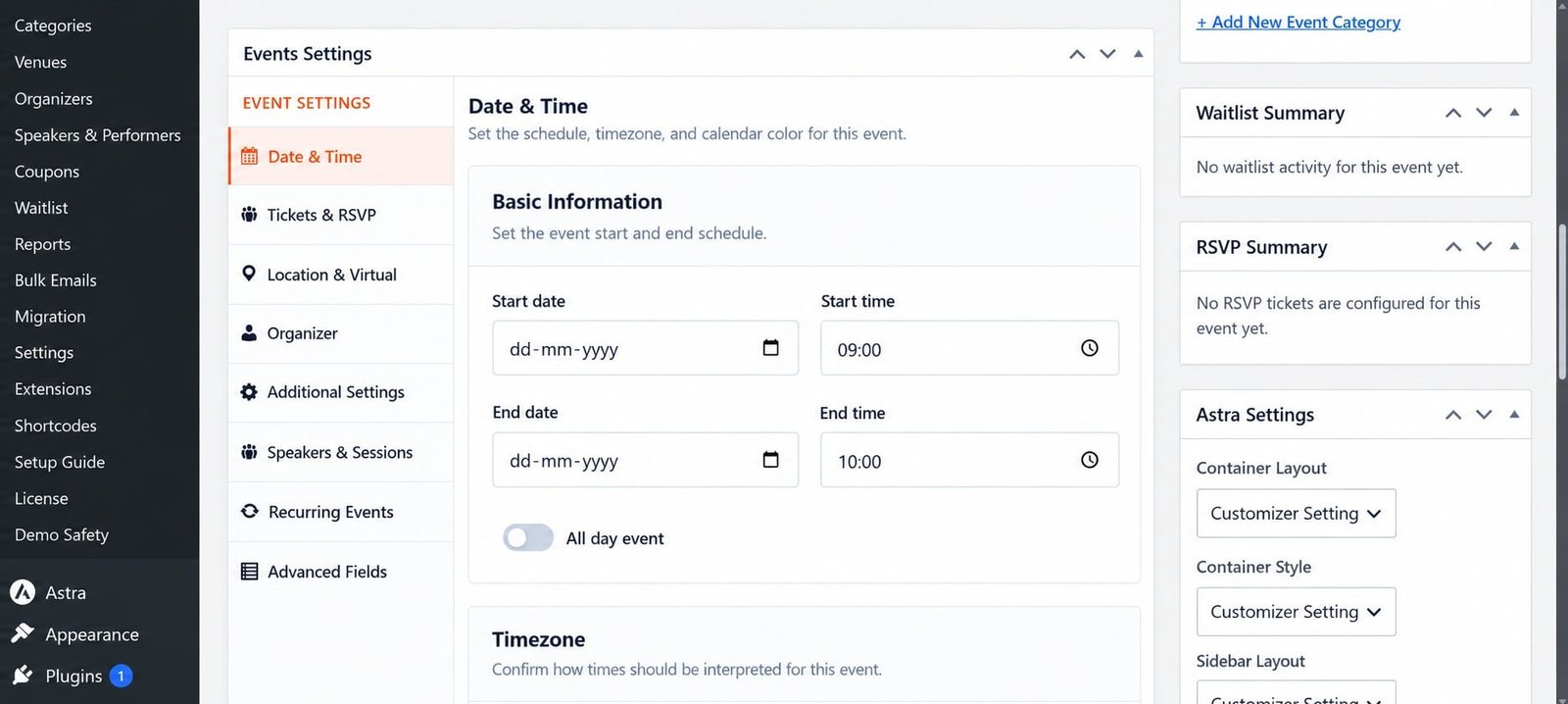
Create a new Eventixa event in WordPress
Go to Eventixa → Events and click Add New Event to begin creating your first event.

Set the Event Date and Time

Choose when the event will take place.

For example:

SettingExample
Start DateOctober 20, 2026
Start Time11:00 AM
End DateOctober 20, 2026
End Time1:00 PM

Make sure your Eventixa timezone is configured correctly.

Choose the Event Type

For this first event, choose: In-Person

You can create virtual and hybrid events later.

If the event is held at a physical location, assign an existing venue or create one from: Eventixa → Venues

Add an Organizer

Assign an organizer if required.

You can create reusable organizers from: Eventixa → Organizers

For a simple test event, one organizer is enough.

Create a Free Ticket

Add a free registration ticket.

Example:

SettingValue
Ticket NameFree Registration
PriceFree
Capacity50

A free ticket lets you test the Eventixa registration workflow without configuring an online payment gateway.
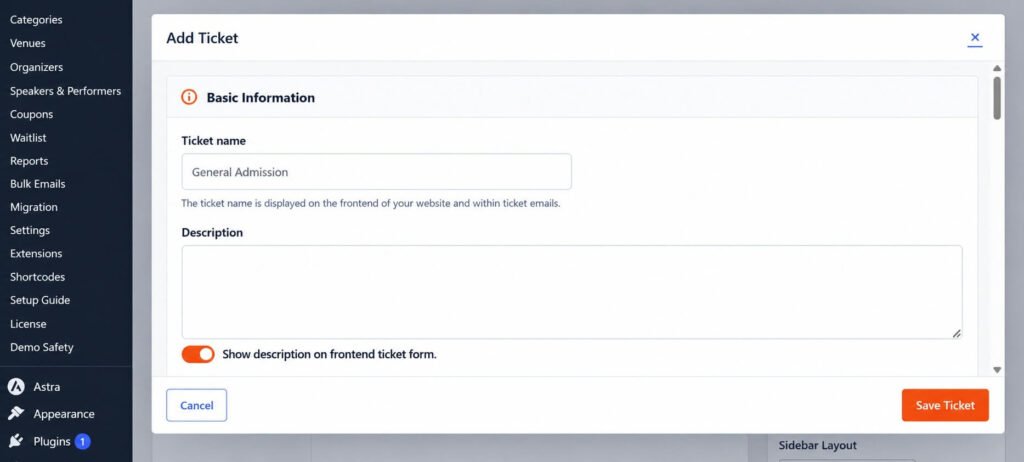
Create a free event ticket in Eventixa
Add a free ticket to test the Eventixa registration workflow without configuring a payment gateway.

Review Attendee Information

Make sure the registration collects the basic attendee information required for the event.

For a simple test, use:

  • Name
  • Email

You can add additional attendee fields later.

Publish the Event

Review:

  • Event title
  • Description
  • Date and time
  • Venue
  • Organizer
  • Ticket
  • Capacity

When everything looks correct, click: Publish

Open the event on the frontend and confirm the event information is displayed correctly.

Complete a Test Registration

Register for the event as a visitor.

Test this workflow:

  1. Open the event page.
  2. Select Free Registration.
  3. Choose the ticket quantity.
  4. Enter the attendee information.
  5. Continue through checkout.
  6. Complete the registration.

Because this is a free ticket, no online payment is required.

Check the Booking

After completing the registration, go to: Eventixa → Bookings

Confirm that the test booking appears.

Review:

  • Event
  • Registration type
  • Ticket
  • Attendee count
  • Booking status

Check the Attendee

Go to: Eventixa → Attendees

Confirm that the attendee created during the test registration appears correctly.

Check:

  • Name
  • Email
  • Event
  • Ticket
  • Status

Check the Email

Check the email address used during registration.

Depending on your Eventixa email configuration, the attendee can receive booking or ticket-related email notifications.

If the email does not arrive, review your Eventixa email settings and WordPress email delivery configuration.

Your First Event Checklist

Before moving on, confirm:

  • Event is published.
  • Date and time are correct.
  • Venue is correct.
  • A free ticket is available.
  • Registration works.
  • Booking is created.
  • Attendee is created.
  • Confirmation email is received.

Once these checks work correctly, your basic Eventixa setup is ready.

What to Configure Next

Now you can start using more Eventixa features, such as:

  • Paid tickets
  • RSVP registration
  • Custom attendee fields
  • Speakers & Performers
  • Sessions & Agenda
  • Virtual and hybrid events
  • Recurring events
  • Coupons
  • QR tickets
  • Check-in
  • Waitlist
  • Integrations

Use the dedicated documentation for each feature rather than configuring everything on your first event.

Next Steps

Continue with:

  1. Eventixa Free vs Pro – Feature Differences Explained
  2. WordPress Event Management with Eventixa
  3. How to Create an Event in WordPress with Eventixa
  4. Eventixa Dashboard and WordPress Admin Overview

Share This Article :

  • Facebook
  • X
  • LinkedIn
  • Pinterest
Eventixa Admin Dashboard OverviewEventixa Core vs Pro

Eventixa is a modern WordPress event management plugin for creating events, selling tickets, managing attendees, and delivering seamless booking experiences—all from a single platform.

Help Center

  • Documentation
  • Starter Guide
  • Contact Us

Features

  • Event Management
  • Email Notifications
  • Payment Processing
  • Recurring Events
  • Live Demo

Company

  • Contact Us
  • Privacy Policy
  • Refund Policy
  • T&Cs

Copyright © 2026 - All rights reserved.