
License Settings
Eventixa Pro License Settings let you activate and manage the Eventixa Pro license used for plugin updates and premium support.
The license interface is integrated directly into the Eventixa settings area and uses the Eventixa Pro licensing service powered by Freemius. eventixa-pro-usage-inventory
Available in: Eventixa Pro
Location: Eventixa → Settings → License
Requires: Eventixa Core + Eventixa Pro
Related features: Eventixa Pro, Plugin Updates, Premium Support
Overview
The License area is used to manage the Eventixa Pro license associated with your WordPress website.
From this screen, you can activate the license, review its status, and deactivate the license from the current site when required.
The current Eventixa Pro licensing implementation also makes an important distinction between:
- Pro feature availability
- License-based updates and support
An expired or not-yet-activated license does not disable Eventixa Pro features. The license primarily affects access to plugin updates and premium support. eventixa-pro-usage-inventory
How to Open License Settings
- Sign in to your WordPress dashboard.
- Go to Eventixa → Settings.
- Open the License tab.
- Review the current Eventixa Pro license status.
- Activate, update, or deactivate the license as required.
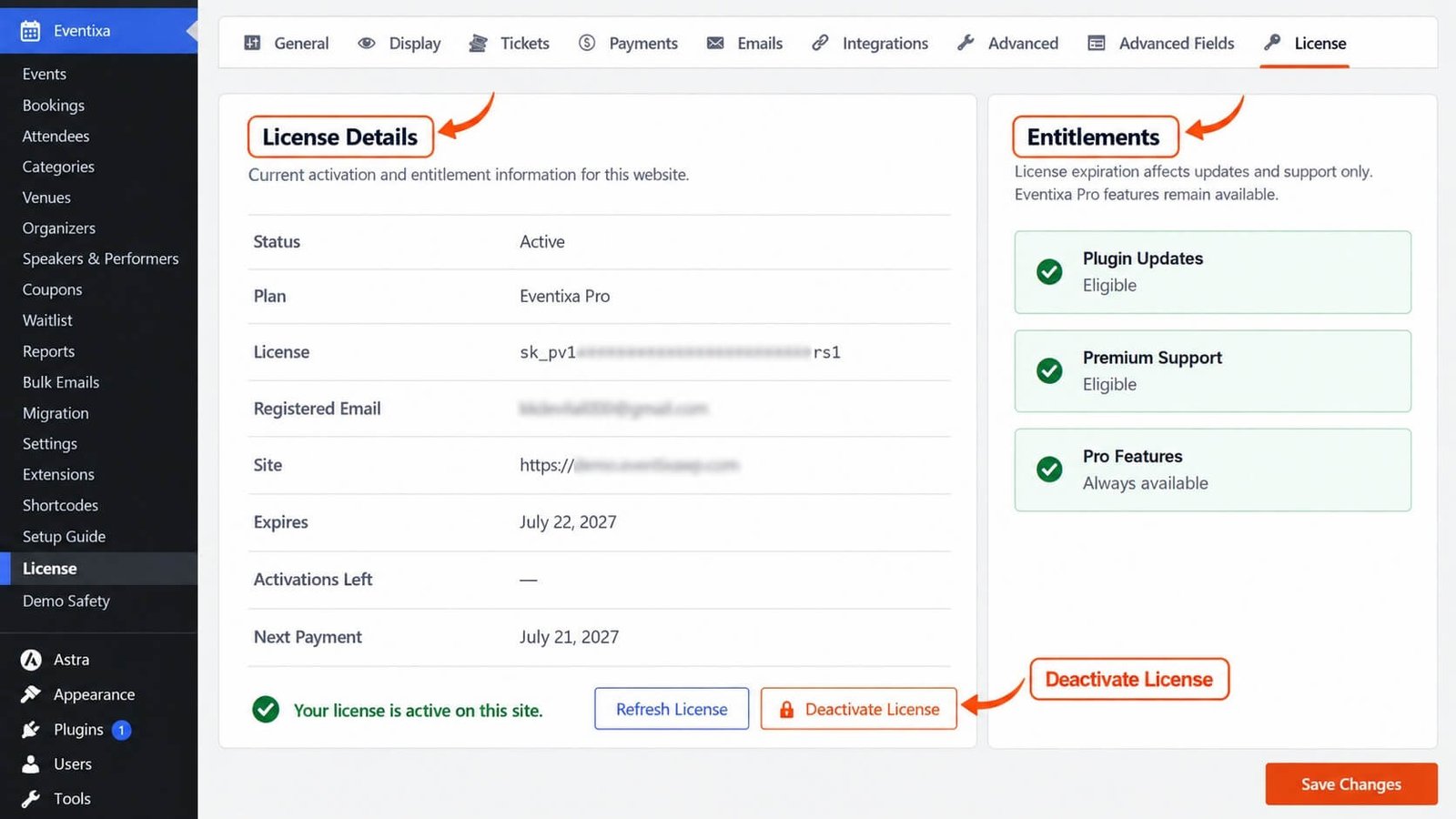
Activate Eventixa Pro
When Eventixa Pro is not activated, the License screen provides an Activate Eventixa Pro section. eventixa-pro-usage-inventory
To activate your license:
- Go to Eventixa → Settings → License.
- Locate Activate Eventixa Pro.
- Enter your active Eventixa Pro license key.
- Submit the activation.
- Wait for the licensing service to verify the key.
- Confirm that the license status changes to an active state.
Use the license key associated with your Eventixa Pro purchase or subscription.
License Key
The license key identifies the Eventixa Pro entitlement associated with the site.
When the license has expired, Eventixa instructs administrators to enter an active license key to restore plugin updates and premium support. eventixa-pro-usage-inventory
Keep your license key private.
Do not publish it in:
- Screenshots
- Documentation
- Support forum posts
- Public repositories
- Shared website code
If you create documentation screenshots of the License screen, always blur or hide the actual license key.
What License Activation Provides
An active Eventixa Pro license is used for entitlement-related services such as:
- Eventixa Pro updates
- Premium support
- License status management
The current license interface explicitly separates these services from Eventixa Pro feature availability. eventixa-pro-usage-inventory
Pro Features Remain Available
Eventixa Pro is designed so that license expiration does not automatically disable Pro functionality already installed on your website.
The current license page states that license expiration affects:
- Updates
- Support
while Eventixa Pro features remain available. eventixa-pro-usage-inventory
The entitlement display also identifies: Pro Features — Always available.
Before License Activation
Eventixa Pro features also remain available before license activation.
The current license interface explicitly states:
Your Eventixa Pro features remain available even before activation. eventixa-pro-usage-inventory
Activation is therefore primarily important for keeping Eventixa Pro current and maintaining access to premium support.
Active License
With an active license, Eventixa Pro can use the licensing service for supported update and entitlement workflows.
Keeping the license active is recommended for production websites because updates can include:
- Bug fixes
- Compatibility improvements
- Security improvements
- Feature improvements
A current license also maintains access to the applicable premium support service.
Expired License
If the Eventixa Pro license expires, the License page displays an expiration notice.
The current message explains that you should enter an active license key to restore:
- Plugin updates
- Premium support
Eventixa Pro functionality itself remains available. eventixa-pro-usage-inventory
What Happens When a License Expires?
A license expiration does not remove Eventixa Pro from WordPress.
It also does not automatically disable the Pro features already installed.
Instead, expiration affects licensing-related benefits such as updates and support. eventixa-pro-usage-inventory
This means your existing event configuration can continue operating, but keeping Eventixa Pro updated is still strongly recommended.
Renewing an Expired License
After renewing or obtaining an active Eventixa Pro license:
- Go to Eventixa → Settings → License.
- Enter the active license key if required.
- Activate the license.
- Confirm the status is updated.
- Check WordPress plugin updates again.
Once the active entitlement is recognized, supported updates and premium support access can be restored.
Deactivate the License
You can deactivate the Eventixa Pro license from the current website when required.
The current license interface displays a confirmation before deactivation:
Deactivate the Eventixa Pro license on this site? eventixa-pro-usage-inventory
To deactivate:
- Open Eventixa → Settings → License.
- Use the license deactivation action.
- Confirm the deactivation when prompted.
- Verify that the site is no longer shown as actively licensed.
When to Deactivate a License
License deactivation can be useful when:
- Moving the website to another domain
- Replacing a staging site
- Retiring an old website
- Reusing the license activation on another eligible installation
- Rebuilding the site
Deactivate the license before permanently removing an old installation where practical.
Deactivation Does Not Remove Eventixa Pro
Deactivating the license is different from deactivating or uninstalling the Eventixa Pro WordPress plugin.
License deactivation changes the site’s licensing status.
It does not automatically delete:
- Eventixa Pro
- Event data
- Bookings
- Attendees
- Pro configuration
License Status and Pro Features
A useful way to understand the current Eventixa Pro licensing model is:
| License State | Pro Features | Updates | Premium Support |
|---|---|---|---|
| Not Activated | Remain available | License required | License required |
| Active | Available | Available according to entitlement | Available according to entitlement |
| Expired | Remain available | Requires active license | Requires active license |
This reflects the current Eventixa Pro license-page behavior, which explicitly keeps Pro features available before activation and after expiration. eventixa-pro-usage-inventory
Licensing Service
Eventixa Pro uses the Freemius SDK for licensing. eventixa-pro-usage-inventory
The licensing system handles the connection between your Eventixa Pro installation and the license entitlement.
Normally, you should manage the license through the Eventixa License interface rather than modifying licensing data manually.
Licensing Service Could Not Be Initialized
If Eventixa Pro cannot initialize its licensing service, the License page can display:
The licensing service could not be initialized. Verify the Eventixa Pro installation and reload this page. eventixa-pro-usage-inventory
This indicates an installation or licensing-service initialization problem rather than an ordinary invalid-key state.
Verify the Eventixa Pro Installation
If the licensing service is unavailable, the current interface also advises verifying that the Eventixa Pro installation contains the Freemius SDK and then reloading the page. eventixa-pro-usage-inventory
Do not manually edit the Freemius SDK files.
Instead:
- Confirm the Eventixa Pro plugin installation is complete.
- Confirm the plugin ZIP was extracted correctly.
- Reinstall Eventixa Pro from a clean official package if necessary.
- Reload the License page.
- Retry license activation.
WordPress Permissions
License management is protected by WordPress permissions.
If the current user does not have permission to manage the license, Eventixa Pro blocks access to the license-management operation. eventixa-pro-usage-inventory
Use an appropriate administrator account when activating or deactivating Eventixa Pro.
Moving Eventixa Pro to Another Website
If you are moving a licensed site:
- Deactivate the Eventixa Pro license on the old installation where possible.
- Move or install Eventixa Core and Eventixa Pro on the new website.
- Go to Eventixa → Settings → License on the new site.
- Enter your active license key.
- Activate Eventixa Pro.
- Confirm the license status.
- Check for Eventixa Pro updates.
Your license activation allowance depends on the entitlement associated with your purchase.
Staging and Development Sites
If you use Eventixa Pro on staging or development environments, manage license activations according to the terms and activation allowance associated with your license.
Avoid leaving unnecessary activations attached to abandoned staging domains.
When a temporary site is no longer needed, deactivate its license where appropriate.
How Eventixa Pro Licensing Works
A simplified licensing workflow is:
Install Eventixa Pro → Open License → Enter License Key → Licensing Service Verifies Entitlement → Updates & Support Enabled
The installed Pro functionality and the license entitlement are intentionally handled separately.
This is why Eventixa Pro features can remain available even when the license is not active. eventixa-pro-usage-inventory
Example: Activate a New Installation
Suppose you have just installed Eventixa Pro on a production website.
- Install and activate Eventixa Core.
- Install and activate Eventixa Pro.
- Go to Eventixa → Settings → License.
- Find Activate Eventixa Pro.
- Enter the Eventixa Pro license key.
- Activate the license.
- Confirm the active status.
- Go to the WordPress Plugins screen.
- Check for available Eventixa Pro updates.
- Continue configuring your Pro features.
Example: License Expired
Suppose the Eventixa Pro license has expired.
The existing Pro features continue to remain available, but updates and premium support are affected. eventixa-pro-usage-inventory
To restore licensing benefits:
- Renew the license.
- Return to Eventixa → Settings → License.
- Enter or reactivate the active license where required.
- Confirm the updated license state.
- Check for plugin updates.
Important Notes
- License Settings require Eventixa Pro.
- The License interface is available from Eventixa → Settings → License.
- Eventixa Pro uses the Freemius SDK for licensing. eventixa-pro-usage-inventory
- The license is used for supported plugin updates and premium support.
- License expiration does not disable installed Eventixa Pro features. eventixa-pro-usage-inventory
- Eventixa Pro features also remain available before license activation. eventixa-pro-usage-inventory
- The License page identifies Pro Features as Always available. eventixa-pro-usage-inventory
- Deactivating a license does not uninstall Eventixa Pro.
- Only authorized WordPress users should manage licensing.
- Never expose a real license key in screenshots or support messages.
Troubleshooting
License Activation Fails
Check:
- The license key was entered correctly.
- The license is active.
- Eventixa Pro is installed correctly.
- The website can communicate with external services.
- The current administrator has permission to manage the license.
Then retry activation.
License Shows as Expired
Renew or obtain an active Eventixa Pro license.
The current Eventixa Pro interface explains that an active license restores plugin updates and premium support, while Pro features remain available. eventixa-pro-usage-inventory
Pro Features Still Work After License Expiration
This is expected with the current Eventixa Pro licensing model.
License expiration affects updates and support, not the installed Pro feature set. eventixa-pro-usage-inventory
Pro Features Work Before Activation
This is also expected.
The current license interface explicitly states that Eventixa Pro features remain available before activation. eventixa-pro-usage-inventory
Licensing Service Could Not Be Initialized
Verify the Eventixa Pro installation and reload the License page.
The current interface specifically recommends confirming that the installation contains the required Freemius SDK. eventixa-pro-usage-inventory
If necessary, reinstall Eventixa Pro from a clean official package.
Cannot Manage the License
Use a WordPress user account with sufficient permissions.
Eventixa Pro prevents unauthorized users from managing the license. eventixa-pro-usage-inventory
License Is Still Attached to an Old Website
If you still have access to the old site:
- Open Eventixa → Settings → License.
- Deactivate the license.
- Activate it on the new site.
If the old site is no longer accessible, use the license-management options provided with your Eventixa Pro account or support channel.
Related Documentation
Frequently Asked Questions
Where Do I Manage the Eventixa Pro License?
Go to: Eventixa → Settings → License
Does Eventixa Pro Stop Working If My License Expires?
No. The current Eventixa Pro license page states that license expiration affects updates and premium support only, while Pro features remain available. eventixa-pro-usage-inventory
Do Pro Features Work Before License Activation?
Yes. The current license interface states that Eventixa Pro features remain available even before activation. eventixa-pro-usage-inventory
What Does an Active License Provide?
An active license is used for supported Eventixa Pro updates and premium support.
Can I Deactivate My License?
Yes. Eventixa Pro includes a license-deactivation workflow and asks for confirmation before deactivating the license on the current site. eventixa-pro-usage-inventory
Does Deactivating the License Delete Eventixa Pro Data?
No. License deactivation changes the license status; it does not uninstall Eventixa Pro or delete your Eventixa data.


