Skip to content
  • Home
  • Features
    • Event Management
    • Email Notifications
    • Payment Processing
    • Recurring Events
  • Documentation
  • Pricing
  • Contact Us
  • Live Demo
    • Simple Event
    • Recurring Event
    • Virtual Event
    • Free Event
    • Paid Event
    • RSVP Event
    • Waitlist Event

EARLY ADOPTER OFFER — Eventixa Pro: $49/year $0 (FREE) · First 100 Pro subscriptions only. Get Pro Free →

Eventixa – Events Calendar, Tickets and Bookings
  • Home
  • Features
    • Event Management
    • Email Notifications
    • Payment Processing
    • Recurring Events
  • Documentation
  • Pricing
  • Contact Us
  • Live Demo
    • Simple Event
    • Recurring Event
    • Virtual Event
    • Free Event
    • Paid Event
    • RSVP Event
    • Waitlist Event
Get Started

EARLY ADOPTER OFFER — Eventixa Pro: $49/year $0 (FREE) · First 100 Pro subscriptions only. Get Pro Free →

Eventixa – Events Calendar, Tickets and Bookings

Getting Started

  • Welcome to Eventixa
  • How to Install Eventixa on WordPress
  • How to Install and Activate Eventixa Pro
  • Setup Wizard
  • Eventixa Admin Dashboard Overview
  • Create Your First Event
  • Eventixa Core vs Pro

Event Management

  • Events Overview
  • Creating an Event
  • Editing and Managing Events
  • Duplicating an Event
  • Event Date and Time Settings
  • Event Categories
  • Venues
  • Organizers
  • Event Archive and Listings
  • Single Event Page
  • Event Templates & Overriding
  • Eventixa Design System

Speakers, Performers & Event Agenda

  • Creating Event Sessions
  • Speakers & Performers Overview
  • Speaker & Performer Groups
  • Creating Speakers & Performers
  • Adding Speakers & Performers to Events
  • Sessions & Event Agenda
  • Recurring Event Agendas

In-Person, Virtual & Hybrid Events

  • In-Person, Virtual & Hybrid Events
  • Virtual Event Access
  • Custom Meeting URL

Tickets & Registration

  • Ticket Management Overview
  • Creating Event Tickets
  • Free and Paid Tickets
  • RSVP Tickets
  • Ticket Capacity and Availability
  • Ticket Sale Schedule
  • Ticket Quantity Rules
  • Attendee Registration Fields
  • Advanced Attendee Fields

Recurring Events

  • Recurring Events Overview
  • Creating a Recurring Event
  • Managing Event Occurrences
  • Recurring Event Tickets
  • Recurring Virtual Events

Checkout & Bookings

  • Checkout Overview
  • Guest Checkout
  • Managing Bookings
  • Booking Details
  • Booking Statuses
  • Manual Bookings
  • Canceling and Refunding Bookings
  • Booking Emails

Attendees

  • Managing Attendees
  • Add and Edit Attendees
  • Resend Event Tickets

Coupons & Discounts

  • Event Coupons Overview
  • Creating a Coupon
  • Advanced Coupon Rules

Payments

  • Payment Overview
  • Currency Settings
  • Stripe Payment
  • PayPal Payment
  • WooCommerce Integration
  • Offline Payment
  • Payment Statuses
  • Transactions
  • Refunds

Emails & Bulk Emails

  • Email Notifications Overview
  • Customer Emails
  • Administrator Emails
  • Email Templates
  • Email Placeholders
  • Reminder Emails
  • Bulk Emails

QR Tickets & Check-In

  • QR Tickets
  • Event Check-In
  • QR Scanner

Waitlist

  • Event Waitlist Overview
  • Enable Waitlist for an Event
  • Waitlist Reservations & Offers
  • Managing the Waitlist
  • Waitlist Emails

Reports

  • Reports Overview
  • Event Reports
  • Ticket & Registration Reports
  • Revenue Reports
  • Filtering Reports

Integration

  • Integrations Overview
  • MailPoet Integration
  • Mailchimp Integration
  • WooCommerce Integration
  • Zoom Integration
  • Google Meet Integration
  • Webhooks

Migration

  • Migration Overview
  • Migration from The Events Calendar
  • Supported Migration Data
  • Recurring Event Migration
  • Migration Warnings & Troubleshooting

My Account & Customer Experience

  • Eventixa My Account
  • Viewing Event Bookings
  • Viewing Event Tickets

Shortcodes, Blocks & Display

  • Eventixa Shortcodes
  • Gutenberg Blocks
  • Elementor Integration

Settings

  • Eventixa Settings Overview
  • General Settings
  • Display Settings
  • Ticket Settings
  • Payment Settings
  • Email Settings
  • Integration Settings
  • License Settings

Troubleshooting

  • Troubleshooting Overview
  • Ticket Availability Problems
  • Checkout Problems
  • Payment Problems
  • Email Delivery Problems
  • Virtual Event Integration Problems
  • QR Ticket & Check-In Problems
View Categories
  • Home
  • Documentations
  • Event Management
  • Events Overview

Events Overview

0:00 / 3:35
  • View as Markdown Open this page as plain Markdown (opens in a new tab)
  • Open in ChatGPT Ask questions about this page (opens in a new tab)
  • Open in Claude Ask questions about this page (opens in a new tab)
  • Open in Google AI Studio Ask questions about this page (Google account required) (opens in a new tab)

Eventixa gives you a central WordPress event management workflow for creating events, adding tickets, managing registrations, assigning venues and organizers, and connecting related event features.

Available in: Eventixa Core
Pro enhancements: Recurring events, advanced virtual event integrations, waitlist, reports, and other premium features
Location: Eventixa → Events

What Is an Event in Eventixa?

An Eventixa event is the main record that connects the different parts of your event workflow.

An event can include:

  • Title and description
  • Date and time
  • Event category
  • Venue
  • Organizer
  • Event type
  • Tickets or RSVP
  • Attendee fields
  • Speakers and performers
  • Sessions and agenda
  • Virtual meeting information
  • Recurrence
  • Waitlist options

Bookings, attendees, emails, payments, and check-in can then connect back to that event.

Open the Events Screen

Go to:

Eventixa → Events

From here, you can:

  • Create a new event
  • Edit existing events
  • Review event schedules
  • Check registration counts
  • See event status
  • Identify recurring events
  • Access event-related actions
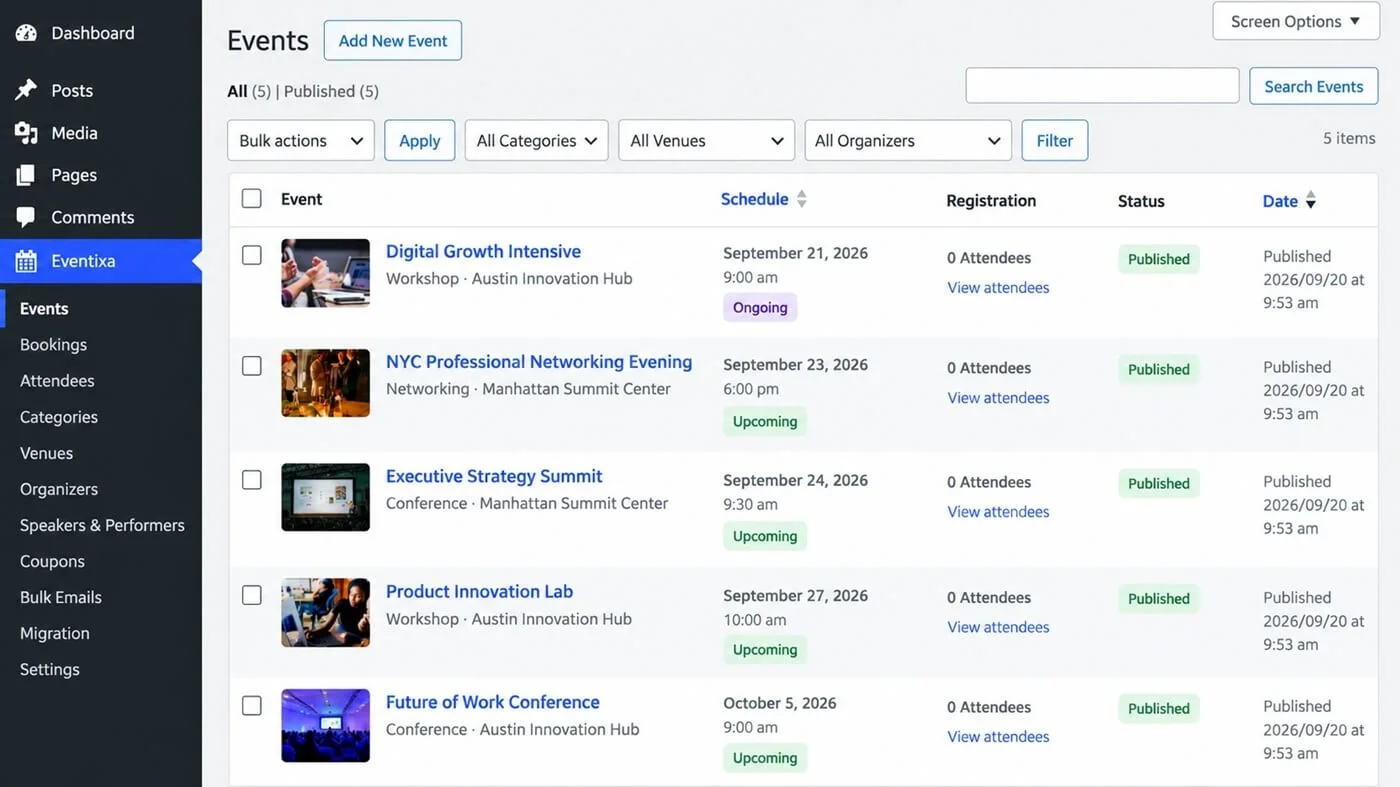
Eventixa events list in WordPress admin
Use Eventixa → Events to review event schedules, registrations, recurring status, and publication status.

Main Parts of an Event

Event AreaPurpose
Date & TimeControls when the event takes place
CategoriesOrganizes events into groups
VenueStores the physical event location
OrganizerIdentifies who manages the event
Tickets & RSVPControls registration
Attendee FieldsCollects attendee information
Speakers & PerformersAdds event participants
Sessions & AgendaBuilds the event schedule
Location & VirtualConfigures in-person or online access
Recurring EventsCreates repeating occurrences
WaitlistHandles sold-out ticket demand

Not every event needs every feature.

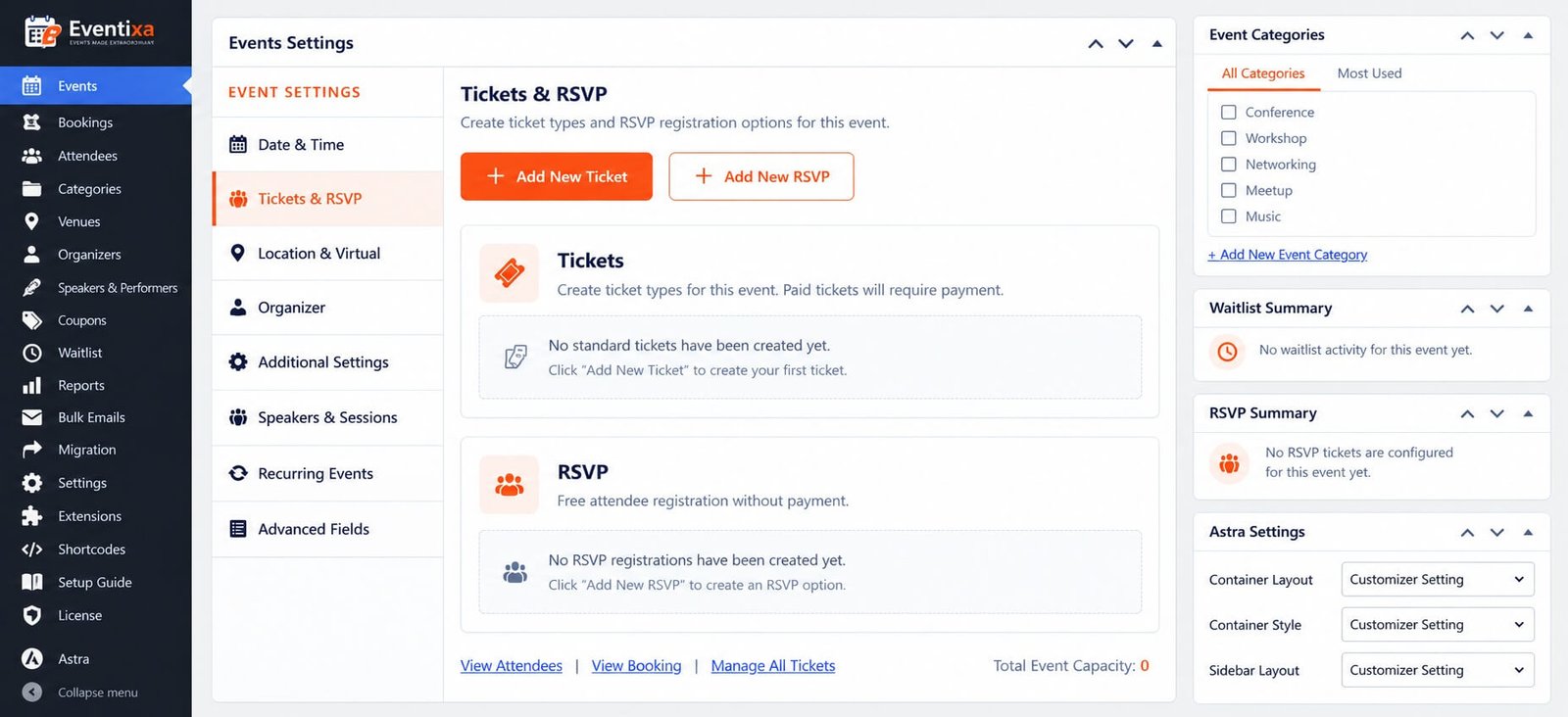
Eventixa event settings for date tickets location organizer and sessions
Each Eventixa event can contain date, ticket, location, organizer, speaker, session, and recurring event settings.

Use only the areas required for that event.

Event Types

Eventixa supports different event formats.

In-Person

Use this for events held at a physical venue.

Examples:

  • Conferences
  • Workshops
  • Meetups
  • Exhibitions

Virtual

Use this for online events.

Depending on your Eventixa edition, virtual events can use:

  • Custom Meeting URL
  • Zoom
  • Google Meet

Hybrid

Use this when attendees can participate both:

  • At a physical venue
  • Online

For detailed configuration, see the dedicated In-Person, Virtual & Hybrid Events documentation when available.
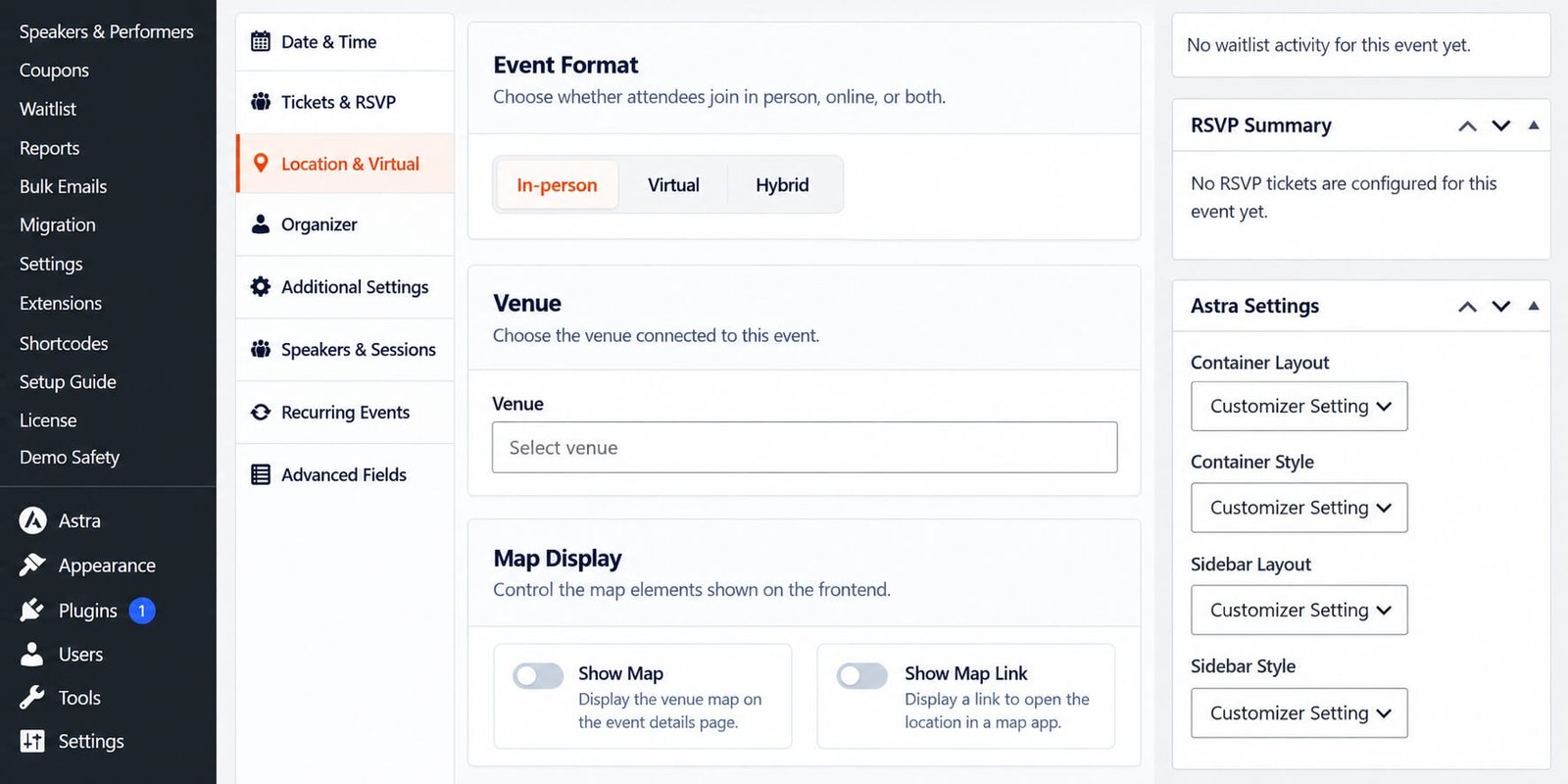
Eventixa Settings of event formate, venue, virtual event, hybride event

Tickets and Registration

Eventixa events can use different registration models.

These can include:

  • Free tickets
  • Paid tickets
  • RSVP registration

Ticket settings can control:

  • Price
  • Capacity
  • Sale dates
  • Quantity limits
  • Attendee information

For detailed configuration, see How to Create an Event in WordPress with Eventixa.

Venues and Organizers

Venues and organizers are reusable records.

This means you can create them once and assign them to multiple events.

Use: Eventixa → Venues and Eventixa → Organizers

This helps keep event information consistent across your website.

Speakers, Performers and Sessions

Eventixa can also support professional event content such as:

  • Speakers
  • Performers
  • Presenters
  • Sessions
  • Event agenda

This is useful for:

  • Conferences
  • Festivals
  • Training programs
  • Multi-session workshops

These features are documented separately so the main event workflow stays simple.

Recurring Events

Requires: Eventixa Pro

Recurring events let you create multiple event occurrences without manually creating the same event again and again.

Recurring functionality can also work with:

  • Tickets
  • Sessions
  • Virtual meetings
  • QR tickets
  • Check-in

Event Status and Schedule

The Events screen can show information such as:

  • Event date
  • Event time
  • Upcoming or ongoing status
  • Recurring status
  • Number of future occurrences
  • Registration count
  • Publication status

This makes it easier to review your event schedule from one screen.

Typical Event Workflow

A typical Eventixa event follows this structure:

Create event → Configure date and location → Add tickets → Publish → Accept registrations → Manage bookings and attendees

For more advanced events, the workflow can also include:

  • Speakers
  • Sessions
  • Recurrence
  • Virtual meetings
  • Waitlist
  • QR check-in
  • Reports

Before Publishing an Event

Check the following:

  • Event title and description
  • Date and time
  • Event type
  • Venue or virtual access
  • Organizer
  • Ticket or RSVP setup
  • Ticket capacity
  • Attendee fields
  • Payment method for paid tickets

Then complete at least one test registration.

Related Documentation

Continue with:

  1. How to Create an Event in WordPress with Eventixa
  2. Create Your First WordPress Event with Eventixa
  3. Eventixa Dashboard and WordPress Admin Overview
  4. Eventixa Free vs Pro – Feature Differences Explained

Share This Article :

  • Facebook
  • X
  • LinkedIn
  • Pinterest
Eventixa Design SystemCreating an Event

Eventixa is a modern WordPress event management plugin for creating events, selling tickets, managing attendees, and delivering seamless booking experiences—all from a single platform.

Help Center

  • Documentation
  • Starter Guide
  • Contact Us

Features

  • Event Management
  • Email Notifications
  • Payment Processing
  • Recurring Events
  • Live Demo

Company

  • Contact Us
  • Privacy Policy
  • Refund Policy
  • T&Cs

Copyright © 2026 - All rights reserved.