
Speakers & Performers Overview
Eventixa includes a reusable participant system for managing the people who appear at your events.
You can create profiles for speakers, performers, presenters, panelists, hosts, moderators, and other participants, then assign them to events and sessions.
Available in: Eventixa Core
Location: Eventixa → Speakers & Performers
Related features: Sessions, Event Agenda, Events
Pro enhancements: Additional participant presentation controls
What Are Speakers & Performers?
Speakers & Performers are reusable participant profiles.
Instead of entering the same person again for every event, you create the profile once and reuse it across multiple events.
A participant can represent:
- Speaker
- Performer
- Presenter
- Panelist
- Moderator
- Host
- Trainer
- Instructor
- Other event contributor
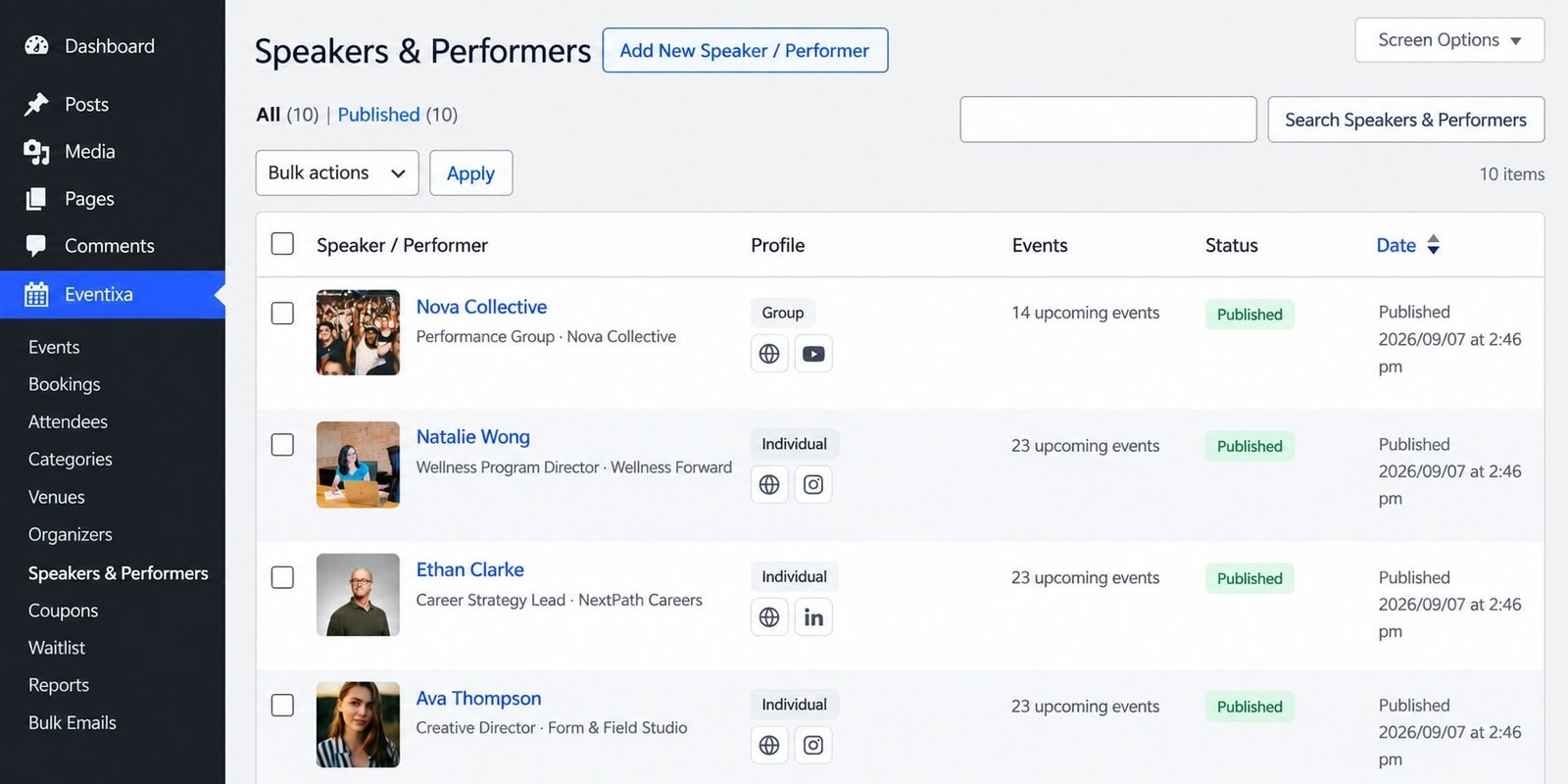
Open Speakers & Performers
Go to: Eventixa → Speakers & Performers
From this screen, you can manage participant profiles used throughout your events.
You can:
- Create participants
- Edit participant profiles
- Review existing participants
- Manage groups
- Reuse participants across events
How the Participant System Works
The basic Eventixa participant workflow is:
Create participant → Add profile information → Assign to event → Optionally assign to sessions → Display on event page
This keeps participant information centralized and reusable.
Participant Profiles
A participant profile can contain information such as:
- Name
- Profile image
- Biography
- Role or designation
- Organization information
- Contact or social information
- Participant group
The exact information displayed on the frontend depends on the profile and event presentation settings.
Speakers
Speaker profiles are useful for:
- Conferences
- Seminars
- Webinars
- Workshops
- Training programs
- Panel discussions
For example:
Participant: Sarah Mitchell
Role: Product Strategy Director
Event: FutureTech America Summit
Session: Building AI-Ready Product Teams
Performers
The same participant system can be used for performers.
Examples include:
- Musicians
- Artists
- Entertainers
- Stage performers
- Cultural performers
This allows Eventixa to support professional events beyond conferences and workshops.
Reuse Participants Across Events
A single participant can be associated with multiple Eventixa events.
For example, the same speaker could participate in:
- Annual Technology Conference
- Leadership Workshop
- Product Management Webinar
You do not need to duplicate the participant profile for each event.
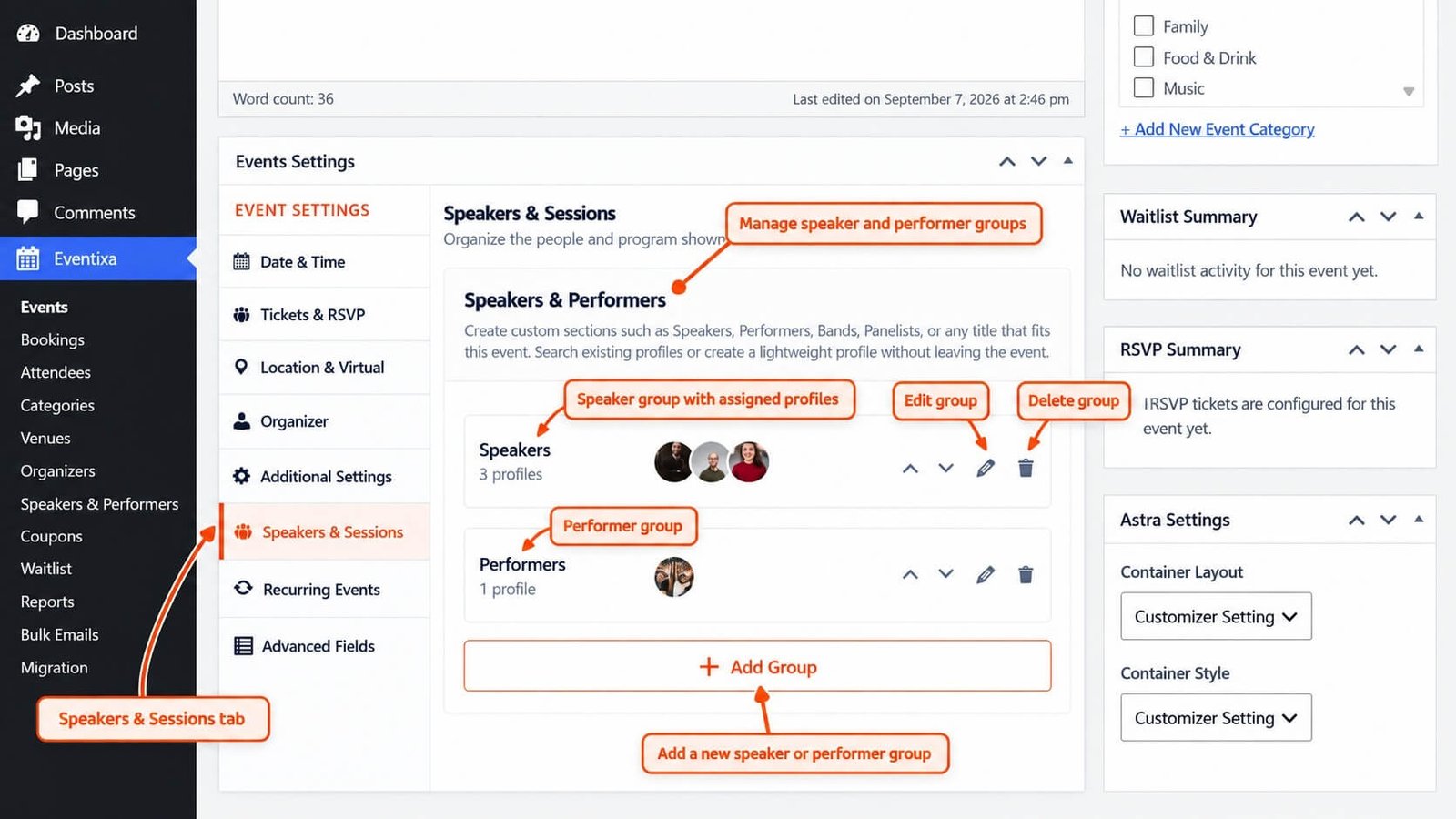
Add Participants to an Event
Participants are connected to an event from:
Eventixa → Events → Edit Event → Speakers & Sessions
Select the speakers or performers required for that event.
The event then knows which participant profiles belong to it.
Participants and Sessions
Speakers and performers can also be connected to individual sessions.
For example:
| Session | Participant |
|---|---|
| Opening Keynote | Sarah Mitchell |
| Product Strategy Panel | Sarah Mitchell, David Chen |
| Closing Performance | The Acoustic Collective |
This allows the frontend agenda to show who is associated with each session.
Participant Groups
Eventixa supports organizing participants into groups.
Groups are useful when a larger event contains different participant types.
Examples:
- Keynote Speakers
- Panelists
- Workshop Hosts
- Performing Artists
- Moderators
Groups make large participant collections easier to organize and present.
A dedicated guide will cover participant groups in detail.
Participant Ordering
Where supported by the participant manager, profiles can be arranged in the preferred display order.
For example:
- Keynote Speaker
- Featured Speakers
- Panelists
- Moderators
Use the order that best matches your event program.
Frontend Display
Assigned speakers and performers can appear on the single event page.
Depending on the active layout and presentation settings, the frontend can show:
- Profile image
- Name
- Role
- Biography
- Group
- Session information
Different Eventixa presentation modes can be used where supported.
Core and Pro Presentation
The core participant workflow is available in Eventixa Core.
Eventixa Pro can extend the presentation options available for professional events.
The underlying participant profiles remain part of the same Eventixa system.
Speakers & Performers vs Organizers
These are separate concepts.
| Type | Purpose |
|---|---|
| Organizer | Person or organization responsible for running the event |
| Speaker / Performer | Person participating in the event program |
For example:
Organizer: Eventixa Conference Team
Speaker: Sarah Mitchell
Do not create the event organizer as a speaker unless they are genuinely participating in the program.
Speakers & Performers vs Attendees
Participants are also different from attendees.
| Record | Meaning |
|---|---|
| Speaker / Performer | Part of the event program |
| Attendee | Person registered to attend the event |
A speaker does not automatically become a registered attendee.
Duplicate Events
When an Eventixa event is duplicated, supported speaker and session relationships can also be preserved.
After duplication, review whether the copied participants still apply to the new event.
See How to Duplicate an Event in Eventixa.
Recurring Events
For recurring events, speakers and sessions remain connected to the event workflow.
Recurring agendas can additionally control whether the same agenda is used for all occurrences or different agenda information is used per occurrence.
Recurring agenda behavior is covered in a dedicated guide.
Common Problems
Participant Does Not Appear on the Event
Check that:
- The participant profile is saved.
- The participant is assigned to the event.
- The event has been updated.
- The frontend participant section is available in the selected presentation.
Participant Is Missing from a Session
Check:
- The participant profile exists.
- The participant belongs to the event.
- The correct participant is assigned to the session.
Profile Change Appears on Multiple Events
This is expected.
Participant profiles are reusable, so changing shared profile information can affect every event using that participant.
Duplicate Participant Profiles Appear
Search the existing participant list before creating a new profile.
Reuse an existing participant whenever it represents the same person.
Recommended Workflow
For a professional event:
- Create your event.
- Create the required participant profiles.
- Organize participants into groups if needed.
- Assign participants to the event.
- Create sessions.
- Assign participants to the appropriate sessions.
- Preview the event page and agenda.


