
Ticket Quantity Rules
Eventixa lets you control how many tickets a visitor can select in a single booking.
Use Minimum quantity per booking and Maximum quantity per booking to prevent invalid quantities and control how many attendee places one purchaser can reserve at once.
Available in: Eventixa Core
Location: Eventixa → Events → Edit Event → Tickets & RSVP → Edit Ticket
Related features: Capacity, Checkout, Attendee Information, RSVP
Open Ticket Quantity Settings
Go to: Eventixa → Events
Open the event you want to edit.
Then go to: Event Settings → Tickets & RSVP
Create a new standard ticket or edit an existing ticket.
Find: Capacity → Booking Quantity Limits
The available fields are:
- Minimum quantity per booking
- Maximum quantity per booking
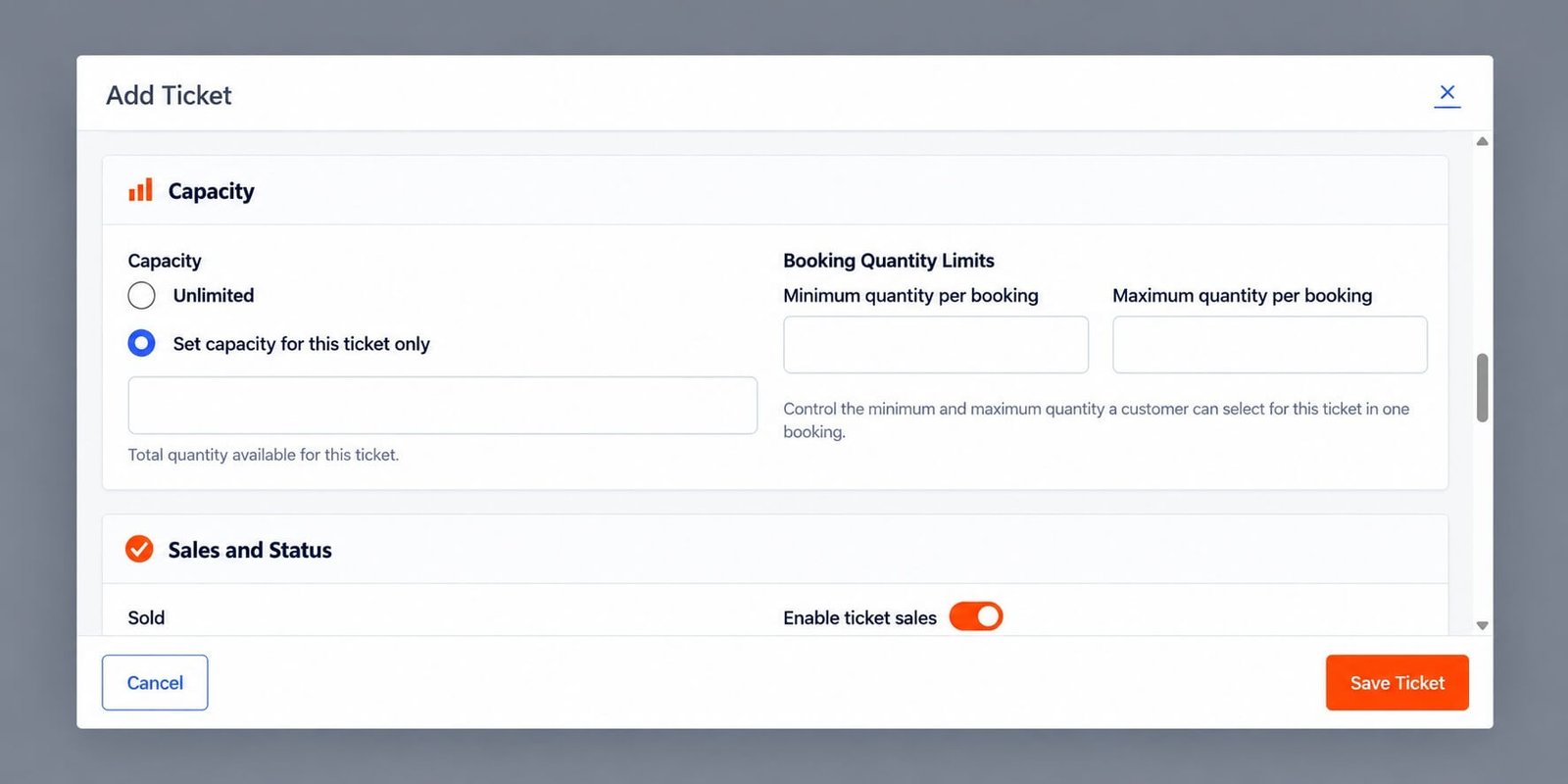
Minimum Quantity per Booking
The minimum quantity controls the smallest number of tickets a customer can select for that ticket in one booking.
For most events, use: Minimum quantity: 1
This means a visitor must select at least one ticket before proceeding.
Example: Minimum 1
Configuration:
| Setting | Value |
|---|---|
| Minimum quantity | 1 |
| Maximum quantity | 4 |
A visitor can select:
- 1
- 2
- 3
- 4
They cannot proceed with zero tickets selected.
Minimum Greater Than One
You can use a higher minimum when the ticket is intended to be booked as a group.
For example:
Minimum quantity: 2
This can be useful for:
- Couple registrations
- Group packages
- Team bookings
- Table reservations
Visitors must select at least two tickets for that ticket type.
Maximum Quantity per Booking
The maximum quantity determines the largest number of tickets one customer can select in a single booking.
For example:
Maximum quantity: 4
One booking can contain no more than four of that ticket.
Why Set a Maximum?
A maximum quantity can help:
- Prevent one customer from taking too much capacity.
- Encourage fair ticket distribution.
- Limit group sizes.
- Reduce accidental large bookings.
- Control attendee data collection.
For limited-capacity events, setting a maximum is especially useful.
Example: General Admission
A common configuration is:
| Setting | Value |
|---|---|
| Minimum quantity | 1 |
| Maximum quantity | 4 |
A customer can purchase between one and four General Admission tickets in a single booking.
Example: VIP Ticket
For a limited VIP tier:
| Setting | Value |
|---|---|
| Capacity | 20 |
| Minimum quantity | 1 |
| Maximum quantity | 2 |
Even if many VIP places remain, one booking can contain at most two VIP tickets.
Quantity Limits and Capacity
Quantity limits do not override ticket availability.
Suppose:
Maximum quantity: 4
Remaining capacity: 2
A visitor can only select up to: 2 because only two places remain.
The effective maximum is always constrained by current availability.
Example
Ticket settings:
- Capacity: 100
- Maximum per booking: 5
- Available: 3
The visitor cannot select five.
The quantity selector should stop at three because that is all the remaining capacity.
Unlimited Capacity
Quantity limits can still be used when ticket capacity is Unlimited.
For example:
Capacity: Unlimited
Maximum quantity: 4
There is no total stock limit, but one booking can still contain no more than four tickets.
This is useful for virtual events where total capacity is unlimited but group booking size should remain controlled.
Quantity Rules on the Frontend
On the event page, Eventixa displays ticket quantity controls.
Visitors can typically use:
- Minus button
- Current quantity
- Plus button
The selector respects:
- Minimum quantity
- Maximum quantity
- Remaining ticket availability
Frontend Example
A ticket might show:
Min 1 / Max 4 per booking
This gives visitors a clear explanation of the selection limits.
Proceed to Checkout
The checkout button becomes relevant once the attendee has selected a valid ticket quantity.
If the selected quantity violates the ticket rules, Eventixa should prevent the booking from proceeding.
Multiple Ticket Types
Quantity limits apply to each ticket type individually.
For example:
Student Admission
- Minimum: 1
- Maximum: 1
General Admission
- Minimum: 1
- Maximum: 4
VIP Pass
- Minimum: 1
- Maximum: 2
This lets each ticket tier have its own booking rules.
Booking Multiple Ticket Types
If an event offers several tickets, visitors may be able to select quantities from more than one ticket type according to the active Eventixa workflow.
Each ticket’s own quantity restrictions still apply.
For example:
- General Admission: Max 4
- VIP: Max 2
The visitor cannot exceed either ticket’s individual maximum.
Quantity and Individual Attendee Information
If a purchaser selects multiple tickets and attendee collection is enabled, Eventixa can collect information for every attendee.
For example:
Quantity selected: 4
Eventixa can request details for four individual attendees.
This keeps attendee records aligned with the number of reserved places.
Quantity and Capacity Calculations
Capacity is based on attendee quantity, not merely booking count.
For example:
One booking contains:
Quantity: 4
That booking consumes four ticket places.
This matters when reviewing:
- Availability
- Capacity
- Attendee count
- Waitlist behavior
Quantity and Free Tickets
Free standard tickets can use the same quantity rules as paid tickets.
For example:
Free Community Ticket
- Minimum: 1
- Maximum: 6
A visitor can register up to six people without payment.
Quantity and Paid Tickets
Paid tickets use the same limits.
If a ticket costs $20 and a visitor selects three tickets:
Ticket subtotal: $60
before any applicable discounts, taxes, or other checkout calculations.
RSVP Quantity
RSVP registration can also use quantity selection.
For RSVP, the quantity represents the number of attendees included in the response.
For example: Going × 3 means three attendee places are being reserved.
RSVP Maximum Quantity
An RSVP could be configured as:
Minimum: 1
Maximum: 4
This allows one RSVP submission to include up to four people.
Individual attendee information can then be collected for those participants.
Not Going Quantity
If Not Going is enabled, RSVP quantity can also represent multiple people reporting that they will not attend.
Not Going attendees do not consume normal attending capacity.
Recurring Event Tickets
Quantity rules also apply to recurring event ticket bookings.
For recurring events, Eventixa must additionally consider the availability of the selected occurrence.
For example:
Maximum per booking: 4
Occurrence availability: 2
Only two can be selected for that occurrence.
Quantity Rules and Checkout Reservations
When a visitor selects multiple tickets and enters checkout, Eventixa can temporarily reserve the corresponding quantity.
For example:
Visitor selects: 4 tickets
The checkout session can temporarily reserve four attendee places.
If the session expires, those places can become available again.
Last Few Tickets
Quantity rules automatically interact with the final available capacity.
Suppose:
Maximum: 4
Available: 1
The frontend should only allow one ticket.
This prevents overselling even though the configured booking maximum is higher.
Changing Quantity Rules After Bookings Exist
You can change quantity settings for future bookings.
For example:
Old maximum: 6
New maximum: 2
Existing completed bookings with quantities above two should remain historical booking records.
The new rule affects future selection behavior.
Minimum Greater Than Remaining Capacity
Avoid configurations where the required minimum cannot be satisfied.
For example:
Minimum: 3
Available: 2
New visitors cannot create a valid booking because they cannot meet the minimum.
Review quantity rules as capacity gets low.
Choosing Appropriate Quantity Limits
For most standard events:
Minimum: 1
Then choose the maximum according to your registration strategy.
Examples:
- Individual-only event → Maximum 1
- Typical event → Maximum 4
- Family event → Maximum 6
- Group registration → Higher maximum as needed
Do not use unnecessarily large limits.
Example: Individual Conference Registration
| Setting | Value |
|---|---|
| Minimum | 1 |
| Maximum | 1 |
Each booking represents one attendee.
Example: Family Event
| Setting | Value |
|---|---|
| Minimum | 1 |
| Maximum | 6 |
One customer can register several family members.
Example: Group Package
| Setting | Value |
|---|---|
| Minimum | 4 |
| Maximum | 10 |
This could be used when a ticket type is intended only for group registration.
Common Problems
Plus Button Stops Increasing
Check:
- Maximum quantity
- Remaining capacity
Either may be preventing additional tickets.
Customer Can Only Select One Ticket
Check whether:
Maximum quantity per booking = 1
Quantity Is Lower Than the Configured Maximum
The remaining availability may be lower than the maximum.
Booking Cannot Proceed
Verify the selected quantity meets the minimum requirement.
Minimum Quantity Cannot Be Reached
Check current ticket availability.
For example, a minimum of three cannot be satisfied if only two places remain.
Multiple Attendees Are Missing
If multiple tickets were selected but individual attendee information is needed, check the attendee collection settings.
Recommended Workflow
- Decide whether the ticket supports individual or group registration.
- Set the minimum quantity.
- Set the maximum quantity.
- Review ticket capacity.
- Save the ticket.
- Preview the frontend ticket selector.
- Test the minimum.
- Test the maximum.
- Test when remaining capacity is lower than the maximum.
- Complete a multi-ticket booking.
- Verify attendee records.
Recommended Defaults
For most events, start with:
Minimum quantity: 1
Maximum quantity: 4
Then adjust based on the event’s actual requirements.
Important Notes
- Minimum controls the smallest valid booking quantity.
- Maximum controls the largest quantity for one ticket type in one booking.
- Availability can lower the effective maximum.
- Quantity consumes attendee capacity, not just booking count.
- Unlimited-capacity tickets can still have booking limits.
- Multi-ticket bookings should collect individual attendee details when required.
- Review minimum quantities as the event approaches sold out.


