
Enable Waitlist for an Event
Eventixa Pro lets you enable a waitlist for tickets that may reach capacity.
When an eligible ticket becomes sold out, visitors can use Join Waitlist instead of completing a normal booking. Their request is added to the Eventixa Waitlist and can later be processed when capacity becomes available.
Available in: Eventixa Pro
Location: Eventixa → Events → Add/Edit Event → Tickets
Related features: Ticket Capacity, Waitlist, Bookings, Email Notifications
Before You Enable Waitlist
Before using the waitlist, make sure the event has at least one ticket with a defined capacity.
The waitlist is intended for tickets where availability can eventually reach:
0 available
For example:
Ticket: Standard Event Pass
Capacity: 100
Booked: 100
Available: 0
Once the ticket reaches its available limit, visitors can be offered the waitlist workflow instead of normal ticket selection.
Open the Event
Go to: Eventixa → Events
Open the event you want to configure.
You can edit an existing event or configure the waitlist while creating a new event.
Open the Tickets Section
In the event editor, locate the ticket configuration area.
Open the ticket you want to use with the waitlist.
The waitlist applies to ticket availability, so configure the ticket carefully before publishing the event.
Configure Ticket Capacity
Set the ticket quantity or capacity according to the number of registrations you want to accept.
For example:
Ticket Name: Standard Event Pass
Capacity: 100
Eventixa uses ticket availability to determine when normal registration is no longer available.
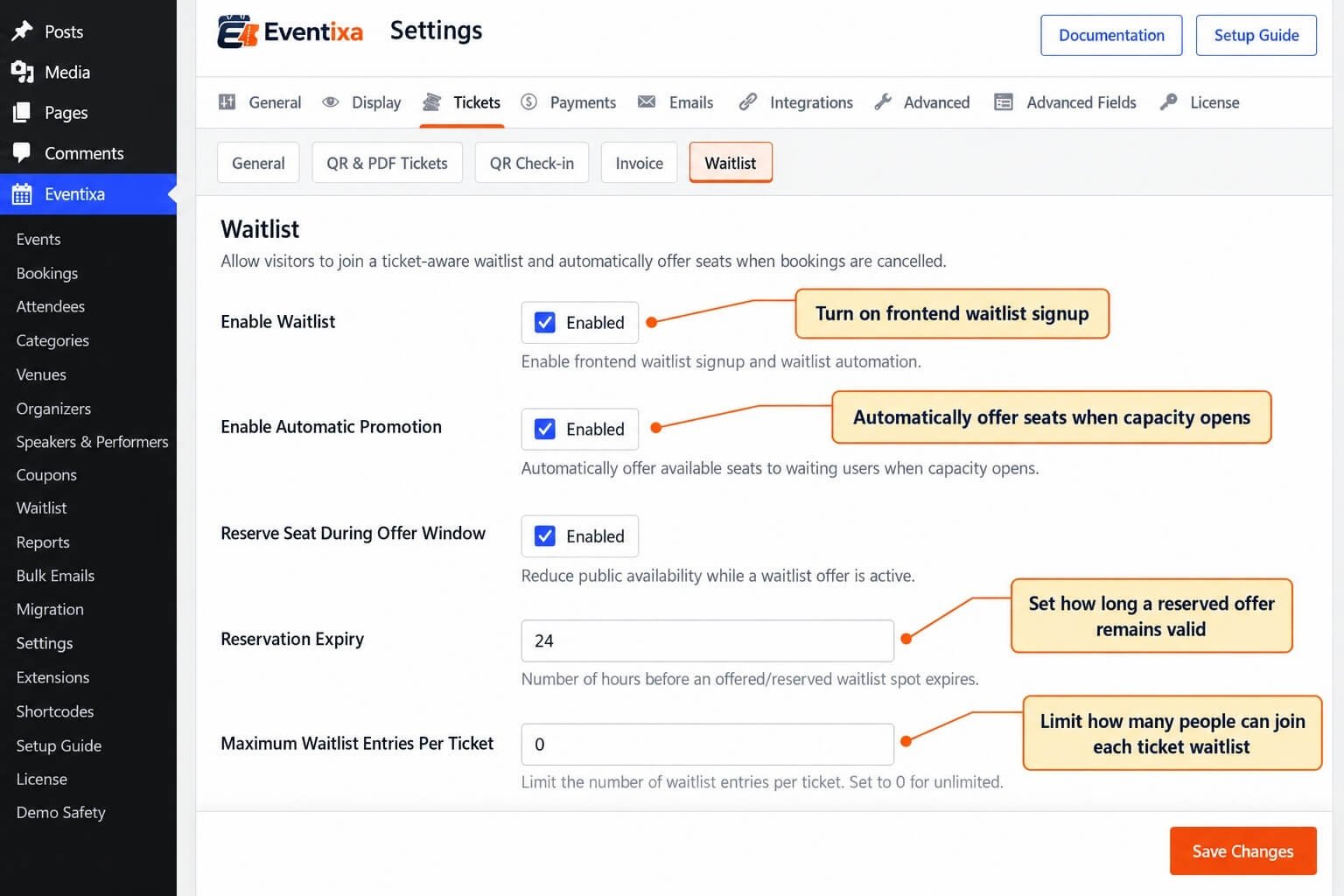
Enable the Waitlist
Enable the waitlist option for the applicable ticket or event configuration.
Once enabled, Eventixa can display the waitlist option when that ticket reaches its sold-out state.
The waitlist does not replace the normal ticket form while seats are still available.
Save the Event
After configuring the waitlist, save or update the event.
Make sure the changes are saved before testing the frontend.
What Visitors See While Tickets Are Available
While a ticket still has availability, visitors use the normal booking controls.
For example:
Student Admission
100 available
The visitor can select a quantity and continue to checkout.
There is no need to join a waitlist while tickets can still be booked normally.
What Visitors See When the Ticket Is Sold Out
When an eligible ticket reaches capacity, Eventixa can display:
Sold out
and:
Join Waitlist
instead of allowing the visitor to select a normal ticket quantity.
This clearly separates available tickets from sold-out tickets.
Example
Suppose an event has two tickets:
Student Admission
Availability: 100 available
Price: Free
Visitors can still book this ticket normally.
Standard Event Pass
Availability: Sold out
Price: $19.00
Visitors can no longer increase the ticket quantity.
Instead, Eventixa displays: Join Waitlist
This allows the visitor to register their interest specifically for the sold-out ticket.
Join Waitlist Button
The Join Waitlist button appears with the sold-out ticket when the waitlist is enabled and the ticket is eligible.
Visitors can select it to begin the waitlist signup process.
Waitlist Is Ticket-Specific
Waitlist demand belongs to the relevant ticket.
If one ticket is sold out while another still has availability, visitors can continue booking the available ticket.
For example:
Student Admission: Available
Standard Event Pass: Sold out
The customer can either:
- Book Student Admission, or
- Join the Standard Event Pass waitlist
depending on what they want.
Joining the Waitlist
When the visitor selects: Join Waitlist
they can provide the required waitlist information.
Typical information includes:
- Name
- Email address
After submission, Eventixa creates a waitlist entry for the relevant ticket.
Waitlist Registration Does Not Create a Booking
Joining the waitlist does not create an Eventixa booking.
At this stage:
- No booking is completed.
- No attendee is created.
- No event ticket is issued.
- No QR ticket is generated.
- No payment is collected.
The visitor is simply waiting for ticket availability.
Waitlist Confirmation
After joining successfully, Eventixa can send a: Waitlist Confirmation email.
This confirms that the customer’s waitlist request has been received.
It is not a booking confirmation.
Verify the Waitlist Entry
After testing the frontend, go to: Eventixa → Waitlist
The new record should appear in the Waitlist screen.
You can review information such as:
- Customer
- Ticket / Occurrence
- Status
- Joined date
- Offer
- Actions
Waiting Status
A newly added customer normally begins in the waiting stage.
This indicates that the customer has joined the queue but has not yet received a reserved seat.
Waitlist Order
The Waitlist screen allows administrators to review the order of waiting entries.
Where the available actions permit it, entries can be reordered or manually promoted according to the Eventixa waitlist workflow.
Promote
The Waitlist screen can provide a: Promote action for waiting entries.
Promotion is used when an eligible seat is to be reserved for that waitlisted customer.
Normally, capacity availability and the waitlist workflow should be reviewed before manually promoting someone.
Reserved Status
When a waitlisted customer receives a reservation, their status can move to: Reserved
The Waitlist screen can also display the offer time remaining.
For example: 24 hours left
This indicates how long the reserved customer has to complete their booking.
Resend Email
For an active reserved entry, Eventixa can provide: Resend Email
This allows the reservation email to be sent again without creating another waitlist entry.
Removing a Waitlist Entry
Administrators can remove a waitlist entry when necessary.
Use this carefully because the customer will no longer remain in that waitlist queue.
Waitlist Status Overview
The Eventixa Waitlist screen can provide summary cards for statuses such as:
- Waiting
- Reserved
- Offered
- Converted
- Expired
- Cancelled
These counts help administrators understand the current waitlist activity.
Status Filters
You can filter the Waitlist screen by status.
For example:
All | Waiting | Reserved | Offered | Converted | Expired | Cancelled
This is useful when managing a larger number of waitlist records.
When Should the Waitlist Become Available?
The visitor-facing waitlist is intended for tickets that no longer have normal availability.
For example:
Available: 1
The final customer can still complete a normal booking.
After that seat is booked:
Available: 0
The ticket becomes sold out, and the waitlist option can become relevant.
Waitlist and Ticket Quantity
The waitlist does not add more quantity to the ticket.
If the configured capacity is: 100 and the ticket is sold out, adding 20 customers to the waitlist does not change the ticket capacity to 120.
The additional customers are waiting for existing capacity to become available.
What Releases Capacity?
Ticket capacity can become available again when the normal Eventixa booking workflow releases a seat.
One important example is an eligible booking cancellation.
Once capacity is released, Eventixa can process the relevant waitlist.
Waitlist Reservation
When capacity becomes available, a waitlisted customer can receive a temporary reservation.
This keeps the released seat from immediately becoming generally available while the selected customer completes checkout.
Waitlist Offer Expiration
The reservation does not last indefinitely.
The customer must complete the booking within the available offer period.
If the reservation expires, the capacity can be released for continued waitlist processing.
Paid Tickets
Waitlist can be used with eligible paid-ticket workflows.
The visitor joins the waitlist without paying.
Payment takes place only after the visitor receives an available-seat offer and continues through the normal checkout process.
Free Tickets
Free tickets can also use the waitlist where supported.
The customer still needs to complete the registration after receiving an available-seat offer, even though payment is not required.
Recurring Events
For recurring events, waitlist registrations should remain associated with the relevant occurrence.
For example:
April 15 — Sold Out
August 16 — Available
The visitor joining the April waitlist should be waiting for April availability, not August availability.
Test the Correct Occurrence
If the event is recurring:
- Open the desired occurrence.
- Confirm its ticket availability.
- Fill the applicable ticket to capacity.
- Verify Join Waitlist appears for that occurrence.
- Submit a test waitlist entry.
- Confirm the Waitlist admin screen shows the relevant occurrence.
When Not to Enable Waitlist
A waitlist may not be useful when:
- Ticket capacity is unlimited.
- You do not want to reallocate cancelled seats.
- The event does not require ticket registration.
- You prefer to close registrations permanently after sellout.
Recommended Setup Workflow
For each ticket where you want to use a waitlist:
- Open the event.
- Configure the ticket.
- Set an accurate capacity.
- Enable the waitlist.
- Save the event.
- Fill the ticket to capacity in a test environment.
- Open the frontend event page.
- Confirm Sold out appears.
- Confirm Join Waitlist appears.
- Submit a test waitlist request.
- Open Eventixa → Waitlist.
- Confirm the new entry appears.
Test Capacity Release
After confirming the waitlist signup:
- Keep the ticket sold out.
- Confirm at least one waiting entry exists.
- Cancel an eligible existing booking.
- Confirm capacity is released.
- Review the Waitlist screen.
- Verify the expected reservation workflow.
- Verify the customer email.
- Complete the offered booking.
Test Offer Expiration
You should also test what happens when a customer does not complete their booking.
- Create another waiting entry.
- Make a seat available.
- Allow the reservation to expire.
- Verify the waitlist status changes appropriately.
- Confirm capacity is released for continued processing.
Common Problems
Join Waitlist Does Not Appear
Check:
- Eventixa Pro is active.
- Waitlist is enabled.
- Ticket capacity is configured.
- The ticket is actually sold out.
- Event changes were saved.
- You are viewing the correct ticket or occurrence.
Join Waitlist Appears While Another Ticket Is Available
This can be normal.
Waitlist availability applies to the sold-out ticket.
Another ticket for the same event may still be bookable.
Ticket Shows Sold Out but No Waitlist Button
Confirm the waitlist has been enabled for that ticket/event configuration.
Visitor Joins but No Booking Appears
This is expected.
Joining the waitlist creates a waitlist entry, not a normal booking.
Visitor Joins but No Attendee Appears
This is also expected.
An attendee is created only after the visitor successfully completes the offered booking.
Waitlist Entry Does Not Appear in Admin
Verify:
- The signup was successfully submitted.
- The correct event/ticket was used.
- Eventixa → Waitlist is showing the correct status filter.
Wrong Recurring Occurrence Is Shown
Review the occurrence selected on the frontend and confirm the visitor joined the waitlist for the intended date.
Important Notes
- Waitlist requires Eventixa Pro.
- Set accurate ticket capacity before enabling the waitlist.
- Join Waitlist is intended for sold-out eligible tickets.
- A waitlist entry does not create a booking or attendee.
- Available tickets continue using the normal booking workflow.
- Different ticket types can have different availability states.
- For recurring events, waitlist entries should remain tied to their relevant occurrence.
- Test both waitlist signup and capacity-release behavior before using the feature on a live event.


