
Email Notifications Overview
Eventixa uses email notifications to keep customers and administrators informed throughout the event registration lifecycle.
Depending on the active Eventixa features and configuration, emails can be used for booking confirmations, attendee tickets, administrator alerts, reminders, and targeted bulk communication.
Available in: Eventixa Core + Eventixa Pro
Location: Eventixa → Settings → Emails
Related features: Bookings, Attendees, Tickets, Reminders, Bulk Emails, MailPoet, Mailchimp
What Are Eventixa Email Notifications?
Email notifications are automated or administrator-triggered messages connected to Eventixa activity.
They can help communicate:
- Booking confirmation
- Registration details
- Ticket information
- Booking status changes
- Payment-related updates
- Event reminders
- Administrator alerts
- Bulk event announcements
The exact emails available depend on the active Eventixa modules and extensions.
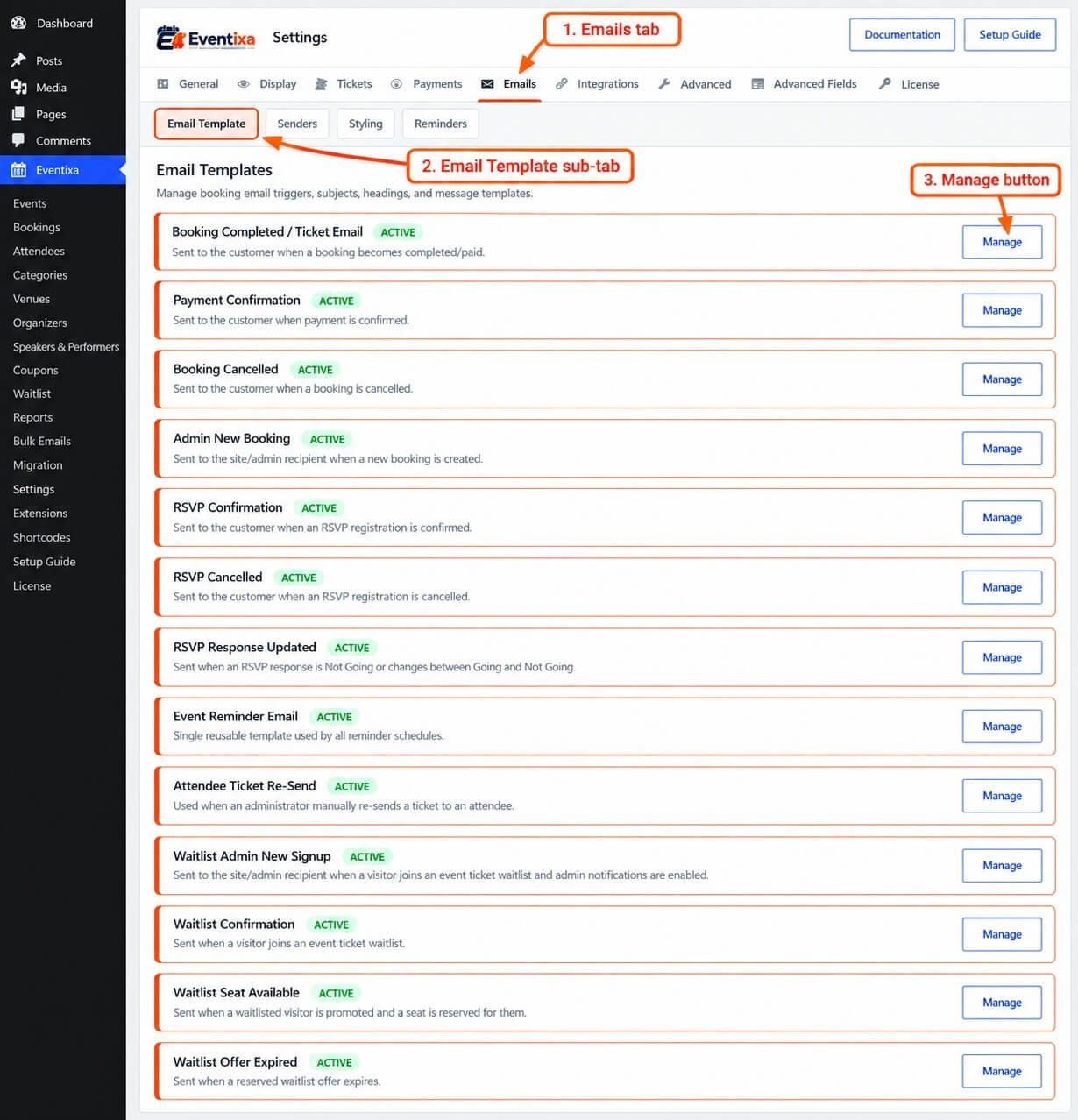
Open Email Settings
From the WordPress dashboard, go to: Eventixa → Settings → Emails
This area contains the available Eventixa email configuration.
From here, you can review or configure customer and administrator email behavior.
Customer Emails
Customer emails are messages sent to the purchaser or attendee.
Common examples include:
- Booking confirmation
- Ticket delivery
- Registration information
- Status-related notifications
- Reminder emails
These messages help customers understand what they booked and what they need to do next.
Administrator Emails
Administrator emails notify site managers or organizers about Eventixa activity.
Depending on configuration, they can be used to notify administrators about:
- New bookings
- Registration activity
- Booking changes
- Other operational events
Administrator emails are covered separately in: Administrator Emails
Purchaser vs Attendee Emails
Eventixa distinguishes between the purchaser and attendee.
This is important because they may be different people.
For example:
Purchaser: Eventixa Team
Attendee: John Paul
A booking email may need to go to the purchaser, while ticket or attendee-specific information may need to go to the attendee.
Multiple Attendees
One booking can include multiple attendee records.
For example:
Purchaser: Jane Smith
Attendees:
- Jane Smith
- John Smith
- Alex Smith
Email behavior can therefore depend on whether the notification is booking-level or attendee-level.
Booking-Level Emails
Booking-level emails relate to the whole registration.
They may contain information such as:
- Booking reference
- Event
- Ticket summary
- Booking total
- Payment method
- Purchaser information
These are normally associated with the purchaser or booking contact.
Attendee-Level Emails
Attendee-level messages relate to a specific attendee.
They may contain:
- Attendee name
- Ticket
- Event information
- QR code
- Check-in information
- Virtual access information
This is especially important when one booking contains several attendees.
Ticket Emails
Where ticket delivery is enabled, Eventixa can send ticket information to the applicable attendee email.
Ticket emails may include:
- Event name
- Date and time
- Ticket name
- Attendee name
- QR information
- Ticket PDF where applicable
Re-Send Ticket
Requires Eventixa Pro
Administrators can re-send an attendee ticket from the attendee details screen.
This is useful when:
- Original ticket email was lost
- Email address was corrected
- Delivery failed
- Attendee asks for another copy
Correct Email Before Re-Sending
If the attendee email is incorrect:
- Open the attendee.
- Update the email.
- Save the attendee fields.
- Confirm the new address.
- Re-send the ticket.
This prevents the replacement ticket from going to the wrong address.
Free Ticket Emails
Free tickets can still generate registration and ticket emails.
The absence of a payment transaction does not mean the attendee should receive no confirmation.
Paid Booking Emails
For paid tickets, customer emails may depend on the final booking/payment outcome.
A successfully paid booking can proceed through the normal confirmation and ticket-delivery workflow.
Pending Payment Emails
Be careful with emails sent before payment is confirmed.
For example, a Pending booking should not necessarily receive the same message as a successfully completed paid booking.
Email behavior should match the booking state.
Failed Payment
A failed payment should not generate messaging that implies the customer has a valid paid registration.
Review the booking and payment state when troubleshooting unexpected emails.
Offline Payment Emails
For Local / Offline Payment, emails can be especially important because the customer may need instructions for completing payment outside the website.
For example:
- Pay at venue
- Bank transfer
- Contact organizer
Make sure the offline payment instructions are clear.
WooCommerce Emails
When WooCommerce handles checkout, WooCommerce can also send its own transactional emails.
This means a customer may receive both:
- WooCommerce order email
- Eventixa event-related email
Configure both systems carefully to avoid unnecessary duplication.
Include Event Details in WooCommerce Email
Where available in the Eventixa WooCommerce settings, Eventixa can add relevant event context to WooCommerce transactional emails.
This may include information such as:
- Event details
- Venue
- Organizer
- Event links
Test the WooCommerce email experience before going live.
Reminder Emails
Event reminders can be used to contact registered attendees before the event.
Examples:
- Event starts tomorrow
- Event starts in 2 hours
- Venue reminder
- Virtual access reminder
Reminder Emails are covered separately.
Bulk Emails
Eventixa also provides a Bulk Emails feature for sending targeted messages to event registrants.
This is different from automated transactional notifications.
Bulk Emails are useful for:
- Schedule changes
- Venue updates
- Event announcements
- Important attendee information
Transactional vs Bulk Email
Transactional Email
Triggered by a booking or attendee workflow.
Examples:
- Booking confirmation
- Ticket email
- Payment-related email
Bulk Email
Sent intentionally by an administrator to a selected audience.
Example:
Venue changed to Hall B
These serve different purposes.
Email Templates
Eventixa email templates control the content and structure of supported notifications.
Templates can include:
- Subject
- Heading
- Message body
- Dynamic placeholders
Email Templates are documented separately.
Email Placeholders
Placeholders let Eventixa insert dynamic data into email content.
For example, a template may use placeholders for:
- Customer name
- Event name
- Booking reference
- Event date
- Ticket
- Amount
The actual supported placeholders depend on the template and workflow.
Why Use Placeholders?
Placeholders allow one email template to work for many bookings.
Instead of writing:
Your booking for Community Science Festival is confirmed
you can use a dynamic event placeholder so the same template works for every event.
Email Personalization
Good Eventixa emails should clearly identify:
- Recipient
- Event
- Booking
- Relevant next step
Avoid overly generic messages that leave customers unsure which event the email belongs to.
Event Information in Emails
Where relevant, customer emails should include useful event details such as:
- Event name
- Date
- Time
- Venue or virtual information
- Ticket
- Booking reference
This reduces support questions.
Recurring Events
For recurring events, email content should identify the correct occurrence.
For example:
Community Science Festival
August 16, 2028
rather than only showing the parent recurring event title.
This helps attendees know exactly which date they registered for.
Virtual Events
Virtual and Hybrid events can require additional communication.
Depending on the workflow, emails can provide:
- Registration confirmation
- Meeting access information
- Reminder information
Virtual access should still respect Eventixa reveal and eligibility rules.
Do Not Expose Managed Join URLs Too Early
For managed virtual providers such as Zoom or Google Meet, access information should follow the applicable Eventixa access rules.
Emails should not bypass those controls.
Guest Checkout
Guest customers rely heavily on email because they may not have an Eventixa account area to revisit later.
Make sure guest checkout emails contain enough information to identify the booking.
Logged-In Customers
Logged-in customers can receive the same applicable notifications, while also having access to their account workflow where supported.
Email Delivery Depends on WordPress Mail
Eventixa sends email through the WordPress email environment.
Actual delivery can depend on:
- Hosting configuration
- SMTP configuration
- Transactional email provider
- Receiving mail server
- Spam filtering
An email being generated does not guarantee inbox delivery.
SMTP Recommended for Production
For production event websites, a reliable SMTP or transactional mail service is recommended.
This improves the chances that booking and ticket emails reach customers.
Test Email Delivery Before Launch
Before accepting registrations, complete a test booking and verify:
- Purchaser email
- Attendee ticket email
- Administrator email
- Links
- Event information
- Formatting
Do not wait until the first live booking to discover email problems.
Email From Name
Where configurable, use a recognizable sender name.
For example: Eventixa Events or your organization’s name.
Avoid sender names that customers will not recognize.
Reply-To Address
Where supported, use an email address that customers can contact for event questions.
This makes the notification more useful than a no-reply address when customer support is expected.
Avoid Sensitive Information
Do not place sensitive information in email content.
Avoid including:
- Passwords
- API keys
- Card details
- Secret credentials
- Internal-only notes
Email is not the correct place for confidential administrative data.
Booking References
Including the Eventixa booking reference can make support easier.
For example:
Booking: EC26001572
The customer can provide this reference when contacting the organizer.
Email and Booking Notes
Internal booking notes are intended for administrators.
They should not automatically appear in customer emails.
Keep public customer communication separate from private administrative notes.
Email and Attendee Notes
Similarly, attendee internal notes are private.
Do not include them in customer-facing notifications.
Email and Coupons
A booking confirmation can reflect the final discounted amount after a coupon.
For example:
Subtotal: $100
Discount: $20
Total: $80
Customer communication should reflect the amount actually due or paid.
Email and Refunds
After a refund, communication should match the real financial outcome.
Do not send a refund confirmation before the actual payment provider refund has succeeded.
Email and Cancellation
Booking cancellation and financial refund are separate.
A cancellation email should not imply that money has been returned unless the refund actually occurred.
Email and Waitlist
Waitlist requires Eventixa Pro
Waitlist emails can be time-sensitive.
A customer may receive an email when capacity becomes available, with instructions to complete the reserved booking before expiration.
Make sure those emails clearly communicate:
- Availability
- Reservation deadline
- Checkout action
Email and Check-In
Check-in itself does not necessarily require a customer email.
However, Eventixa may use attendee records and ticket emails as part of the check-in workflow.
MailPoet Integration
Eventixa Core includes MailPoet integration for supported marketing/list workflows.
This is separate from the normal Eventixa transactional email system.
MailPoet can be used for audience synchronization according to the integration configuration.
Mailchimp Integration
Requires Eventixa Pro
Eventixa Pro provides Mailchimp integration for supported audience workflows.
Like MailPoet, this is separate from ordinary booking confirmation and ticket email delivery.
Integrations vs Eventixa Emails
Do not confuse:
- Eventixa transactional emails
- MailPoet/Mailchimp subscriber synchronization
- Bulk Emails
Each serves a different purpose.
Common Problems
Customer Did Not Receive Booking Email
Check:
- Customer email address
- Spam folder
- WordPress mail configuration
- SMTP logs
- Booking status
Attendee Did Not Receive Ticket
Verify:
- Attendee email
- Attendee status
- Booking status
- Ticket eligibility
Then re-send the ticket where supported.
Wrong Person Received Ticket
Check purchaser vs attendee email fields.
One booking can contain multiple people.
Email Contains Wrong Event Date
For recurring events, verify the correct occurrence is associated with the booking.
Customer Received Email Before Payment Completed
Review:
- Booking status
- Payment status
- Trigger configuration
WooCommerce Sends Duplicate-Looking Emails
Remember that WooCommerce and Eventixa can both send messages.
Configure the customer experience intentionally.
Email Formatting Looks Broken
Check:
- Template content
- HTML
- Placeholders
- Theme/email plugin conflicts
Placeholder Appears as Raw Text
Confirm the placeholder is supported by that email template.
Email Goes to Spam
Use a properly configured SMTP or transactional mail service and verify your sending domain.
Guest Customer Cannot Find Booking
Make sure their confirmation email includes clear booking and event information.
Recommended Email Setup Workflow
- Go to Eventixa → Settings → Emails.
- Review customer emails.
- Review administrator emails.
- Configure sender information where available.
- Review email templates.
- Review placeholders.
- Save Changes.
- Complete a test free booking.
- Complete a test paid booking.
- Test guest checkout.
- Test attendee ticket delivery.
- Test administrator notifications.
- Test recurring-event email content.
- Test virtual-event communication.
- Verify SMTP/mail logs.
Recommended Production Checklist
Before going live, confirm:
- Sender name is recognizable.
- Reply-to address is correct.
- Customer templates are enabled as required.
- Administrator notifications are configured.
- Ticket delivery works.
- Recurring occurrence information is correct.
- Virtual-event information follows access rules.
- Guest booking emails are clear.
- SMTP is configured.
- Test messages reach the inbox.
Important Notes
- Eventixa email notifications support customer and administrator communication.
- Booking-level and attendee-level emails serve different purposes.
- Purchaser and attendee can be different people.
- Transactional emails are different from Bulk Emails.
- Email templates can use dynamic placeholders.
- Recurring-event emails should identify the correct occurrence.
- WooCommerce can send its own transactional emails alongside Eventixa.
- Actual delivery depends on the WordPress mail environment.
- A reliable SMTP or transactional email provider is recommended.
- Do not expose sensitive data or internal notes in customer emails.
- Always test email delivery before accepting live registrations.


