Skip to content
No results
  • Documentation
  • Features
    • Event Management
    • Payment Processing
  • Home
  • Pricing
  • Sample Page
Eventixa – Events Calendar, Tickets and Bookings
  • Home
  • Features
    • Event Management
    • Payment Processing
  • Pricing
  • Documentation
Eventixa – Events Calendar, Tickets and Bookings

Getting Started

  • Welcome to Eventixa
  • Installation
  • Activate Pro License
  • Setup Wizard
  • Shortcodes

Event Management

  • Creating an Event
  • Venues
  • Organizers
  • Virtual Events
  • Advanced Fields
  • Event Listing Views (Calendar, Grid, List & Map)
  • Search & Filters

Recurring Events

  • Creating Recurring Events
  • Recurrence Types
  • Exceptions & Exclusions
  • Editing Recurring Events
  • Managing Occurrences

Ticket Management

  • Creating Tickets
  • Free & Paid Tickets
  • Ticket Capacity
  • Sale Schedule
  • Ticket Settings
View Categories
  • Home
  • Documentations
  • Event Management
  • Virtual Events

Virtual Events

Eventixa allows you to create virtual events, making it easy to host webinars, online meetings, live streams, and other online experiences without a physical venue.

Enable a Virtual Event

  1. Go to Eventixa → Events.
  2. Create a new event or edit an existing one.
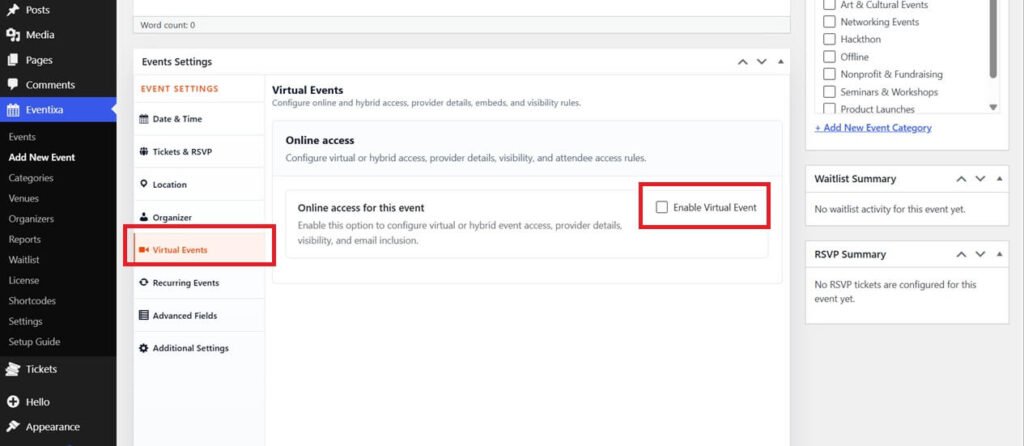
  3. In the Event Details section, enable the Virtual Event option.
  4. Save or update the event.

Screenshot: Virtual Event option


Add the Meeting Link

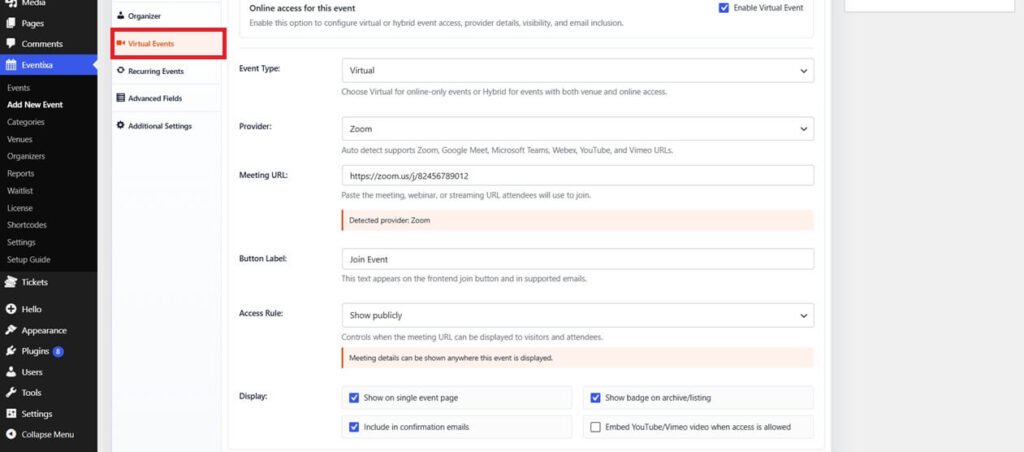
Once the event is marked as virtual, enter the online meeting or streaming URL.

You can use platforms such as:

  • Zoom
  • Google Meet
  • Microsoft Teams
  • YouTube Live
  • Vimeo Live
  • Any custom meeting or streaming URL

Screenshot: Virtual event URL field


Publish the Event

After completing the event details, click Publish or Update.

Visitors will see that the event is virtual, and attendees can join using the provided meeting link.
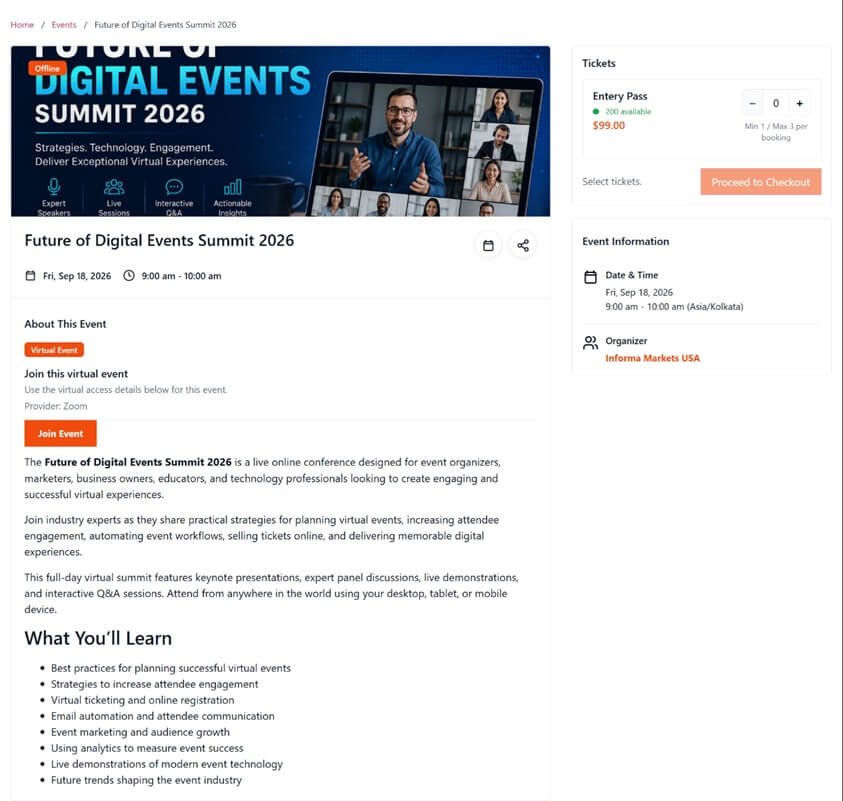
Screenshot: Virtual event on the frontend


Tips

  • Verify your meeting link before publishing the event.
  • Share the meeting link only with registered attendees if your event is private.
  • Include joining instructions in the event description for a better attendee experience.

Share This Article :

  • Facebook
  • X
  • LinkedIn
  • Pinterest
OrganizersAdvanced Fields

Eventixa is a modern WordPress event management plugin for creating events, selling tickets, managing attendees, and delivering seamless booking experiences—all from a single platform.

Help Center

  • Documentation
  • Starter Guide
  • Demo
  • Tutorial

Features

  • Event Management
  • Payment Processing
  • Email Notifications
  • Recurring Events

Company

  • Contact Us
  • Refund Policy
  • Privacy Policy
  • Account

Copyright © 2026 - All rights reserved.