
Exceptions and Exclusions give you greater control over recurring events by allowing you to skip or modify specific occurrences without changing the entire recurrence schedule.
This is useful when an event needs to be cancelled, postponed, or omitted due to holidays, maintenance, or other special circumstances.
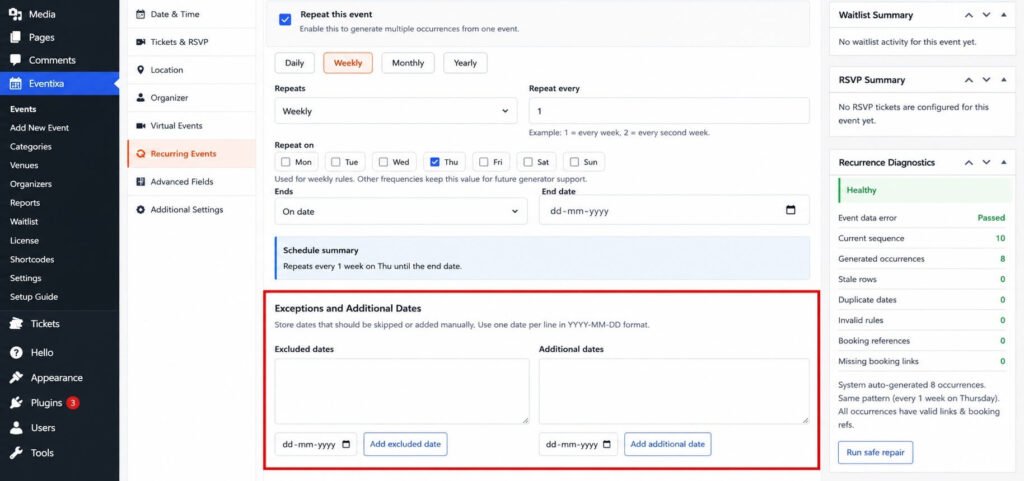
Add an Exception
To exclude a specific occurrence:
- Open the recurring event.
- Navigate to the Recurring Events section.
- Locate Exceptions & Exclusions.
- Click Add Exception.
- Select the date you want to exclude.
- Save or update the event.
The selected occurrence will no longer be generated or displayed on the frontend.
Common Use Cases
Exceptions are useful in situations such as:
- Public holidays
- Venue unavailability
- Staff vacations
- Event cancellations
- Seasonal breaks
- Maintenance periods
For example, if your event takes place every Monday but you don’t want an event on a public holiday, simply exclude that date.
View Excluded Dates
All excluded dates are listed within the recurring event settings, making it easy to review and manage them.
From this list, you can:
- View excluded dates
- Edit an exclusion
- Remove an exclusion
Remove an Exception
If an excluded occurrence should be restored:
- Open the recurring event.
- Go to Exceptions & Exclusions.
- Locate the excluded date.
- Remove the exception.
- Save the event.
The occurrence will be generated again according to the recurrence schedule.
Things to Know
- Exceptions only affect the selected occurrence.
- Other occurrences in the series remain unchanged.
- You can add multiple exceptions to the same recurring event.
- Removing an exception restores the occurrence if it falls within the recurrence schedule.
Tips
- Review your recurring schedule before adding exceptions.
- Use exceptions for one-time changes instead of editing the entire recurring series.
- Regularly review excluded dates to ensure your schedule stays accurate.


