
Eventixa includes powerful search and filtering options that help visitors quickly find the events they’re interested in. Instead of browsing every event, users can narrow down the results using various search criteria.

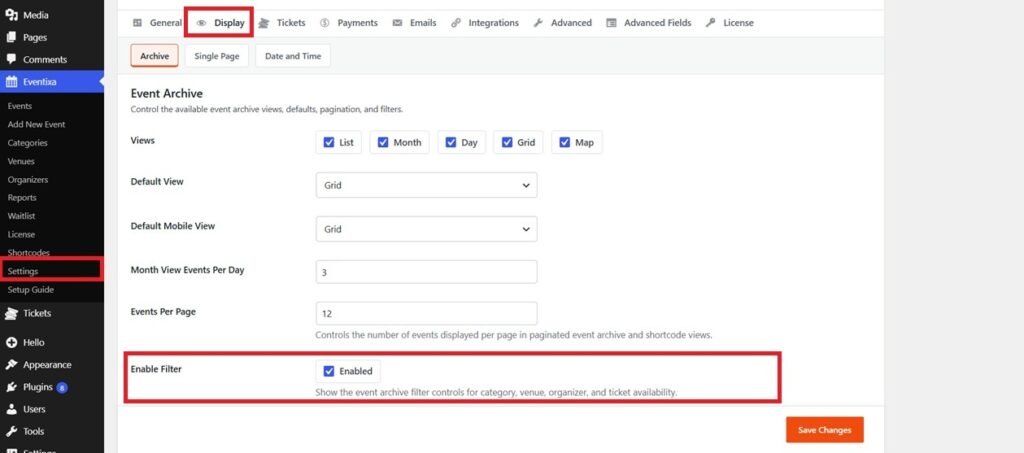
User can Enable / Disable the Filter from Eventixa -> Settings -> Display -> Archive
Search Events
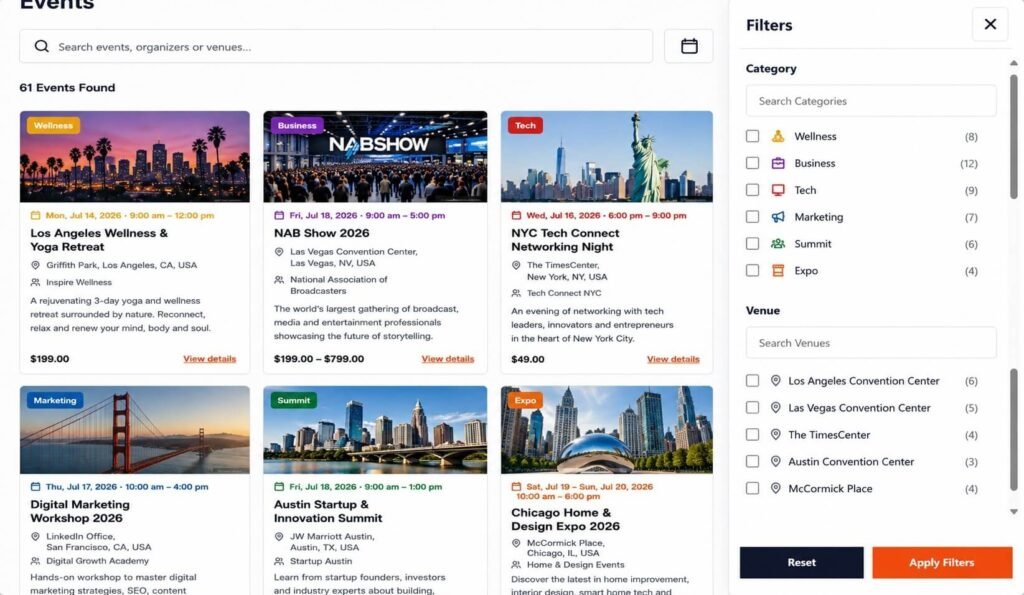
Visitors can search for events by entering keywords into the search box.
Search results may include matches for:
- Event Title
- Event Description
- Venue
- Organizer
Results are updated instantly to help users find relevant events faster.
Filter Events
Visitors can refine the event list using the available filters.
Depending on your website configuration, filters may include:
- Category
- Venue
- Organizer
Multiple filters can be combined to narrow down the results.
Clear Filters
To return to the full event listing, simply click Clear Filters or reset the selected options.
The event list will immediately display all available events again.
Search Across All Views
The search and filters work consistently across all event listing layouts, including:
- Calendar View
- Grid View
- List View
- Map View
This allows visitors to browse events in their preferred layout without losing their selected search criteria.
Tips
- Use clear event titles and descriptions to improve search results.
- Organize events with categories and venues for more accurate filtering.
- Keep event information up to date so visitors can easily discover relevant events.
- Encourage visitors to use filters when managing a large number of events.


