
If you don’t have the Eventixa Pro, you can download from the Customer portal.
If you’re using Eventixa Pro, you’ll need to activate your license to receive automatic updates and access all premium features.
Activate Your License
- In your WordPress Dashboard, go to Eventixa → License.
- Enter your license key.
- Click Activate License.
- Wait a few moments while your license is verified.
Once activated, your license status will be displayed as Active.
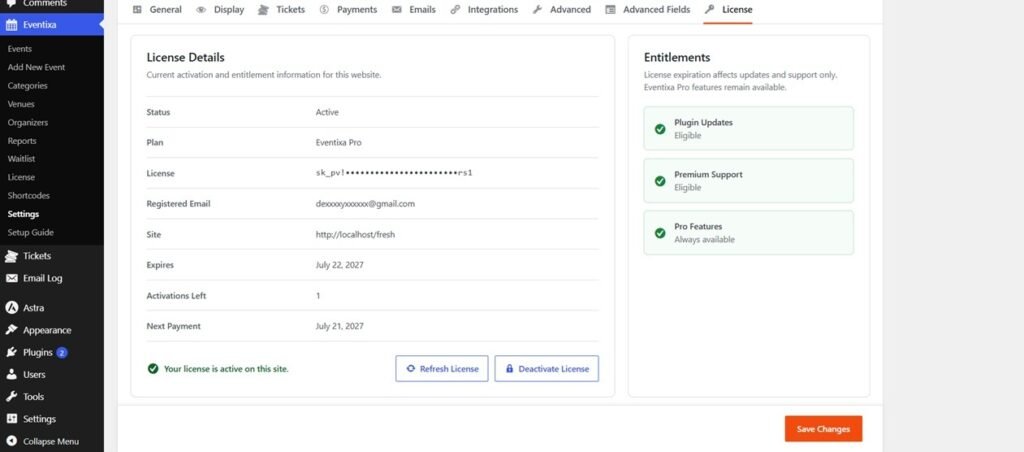
Refresh Your License
If your license information doesn’t update automatically or you’ve renewed your subscription, click Refresh License to sync the latest license status.
Deactivate Your License
Before moving your license to another website, you should deactivate it.
- Go to Eventixa → License.
- Click Deactivate License.
- Confirm the action.
You can then activate the same license on another eligible website.
Troubleshooting
License activation failed?
Check the following:
- Make sure you’re connected to the internet.
- Verify that the license key was entered correctly.
- Ensure your subscription is active.
- Confirm that you haven’t exceeded the allowed number of site activations.
If you’re still experiencing issues, please contact our support team for assistance.


